Last week we announced the general availability of Managed Disks. Managed Disks are Azure Resource Manager (ARM) resources, that can be deployed via templates to create thousands of Managed Disks without worrying about creating storage accounts or specifying disk details. Backup of Managed disk VMs against accidental deletions and corruptions resulting from human errors is a critical capability for customers of all sizes. With Azure Backup service, you get key enterprise features like backup, restore, policy based management, backup alerts, job monitoring, instant data recovery without deploying any infrastructure in your tenant environment. You get the ability to backup Managed Disk VMs directly from VM management blade and the user experience is consistent with backup of VMs attached to Standard or Premium Unmanaged Disks.
Value Proposition
Azure Backup’s cloud-first approach provides:
- Freedom from infrastructure: No need to deploy any infrastructure to backup VMs
- Eliminate backup storage management with bottomless Recovery Services vault.
- Pay as you go model with no egress costs for restores.
- Self-service backup and restore
Key features
- Application Consistent backups for Windows Azure VMs and File-system consistent backup for Linux Azure VMs without the need to shutdown VM.
- Policy Based Management: Azure Backup allows you to specify the backup schedule as well as retention policy of backups. The service handles periodic backups as well as pruning of recovery points beyond the configured retention period.
- Long Term Retention of backup data for years even beyond the lifecycle of the VM.
- Full VM and Disk restore: In case your VM is corrupted and needs replacement or want to simply make a copy of the VM you can do so with full VM or disk restore.
- Instant Data Recovery: With Instant Data Recovery, you can restore individual files and folders within the VM instantly without provisioning any additional infrastructure, and at no additional cost. Instant Restore provides a writeable snapshot of a recovery point that you can quickly mount, browse, recover files/folders by simply copying them to a destination of your choice. These snapshots even allow you to open application files such as SQL, MySQL directly from cloud recovery point snapshots as if they are present locally and attach them to live application instances, without having to copy them.
- Role Based Access: You can limit the access to backup data in the Recovery Services vault using Role Based Access controls. Azure Backup supports Backup Contributor, Backup Operator and Backup Reader roles at a vault level.
- Monitoring and Alerting: You can monitor your backup and restore jobs from the Recovery Services Vault dashboard. In addition, they can also configure email alerts for job failures.
Customers can backup data to Recovery Services Vault in all public Azure regions, including Canada, UK, and West US2.
Getting started
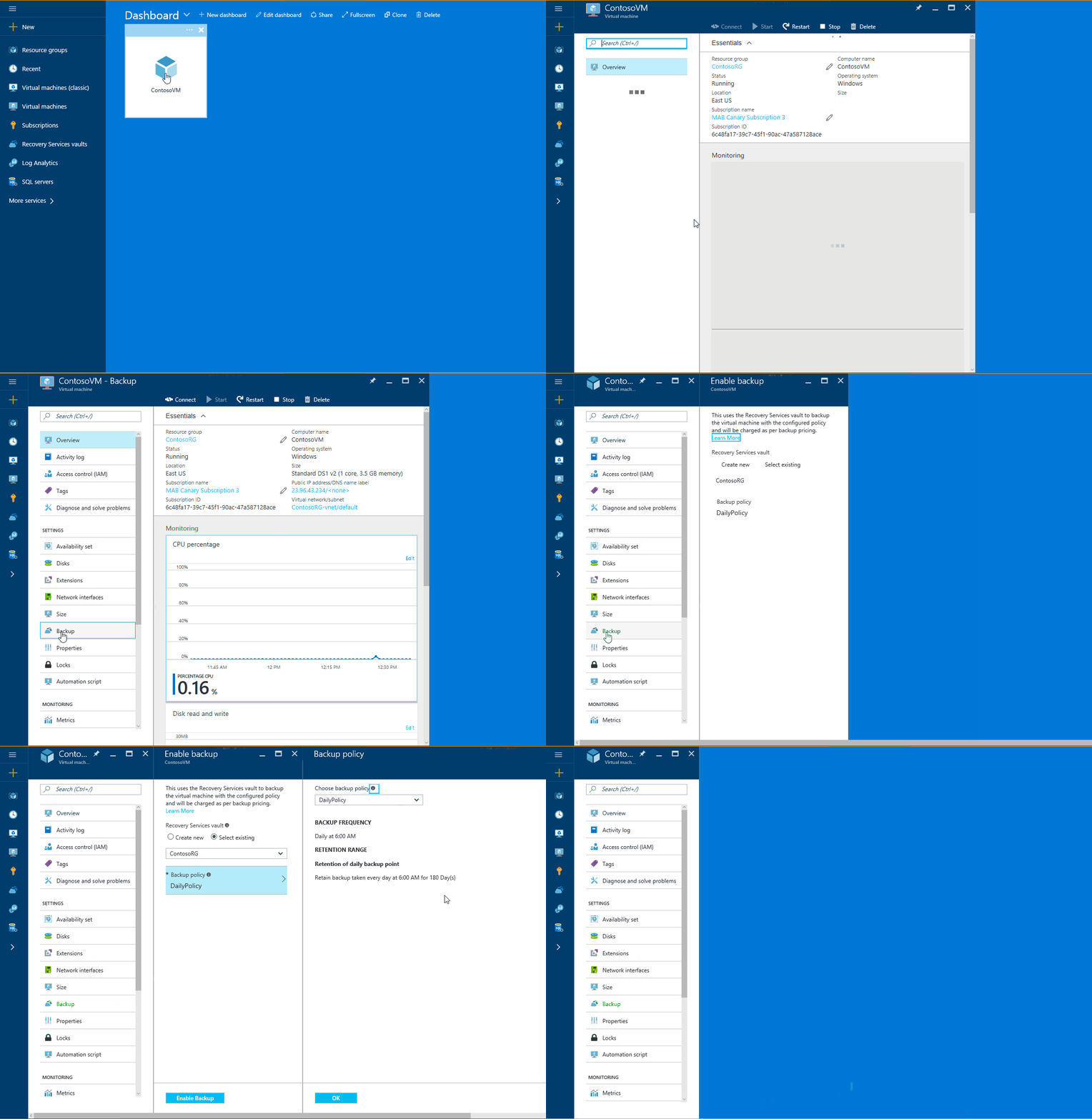
To get started, enable backup with a few steps:
- Select a virtual machine from the Virtual machines list view. Select Backup in the Settings menu.
- Create or select a Recovery Services Vault: The vault maintains backups in a separate storage account with its own lifecycle management.
- Create or select a Backup Policy
Watch the video below to instantly recover files from an Azure VM (Windows) backup.
Watch the video below to instantly recover files from an Azure VM (Linux) backup.
The instant restore capability will be available soon for users who are protecting their Linux VMs using Azure VM backup. If you are interested in being an early adopter and want to provide valuable feedback, please let us know at linuxazurebackupteam@service.microsoft.com. Watch the video below to know more.
Related links and additional content
- Want more details? Check out Azure Backup documentation and Managed Disk Blog
- Learn more about Azure Backup
- Need help? Reach out to Azure Backup forum for support
- Sign up for a free Azure trial subscription
- Tell us how we can improve Azure Backup by contributing new ideas and voting up existing ones.
- Follow us on Twitter @AzureBackup for the latest news and updates