
Today, we are pleased to announce the addition of a new in-built role, Billing Reader role. The new Billing Reader role allows you to delegate access to just billing information with no access to services such as VMs and storage accounts. Users in this role can perform Azure billing management operations such as viewing subscription scoped cost reporting data and downloading invoices. Also, today we are releasing the public preview of a new billing API that will allow you to programmatically download subscription’s billing invoices.
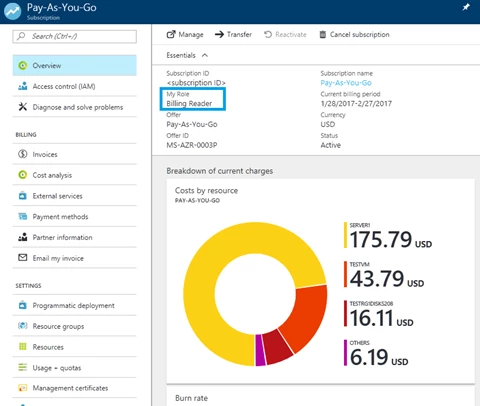
Allowing additional users to download invoices
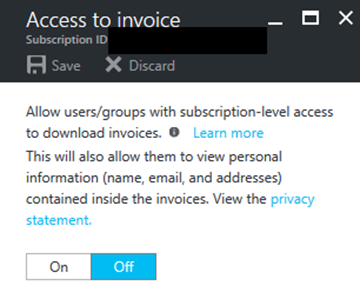
Today, only the account administrator for a subscription can download and view invoices. Now the account administrator can allow users in subscription scoped roles, Owner, Contributor, Reader, User Access Administrator, Billing Reader, Service Administrator and Co-Administrator, to view invoices. The invoice contains personal information and hence the account administrator is required to enable access to allow users in subscription scoped roles to view invoices. The steps to allow users in subscription scoped roles to view invoices are below:
- Login to the Azure Management Portal with account administrator credentials.
- Select the subscription that you want to allow additional users to download invoices.
- From the subscription blade, select the Invoices tab within billing section. Click on Access to invoices command. The feature to allow additional users to download invoices is in preview, not all invoices may be available. The account administrator will have access to all invoices.
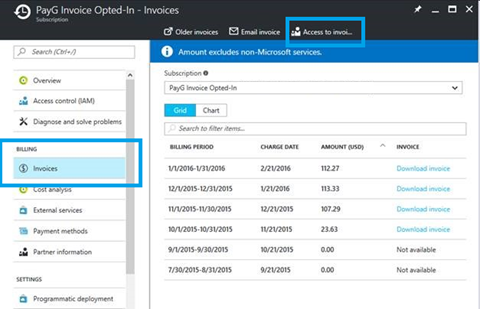
- Allow subscription scoped roles to download invoice
How to add users to Billing Reader Role
Users who are in administrative roles i.e. Owner, User Access Administrator, Service Administrator and Co-administrator roles can delegate Billing Reader access to other users. Users in Billing Reader can view subscription scoped billing information such as usage and invoices. Note, currently billing information is only viewable for non-enterprise subscription. Support for enterprise subscriptions will be available in the future.
- Select the subscription for which you want to delegate Billing Reader access
- From the subscription blade, select Access Control (IAM)
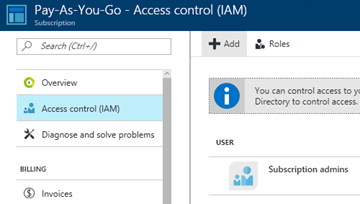
- Click Add
- Select “Billing Reader” role
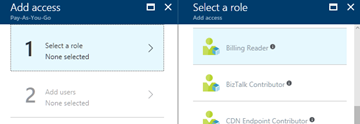
- Select or add user that you want to delegate access to subscription scoped billing information
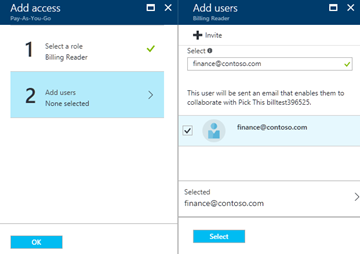
The full definition of access allowed for user in Billing Reader role is detailed in built in roles documentation.
Downloading invoice using new Billing API
Till now you could only download invoices for your subscription via the Azure management portal. We are enabling users in administrative (Owner, Contributor, Reader, Service Administrator and Co-administrator) and Billing Reader roles to download invoices for a subscription programmatically. The invoice API allows you to download current and past invoices for an Azure subscription. During the API preview some invoices may not be available for download. The detailed API documentation is available and samples can also be downloaded. The feature to download invoices via API is not available for certain subscriptions types such as support, enterprise agreements, or Azure in Open. To be able to download invoices through API the account admin has to enable access for users in subscription scoped roles as outlined above.
You can easily download the latest invoice for your subscription using Azure PowerShell.
- Login using Login-AzureRmAccount
- Set your subscription context using Set-AzureRmContext -SubscriptionId
- To get the URL of the latest invoice, execute Get-AzureRmBillingInvoice –Latest
The output will give back an invoice link to download the latest invoice document in PDF format, an example is shown below:
PS C:> Get-AzureRmBillingInvoice -Latest
         Id                           : /subscriptions/{subscription ID}/providers/Microsoft.Billing/invoices/2017-02-09-117274100066163
         Name                   : 2017-02-09-117274100066163
         Type                     : Microsoft. Billing/invoices
         InvoicePeriodStartDate : 1/10/2017 12:00:00 AM
         InvoicePeriodEndDate   : 2/9/2017 12:00:00 AM
         DownloadUrl            : https://{billingstorage}.blob.core.windows.net/invoices/{invoice identifier}.pdf?sv=2014-02-14&sr=b&sig=XlW87Ii7A5MhwQVvN1kMa0AR79iGiw72RGzQTT% 2Fh4YI%3D&se=2017-03-01T23%3A25%3A56Z&sp=r
         DownloadUrlExpiry      : 3/1/2017 3:25:56 PM
To download invoice to a local directory you can run the following:
PS C:> Get-AzureRmBillingInvoice -Latest
PS C:> Invoke-WebRequest -Uri $invoice.DownloadUrl -OutFile InvoiceLatest.pdf
In the future, you will see additions to this API which will enable expanded programmatic access to billing functionality.






