“In a previous blog post in this series, we talked about using chaos engineering and fault injection techniques to validate the resilience of your cloud applications. Chaos testing helps increase confidence in your applications by finding and fixing resiliency issues before they affect customers and streamlining your incident response by reducing or avoiding downtime, data loss, and customer dissatisfaction. To enable this, we launched a new platform for resilience validation through chaos testing—Azure Chaos Studio. As of November 1, 2023, Chaos Studio is now generally available and ready to use in 17 production regions. I’ve asked Chris Ashton, Principal Program Manager from the Chaos Studio Engineering team to share more on when it’s best to implement the key features that support reliability of your applications.” — Mark Russinovich, CTO, Azure.
Design and implement, validate and measure
Design for failure. The first step in building a resilient application is to start with the Microsoft Azure Well-Architected Framework and leverage the guidance to architect an application that is designed to handle failure. Build resilience into your application through the use of availability zones, region pairing, backups, and other recommended techniques. Incorporate Azure Monitor to enable observation of your application’s health. Establish health measures for your application and track key metrics like Service Level Objective (SLO), Recovery Time Objective (RTO), Recovery Point Objective (RPO), and other metrics that are meaningful for your application and business. Before deploying your application to production for customer use, however, you want to verify that it actually handles disruptive conditions as expected and that it is truly resilient. This is where chaos engineering and Microsoft Azure Chaos Studio come in.
Chaos engineering is the practice of injecting faults into an application to validate its resilience to the real-world outage scenarios it will encounter in production. Chaos engineering is more than testing—it allows you to validate architecture choices, configuration settings, code quality, and monitoring components, as well as your incident response process. Chaos engineering is best applied by using the scientific method:
- Form a hypothesis
- Perform fault injection experiments to validate it
- Analyze the results
- Make changes
- Repeat
Chaos validation can be added to automated release pipeline validation or can be performed manually as a drill event, often called a “game day.” Adding chaos to your continuous integration (CI), continuous delivery (CD), and continuous validation (CV) pipeline allows you to gate code flow based on the outcome, gives confidence in the ability to handle nominal conditions, and allows you to continually evaluate the resilience of new code in an ever-changing cloud environment. Chaos can also be combined with load, end-to-end, and other test cases to augment their coverage. Chaos drills and game days can be used less frequently to validate more rare and extreme outage scenarios and to prove disaster recovery (DR) capabilities.
Chaos testing is used in many organizations in a variety of ways. Some teams perform monthly drill events, others have added automated Chaos to release pipeline automation, and some do both. Usually, the purpose of drill events is to validate resilience to a specific real-world scenario, such as AAD or Domain Name System (DNS) going down, or to prove Business Continuity and Disaster Recovery (BCDR) compliance. Aspects of drills can be automated, but they require people to plan, orchestrate, monitor, and analyze the resilience of the system under test.
In CI/CD release pipeline automation, the goal is to fully automate resilience validation and catch defects early. Based on the results, many teams block production deployment if their chaos validation fails. Some teams have chaos testing success metrics they track for “resiliency regressions caught” and “incidents prevented.” On the Chaos Studio team, we perform scenario-focused drills against the different microservices that make up the product. We also use chaos testing as a way to train new on-call engineers. In doing so, engineers can see the impact of a real issue and learn the steps of monitoring, analyzing, and deploying a fix in a safe environment without the pressure to fix a customer-impacting issue during an actual outage. When a real issue does arise, they are better equipped to deal with it with confidence.
Inside Microsoft Azure Chaos Studio
Chaos Studio is Microsoft’s solution to help you measure, understand, improve, and maintain the resilience of your application through hypothesis-driven chaos experiments. Chaos Studio is deeply integrated with Azure to provide safe chaos validation at scale.
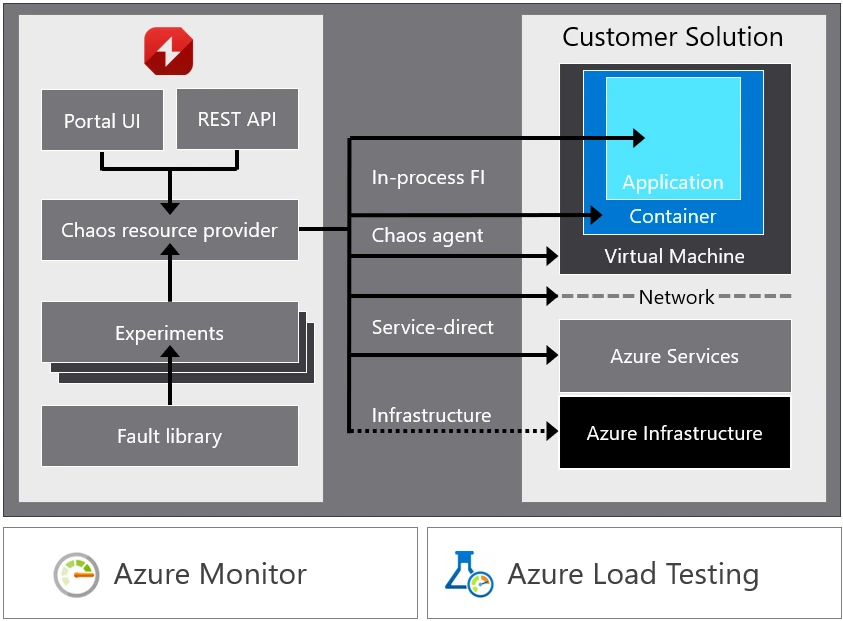
Chaos Studio provides:
- A fully managed service to validate Microsoft Azure application and service resilience.
- Deep Azure integration, including an Azure Portal user interface, Azure Resource Manager compliant REST APIs, and integration with Azure Monitor and Azure Load Testing—all of which enable manual and automated creation, provisioning, and execution of fault injection experiments.
- An expanding library of common resource pressure and dependency disruption faults and actions that work with your Azure infrastructure as a service (IaaS) and Azure platform as a service (PaaS) resources.
- Advanced workflow orchestration of parallel and sequential fault actions that enables simulation of real-world disruption and outage scenarios.
- Safeguards that minimize the impact radius and enable control of who performs experiments and in what environments.
A chaos experiment is where all the action happens. There are several key components of a chaos experiment:
- Your application to be validated. This must be deployed to a test environment, ideally one that is reflective of your production environment. While this could be your production environment, we recommend testing in an isolated environment, at least at first, to minimize potential impact to your customers.
- Experiment targets are the Azure resources provisioned and enabled for use in chaos experiments which will have faults applied to them.
- Fault actions are the orchestrated disruptions and actions to the application and its dependencies and are provided by Chaos Studio. These can be simple resource pressure faults like CPU, memory, and disk pressure, network delays and blocks, or more destructive actions like killing a process, shutting down a virtual machine (VM), causing an Azure Cosmos DB failover, and other activities like a simple delay or starting an Azure Load Testing load test case.
- Traffic is a synthetic workload or actual customer traffic against the application to create production-like customer usage. Users may add synthetic load directly in chaos experiments by leveraging Azure Load Testing fault actions.
- Monitoring is used to observe application health and behavior during an experiment.
Real world scenarios can be validated by building experiments that leverage multiple faults at once. Systematic disruption of individual dependencies like Microsoft Azure Storage, SQL Server, or Azure Cache for Redis is very useful, but real value comes when validating real-world outage scenarios like an availability zone outage from a power outage in a datacenter, crush load due to a holiday sales event, tax day, or DNS going down. You can build experiments to regression test the root cause of your last major outage.
Chaos Studio best practices and tips
Chaos Studio allows you to monitor and improve your applications by providing tight integration with Azure Monitor and your CI/CD pipelines. By integrating with Azure Monitor, you have a view into the lifecycle of your experiments including in-depth data on timing and the faults and resources targeted by the experiment. This data can live side-by-side with your existing Azure Monitor dashboards or added to your external monitoring dashboards. By incorporating Chaos Studio into your CI/CD pipeline, it allows you to continuously validate the resilience of your system by running chaos experiments as part of your build and deployment process.
To help you get started with your chaos journey, here are a few tips and practices that have helped others:
- Pilot: Don’t just jump in and start injecting faults. While that can be fun, take a methodical approach and set up a throw-away test environment to practice onboarding targets, creating experiments, setting up monitoring, and running the experiments to figure out how different faults work and how they impact different resources. Once you’re used to the product, spend time to determine how to safely deploy chaos into a broader, production-like test environment.
- Hypotheses: Formulate resilience hypotheses based on your application architecture and think about the experiments you want to perform, the things you want to validate, and the scenarios you should be resilient to.
- Drill: Pick a hypothesis and plan for a drill event. Line up experiments related to the hypotheses, ensure monitoring is in place, notify other users of the test environment, do a pre-drill health check, and then run your experiment to inject faults. During the drill, monitor your application health. After, conduct a retrospective to analyze results and compare against hypotheses.
- Automation: To further improve resiliency in your software development lifecycle, you can gate your production code flow based on the outcomes of automated Chaos validation.
This should give you a basic understanding of how chaos engineering and Chaos Studio can assist you in enhancing and preserving your application resilience, so that you can confidently launch to production.
Discover the benefits of Chaos Studio
To begin your journey on Chaos Studio, consult the documentation for a summary of concepts and how-to guides. Once you grasp the benefits of chaos testing and Chaos Studio, a crucial next step is to incorporate this into your release pipeline validation.