Azure Virtual Network enables a flexible foundation for building advanced networking architectures. Managing heterogeneous environments with various types of filtering components, such as Azure Firewall or your favorite network virtual appliance (NVA), requires a little bit of planning.
Azure Bastion, which is currently in preview, is a fully managed platform as a service (PaaS) that provides secure and seamless remote desktop protocol (RDP) and secure shell (SSH) access to your virtual machines (VMs) directly through the Azure portal. Azure Bastion is provisioned directly in your virtual network, supporting all VMs attached without any exposure through public IP addresses.
When you deploy Azure Firewall, or any NVA, you invariably force tunnel all traffic from your subnets. Applying a 0.0.0.0/0 user-defined route can lead to asymmetric routing for ingress and egress traffic to your workloads in your virtual network.
While not trivial, you often find yourself creating and managing a growing set of network rules, including DS NAT, forwarding, and so on, for all your applications to resolve this. Although this can impact all your applications, RDP and SSH are the most common examples. In this scenario, the ingress traffic from the Internet may come directly to your virtual machine within your virtual network, but egress traffic will end up going to the NVA. Since most NVAs are stateful, it ends up dropping this traffic as it did not initially receive it.
Azure Bastion, allows for simplified set up of RDP/SSH to your workloads within virtual networks containing stateful NVAs or Azure Firewall with force tunneling enabled. In this blog, we will look at how to make that work seamlessly.
- For a reference on how to deploy Azure Bastion (preview) in your virtual network, please see the documentation “Create an Azure Bastion host (Preview).”
- To learn how to implement Azure Firewall in your virtual network, refer to the documentation “Deploy and configure Azure Firewall using the Azure portal.”
Having deployed both Azure Bastion and Azure Firewall in your virtual network, let us look at how you can configure Azure Bastion to work in this scenario.
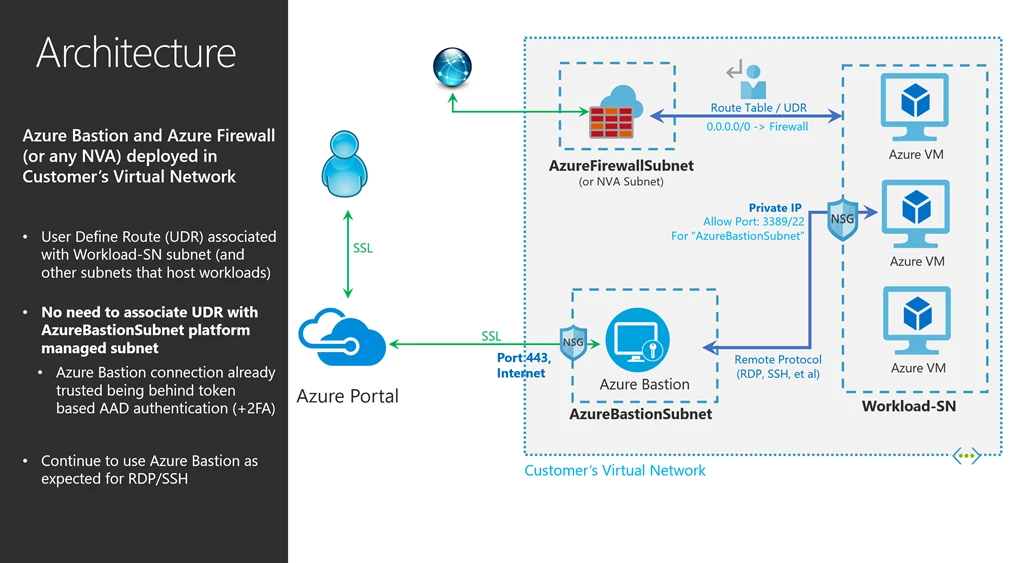
Configuring Azure Bastion
When deploying Azure Firewall, or a virtual appliance, you may end up associating your RouteTable, which was created while deploying Azure Firewall, to all subnets in your virtual network. You may even be including the AzureBastionSubnet subnet as well.
This applies a user-defined route to the AzureBastionSubnet subnet which directs all Azure Bastion traffic to Azure Firewall, thereby blocking traffic required for Azure Bastion. To avoid this, configuring Azure Bastion is very easy, but do not associate the RouteTable to AzureBastionSubnet subnet.
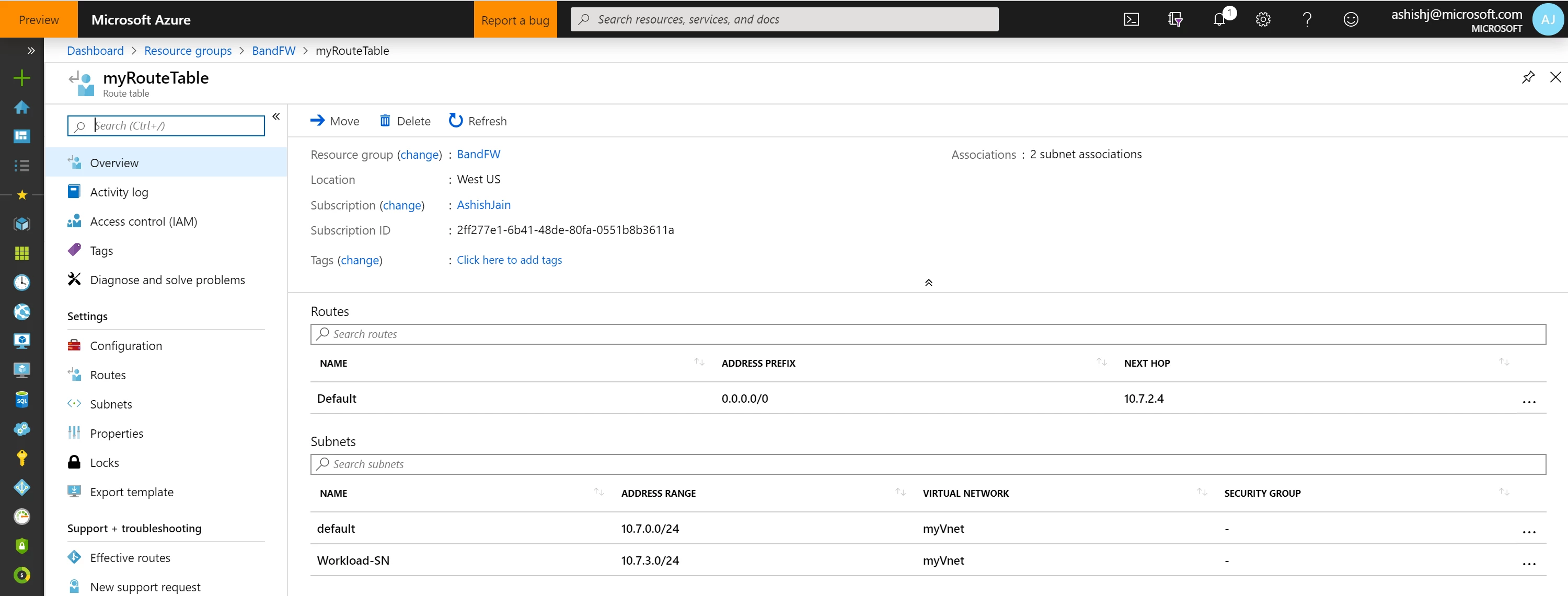
As you would have noticed above, myRouteTable is not associated with the AzureBastionSubnet, but with other subnets like Workload-SN.
The AzureBastionSubnet subnet is secure platform managed subnet, and no other Azure Resource can deploy in this subnet except Azure Bastion. All connections to Azure Bastion are enforced through the Azure Active Directory token-based authentication with 2FA, and all traffic is encrypted/over HTTPS.
Azure Bastion is internally hardened and allows traffic only through port 443, saving you the task of applying additional network security groups (NSGs) or user-defined routes to the subnet.
With this, the RDP/SSH requests will land on Azure Bastion. Configured using the example above, the default route (0.0.0.0/0) does not apply to AzureBastionSubnet as it’s not associated with this subnet. Based on the incoming RDP/SSH requests, Azure Bastion connects to your virtual machines in other subnets, like Workload-SN, which do have a default route associated. The return traffic from your virtual machine will go directly to Azure Bastion, instead of going to the NVA, in your virtual network as the return traffic is directed to a specific private IP in your virtual network. The specific private IP address in your virtual network makes it a more specific route and hence, takes precedence over the force-tunnel route to the NVA, making your RDP/SSH traffic work seamlessly with Azure Bastion when a NVA or Azure Firewall is deployed in your virtual network.
We are grateful and appreciate the engagement and excitement of customers and community and are looking forward to your feedback in further improving the service and making it generally available soon.