Achieving cost efficiency in your cloud usage is more critical today than ever before.
At Azure Backup, we’re committed to helping you optimize your backup costs. Over the last few months, we’ve introduced a comprehensive collection of features that not only gives you more visibility into your backup usage, but also helps you take action to achieve significant cost savings.
To help you get started with this journey, below are five steps you can take to optimize your backup costs, without needing to compromise on the safety of your data.
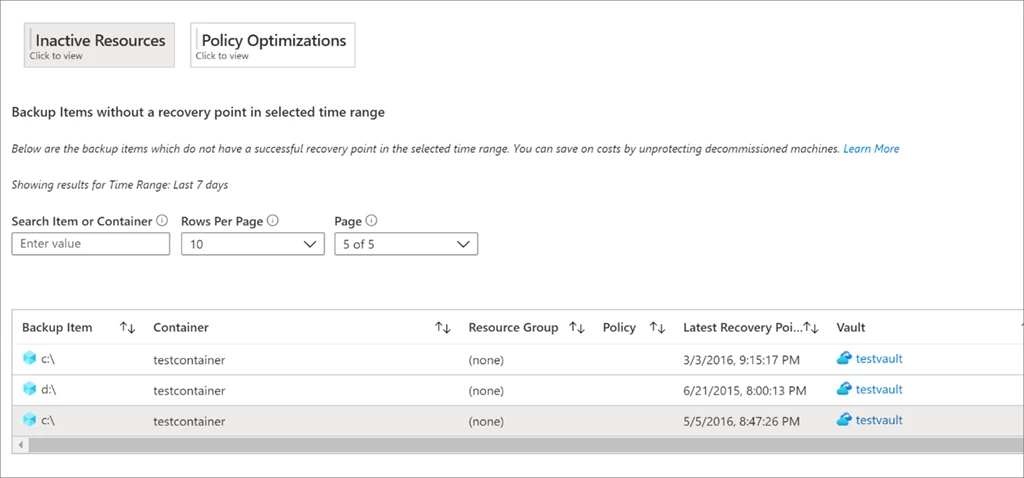
Clean up backups for your deleted resources
If you are backing up resources that do not exist anymore, verify if you still need to retain the backups for these resources. Deleting unnecessary backups can help you save on your backup costs.
You can use the Optimize tab in our Backup Reports solution to gain visibility into all inactive resources, across all types of workloads being backed up. Once you have identified an inactive resource, you can investigate the issue further by navigating to the Azure resource blade for that resource. If you discover that the resource doesn’t exist anymore, you can choose to stop protection and delete backup data for that resource by navigating to the backup item dashboard.
Optimize your backup policies
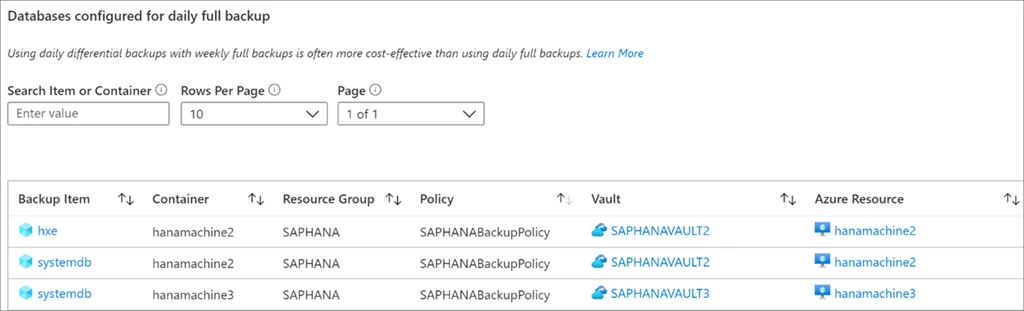
Use differential backup
If you backup SQL or SAP HANA databases inside Azure Virtual Machines, using daily differential backups along with weekly full backups is often more cost-effective than daily full backups. We now offer an advanced pricing calculator that helps you get an idea of the cost savings achievable by switching to differential backup.
You can use the Optimize tab in our Backup Reports solution to identify databases that are currently configured for daily full backup. You can choose to navigate to a particular backup item and modify the policy to use daily differential backup with weekly full backup.
Optimize your retention
Verify if you can potentially have shorter retention durations for your backup items while still meeting your compliance requirements. While this decision will depend on the specific needs of your organization, we help you gain easier visibility into items that have a large retention duration.
You can use the Optimize tab in our Backup Reports solution to view all items with retention larger than a specified value.
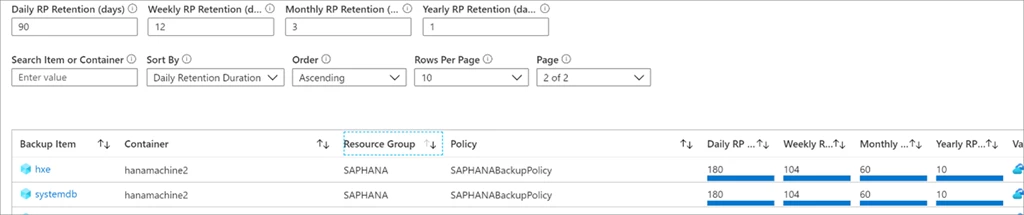
You can further optimize your retention costs by reducing the retention of instant snapshots from the default period of five days to as low as two days.
Take advantage of selective disk backup
Often, you might only require the protection of certain disks within a machine and not the entire machine. Earlier, our Azure Vitual Machine backup solution required you to protect the entire virtual machine. But today, you can choose to exclude or include certain data disks in the virtual machine (VM) from being protected using the selective disk backup feature.
For example, if you only want to backup the OS disk of your VM, you can make use of this feature to exclude all other disks from being backed up, and achieve considerable cost savings. You will get cost saving on the Protected Instance fee when you opt for OS disk only backup option. The backup storage cost is calculated only for the included disks thereby giving storage cost optimization. Learn more on billing details of selective disk backup feature.
Moreover, using PowerShell or Azure command-line interface (Azure CLI), you can also modify the protection to exclude or include specific data disks for a virtual machine that is currently being protected by Azure Backup. This way, you can reduce the backup cost for currently protected virtual machines too, without stopping backup or fear of losing the past recovery points.
You can use the Usage tab of Backup Reports to understand how the backup storage consumption for a machine can reduce significantly when you start selectively backing up disks in that machine.
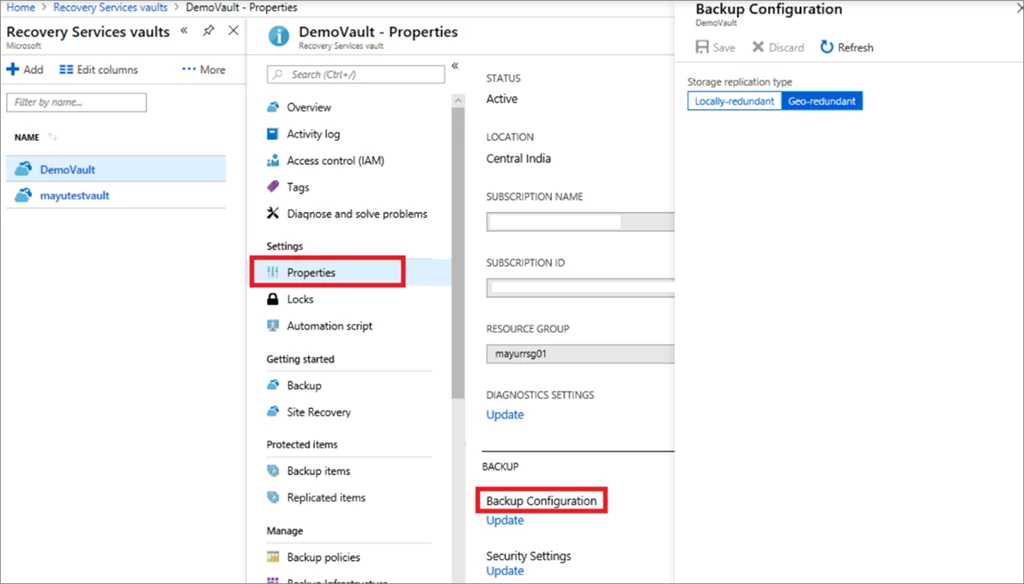
Determine your required storage redundancy settings
By default, when you configure backup for resources, geo-redundant storage (GRS) replication is applied to these backups. While this is the recommended storage replication option as it creates more redundancy for your critical data, you can choose to protect items using locally-redundant storage (LRS) if that meets your backup availability needs for dev-test workloads. Using LRS instead of GRS halves the cost of your backup storage.
Summary
Clearly establishing your backup objectives and paying only for the backups you need helps free up funds that can be put to better business use. At the same time, we continue to help you keep your data safe and recoverable. What’s more, you can now make use of Azure Backup enhanced security at no additional cost. You can enable the soft-delete capability for all your vaults without needing to pay extra (available today for Azure Virtual Machines, SQL in Azure Virtual Machines, and SAP HANA in Azure Virtual Machines).
We are continuously working on adding new features over the next few months to help you achieve even more cost efficiency with Azure Backup. Stay tuned to our product announcements page to learn more or send an email to AskAzureBackupTeam@microsoft.com if you have any questions.
Next Steps
- Understand Azure Backup pricing.
- Try out the advanced pricing calculator for Azure Backup.
- Learn how to use Backup Reports to gain visibility into your usage.
- Learn about the selective disk backup feature.
- Learn about different storage replication options.
- New to Azure Backup? Sign up for a free Azure trial subscription.
- Need help? Reach out to Azure Backup forum for support or browse Azure Backup documentation.
- Follow us on Twitter at @AzureBackup for the latest news and updates.