Azure Security Center’s threat protection enables you to detect and prevent threats across a wide variety of services from Infrastructure as a Service (IaaS) layer to Platform as a Service (PaaS) resources in Azure, such as IoT, App Service, and on-premises virtual machines.
At Ignite 2019 we announced new threat protection capabilities to counter sophisticated threats on cloud platforms, including preview for threat protection for Azure Kubernetes Service (AKS) Support in Security Center and preview for vulnerability assessment for Azure Container Registry (ACR) images.
Azure Security Center and Kubernetes clusters
In this blog, we will describe a recent large-scale cryptocurrency mining attack against Kubernetes clusters that was recently discovered by Azure Security Center. This is one of the many examples Azure Security Center can help you protect your Kubernetes clusters from threats.
Crypto mining attacks in containerized environments aren’t new. In Azure Security Center, we regularly detect a wide range of mining activities that run inside containers. Usually, those activities are running inside vulnerable containers, such as web applications, with known vulnerabilities that are exploited.
Recently, Azure Security Center detected a new crypto mining campaign that targets specifically Kubernetes environments. What differs this attack from other crypto mining attacks is its scale: within only two hours a malicious container was deployed on tens of Kubernetes clusters.
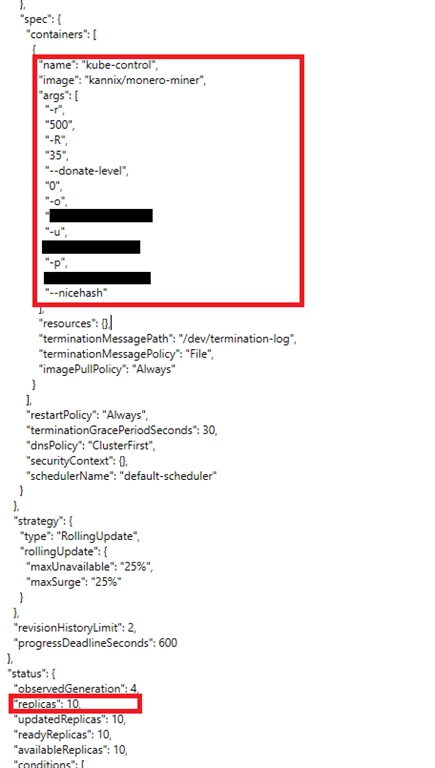
The containers ran an image from a public repository: kannix/monero-miner. This image runs XMRig, a very popular open source Monero miner.
The telemetries showed that container was deployed by a Kubernetes Deployment named kube-control.
As can be shown in the Deployment configuration below, the Deployment, in this case, ensures that 10 replicas of the pod would run on each cluster:
In addition, the same actor that deployed the crypto mining containers also enumerated the cluster resources including Kubernetes secrets. This might lead to exposure of connection strings, passwords, and other secrets which might enable lateral movement.
The interesting part is that the identity in this activity is system:serviceaccount:kube-system:kubernetes-dashboard which is the dashboard’s service account.
This fact indicates that the malicious container was deployed by the Kubernetes dashboard. The resources enumeration was also initiated by the dashboard’s service account.
There are three options for how an attacker can take advantage of the Kubernetes dashboard:
- Exposed dashboard: The cluster owner exposed the dashboard to the internet, and the attacker found it by scanning.
- The attacker gained access to a single container in the cluster and used the internal networking of the cluster for accessing the dashboard (which is possible by the default behavior of Kubernetes).
- Legitimate browsing to the dashboard using cloud or cluster credentials.
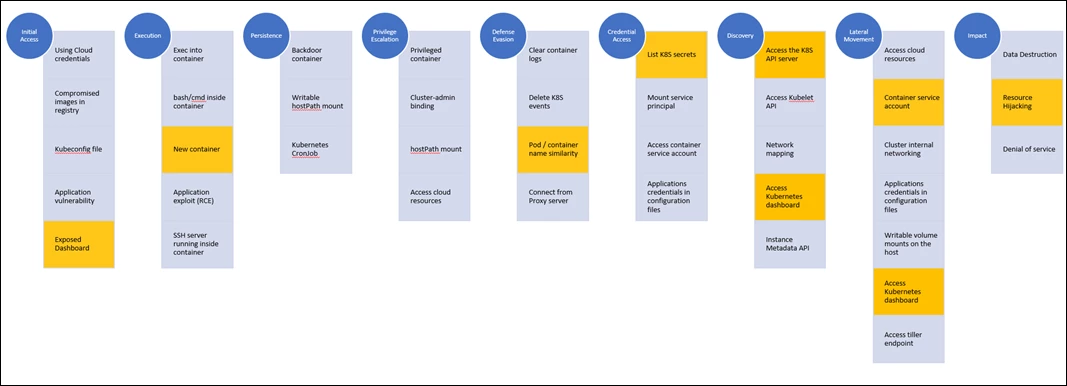
The question is which one of the three options above was involved in this attack? To answer this question, we can use a hint that Azure Security Center gives, security alerts on the exposure of the Kubernetes dashboard. Azure Security Center alerts when the Kubernetes dashboard is exposed to the Internet. The fact that this security alert was triggered on some of the attacked clusters implies that the access vector here is an exposed dashboard to the Internet.
A representation of this attack on the Kubernetes attack matrix would look like:
Avoiding cryptocurrency mining attacks
How could this be avoided?
- Do not expose the Kubernetes dashboard to the Internet: Exposing the dashboard to the Internet means exposing a management interface.
- Apply RBAC in the cluster: When RBAC is enabled, the dashboard’s service account has by default very limited permissions which won’t allow any functionality, including deploying new containers.
- Grant only necessary permissions to the service accounts: If the dashboard is used, make sure to apply only necessary permissions to the dashboard’s service account. For example, if the dashboard is used for monitoring only, grant only “get” permissions to the service account.
- Allow only trusted images: Enforce deployment of only trusted containers, from trusted registries.
Learn more
Kubernetes is quickly becoming the new standard for deploying and managing software in the cloud. Few people have extensive experience with Kubernetes and many only focuses on general engineering and administration and overlook the security aspect. Kubernetes environment needs to be configured carefully to be secure, making sure no container focused attack surface doors are not left open is exposed for attackers. Azure Security Center provides:
- Discovery and Visibility: Continuous discovery of managed AKS instances within Security Center’s registered subscriptions.
- Secure Score recommendations: Actionable items to help customers comply with security best practices in AKS as part of the customer’s Secure Score, such as “Role-Based Access Control should be used to restrict access to a Kubernetes Service Cluster.”
- Threat Detection: Host and cluster-based analytics, such as “A privileged container detected.”
To learn more about AKS Support in Azure Security Center, please visit the documentation here.