Azure Service Fabric is a highly-scalable distributed systems platform to build and manage scalable microservices and container-based applications for Windows and Linux. Service Fabric is a foundational technology powering core Azure infrastructure, as well as other Microsoft cloud services such as Skype for Business, Azure Cosmos DB, Azure SQL Database, Dynamics 365, and many more.
At Build 2018, we shared the Service Fabric product roadmap and demonstrated Azure Service Fabric Mesh, a fully-managed service that enables developers to deploy and operate containerized applications without having to manage VMs, storage or networking configuration, while keeping the enterprise-grade reliability, scalability, and mission-critical performance of Service Fabric. Service Fabric Mesh supports both Windows and Linux containers, so you can develop with the programming language and framework of your choice.
Today, after a couple of months of private preview, we are excited to open the preview of Service Fabric Mesh to everyone. We invite you to try it and give us feedback. Thank you to all the participants for the invaluable feedback during our private preview! The public preview of Service Fabric Mesh is available in three Azure regions – US West, US East, and Europe West. We will expand the service to other Azure regions in the coming months. Head over to the Service Fabric Mesh documentation page to get started. You’ll find all the resources you need including documentation, samples, and SDK.
You can also learn more by reading the Codit Service Fabric Mesh private preview experience (Thanks Tom & team for the write up!) and watching this Azure Friday episode on Service Fabric Mesh.
Frequently asked questions
How do I deploy to Service Fabric Mesh?
As a developer, you would build your application using your choice of languages and frameworks. To get started, you can use the new Visual Studio Tools for Service Fabric Mesh. You can also choose one of the applications you want to lift-and-shift to the cloud. Once you have the application running inside a container, you can deploy it using the Azure CLI with an application manifest to the Service Fabric Mesh service. The manifest specifies the set of services comprising the application along with any scale and networking requirements.
Service Fabric Mesh takes care of the rest, including maintaining availability in the presence of failures (hardware or software), service discovery, scaling, the ability to perform no-downtime upgrades, and more. Essentially, developers can focus on the applications and the business logic without having to invest time on managing a distributed systems or infrastructure. Follow this quick start guide to try on your own.
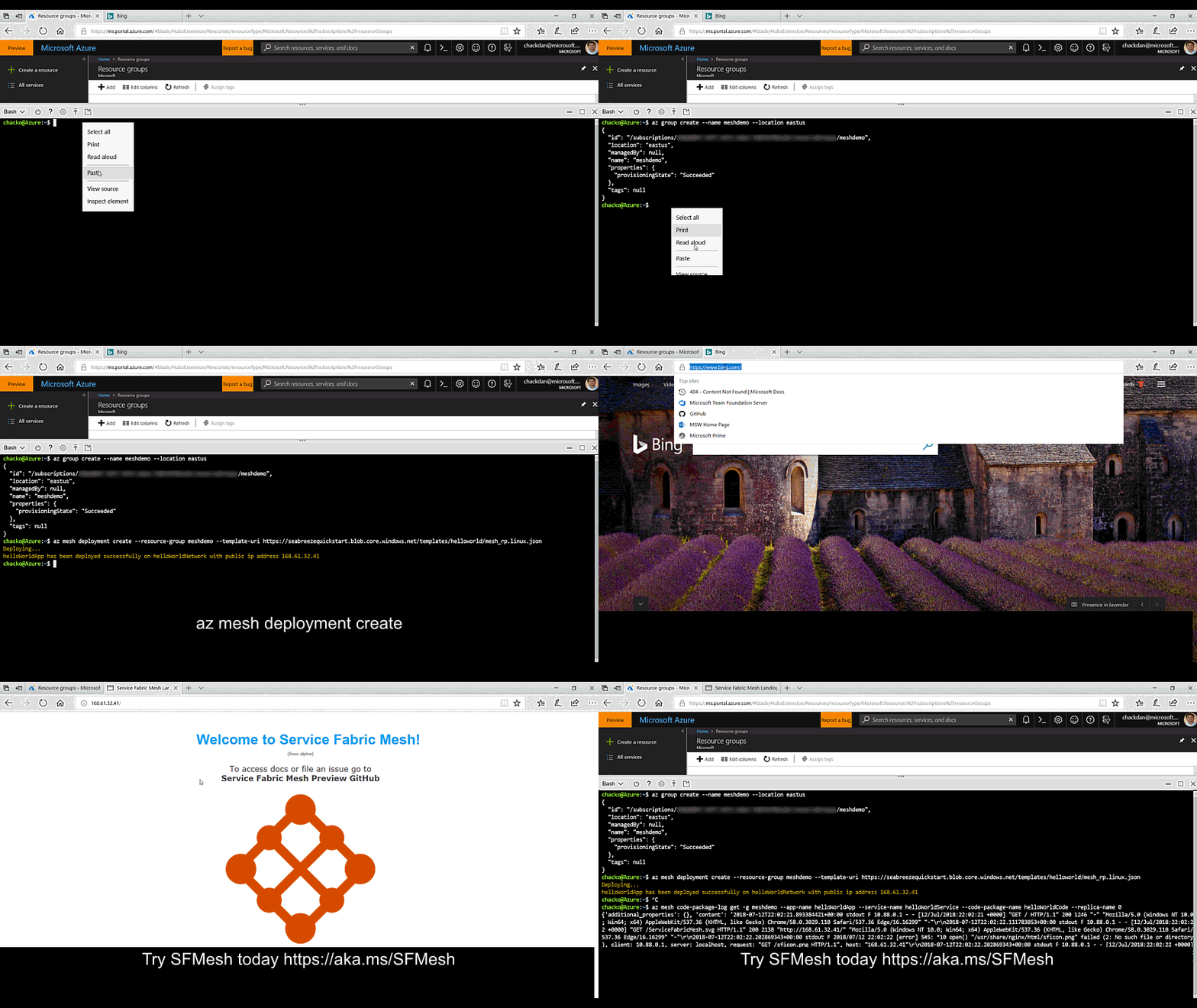
Below you can see how easy it is to deploy a containerized application to Service Fabric Mesh.
Note: You can easily build stateless or stateful services in Service Fabric Mesh the same way you would for a Service Fabric cluster. Stateful services can be developed using either the built-in low latency volume drivers, or by using Reliable Collections (coming soon). We’re extending Reliable Collections to store state for any programming model or framework.
What are the supported container images?
The following container OS images can be used when deploying services.
- Windows – windowsservercore and nanoserver
- Windows Server 2016
- Windows Server version 1709
- Linux
- No known limitations
Is there any cost associated to the preview?
Currently, there are no charges for deploying applications or containers to the Azure Service Mesh public preview. However, in the next few months we will begin to charge for the resources you deploy at 50 percent of the cost when the service is generally available. Before we make the switch to charging you for the resources, we will publish another post on the Azure blog, so that you are aware of this change.
Is there any specific limitation for the preview?
Yes, you will be allocated a restricted quota for use in the preview currently. Once the resources are switched to being charged, the quotas would be managed at the subscription level, similar to the other Azure resources. We will inform users several weeks ahead so you have time to react
Quota for each subscription are as follows:
- Number of applications: 5
- Number of cores per application: 12
- Total RAM per application: 48 GB
- Number of network and ingress end points: 5
- Number of Azure volumes that you can attach: 10
- Number of service replicas: 3
The largest container you can deploy is limited to 4 cores, 16-GB RAM. You can allocate partial cores to your containers.
Can I leave my application running overnight?
Yes, you can. However, we encourage you to delete the resources you deploy and not leave them running, unless you are actively testing it. This preview policy may change in the future and we may delete the resources if they are being misused, or to reclaim capacity needed for onboarding new folks.
Can I use the Service Fabric Mesh public preview service for deploying my production workloads?
The service is in preview and has no SLA, hence we discourage you from deploying your production workloads to it at this time.