The Integration Runtime (IR) is the compute infrastructure used by Azure Data Factory to provide data integration capabilities across different network environments. If you need to perform data integration and orchestration securely in a private network environment, which does not have a direct line-of-sight from the public cloud environment, you can install a self-hosted IR on premises behind your corporate firewall, or inside a virtual private network.
Untill now, you were required to create at least one such compute infrastructure in every Data Factory by design for hybrid and on-premise data integration capabilities. Which implies if you have ten such data factories being used by different project teams to access on-premise data stores and orchestrate inside VNet, you would have to create ten self-hosted IR infrastructures, adding additional cost and management concerns to the IT teams.
With the new capability of self-hosted IR sharing, you can share the same self-hosted IR infrastructure across data factories. This lets you reuse the same highly available and scalable self-hosted IR infrastructure from different data factories within the same Azure Active Directory tenant.
We are introducing a new concept of a Linked self-hosted IR which references another self-hosted IR infrastructure. This does not introduce any change in the way you currently author pipelines in Data Factory and works the same way as the self-hosted IR does. So once you have created a Linked self-hosted IR, you can start using the same way as you would use a self-hosted IR in the Linked Services.
New Self-hosted IR Terminologies (sub-types):
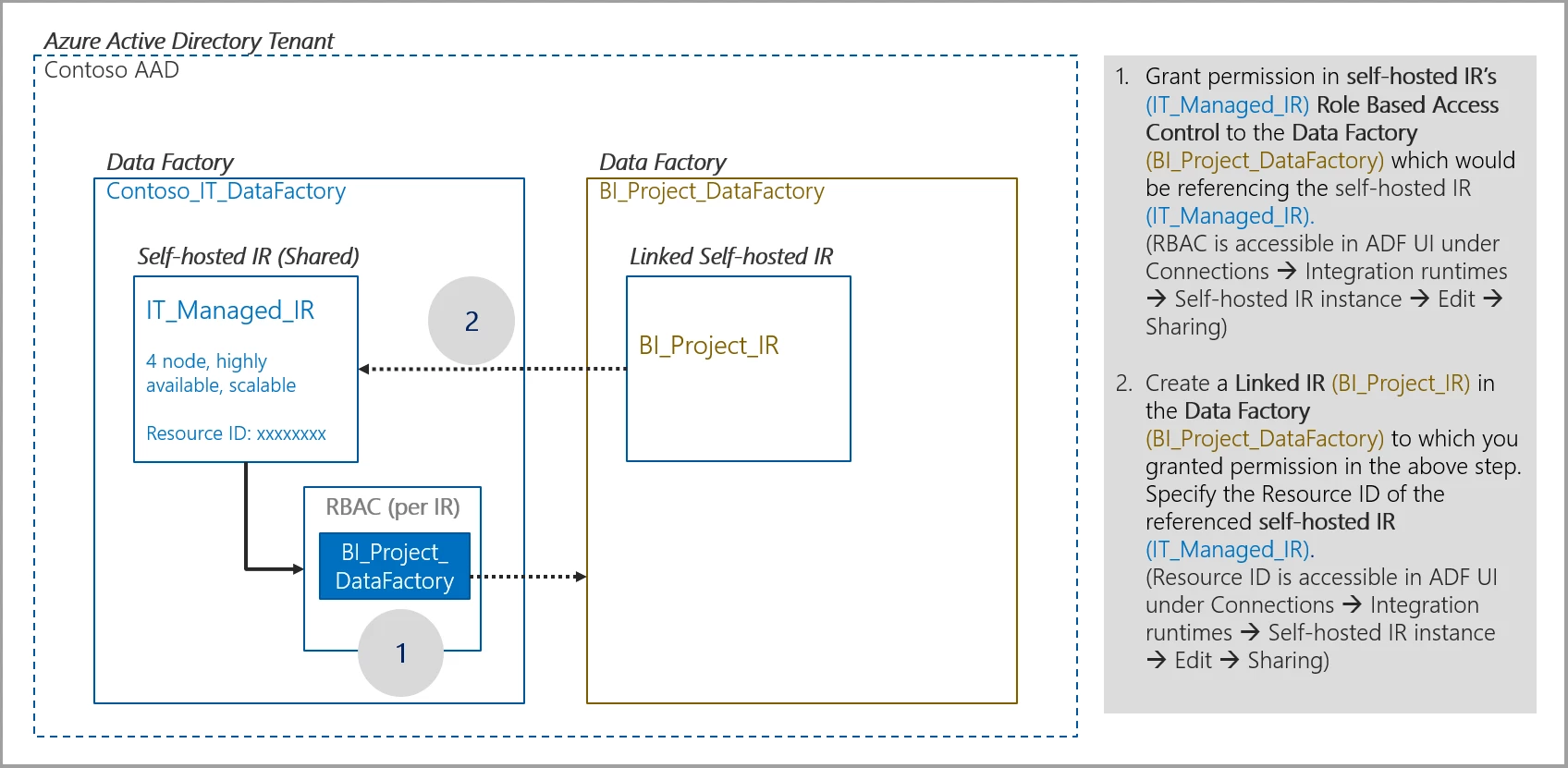
- Shared IR – The original self-hosted IR which is running on a physical infrastructure. By default, self-hosted IR do not have sub-type, but after sharing is enabled on a self-hosted IR, it then carries a sub-type as shared denoting that it is shared with other data factories.
- Linked IR – The IR which references another Shared IR. This is a logical IR and uses the infrastructure of another self-hosted IR (shared).
High-level architecture outlining the Self-hosted IR sharing mechanism across data factories:
Authoring/ creating a Linked self-hosted IR
Reference the step-by-step guide for sharing a self-hosted IR with multiple data factories.
References:
- Create a self-hosted IR infrastructure using Azure Resource Manager template on Azure VM
- Create a highly available and scalable self-hosted IR cluster
- Tutorial – Copy data from an on-premises SQL Server database to Azure Blob storage using self-hosted IR
- Security considerations while hybrid data movement involving self-hosted IR