Our industry has seen an evolution in how we run software. Traditionally, platforms were running in on-premises datacenters but started to transition to the cloud. However, not all workloads can move or customers want to have resiliency across clouds and edge which introduced multi-cloud scenarios.
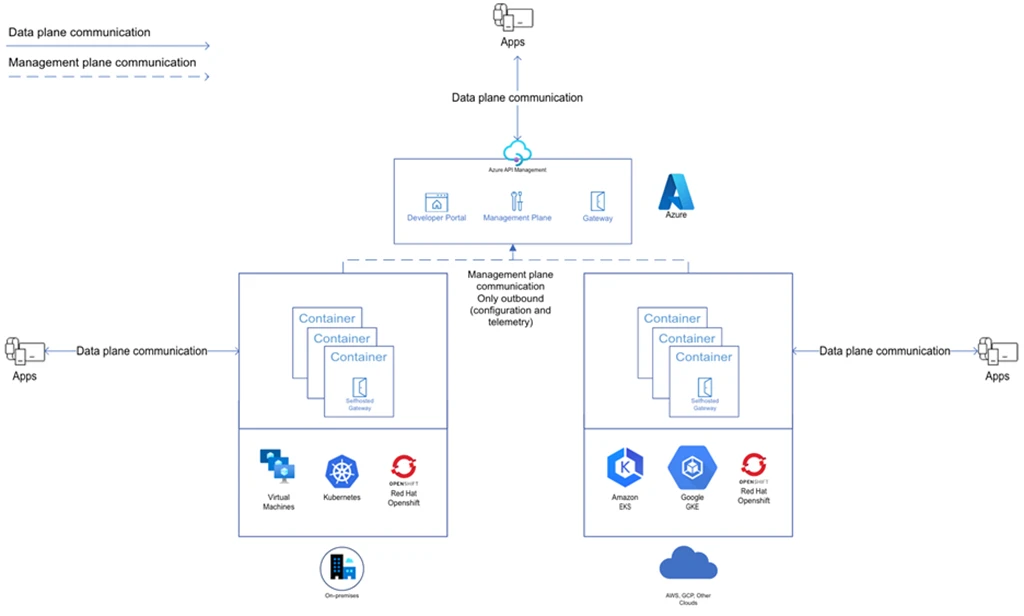
With our self-hosted gateway capabilities, customers can use our existing tooling to extend to their on-premises and multi-cloud APIs with the same role-based access controls, API policies, observability options, and management plane that they are already using for their Azure-based APIs.
New to the self-hosted gateway, how does it work?
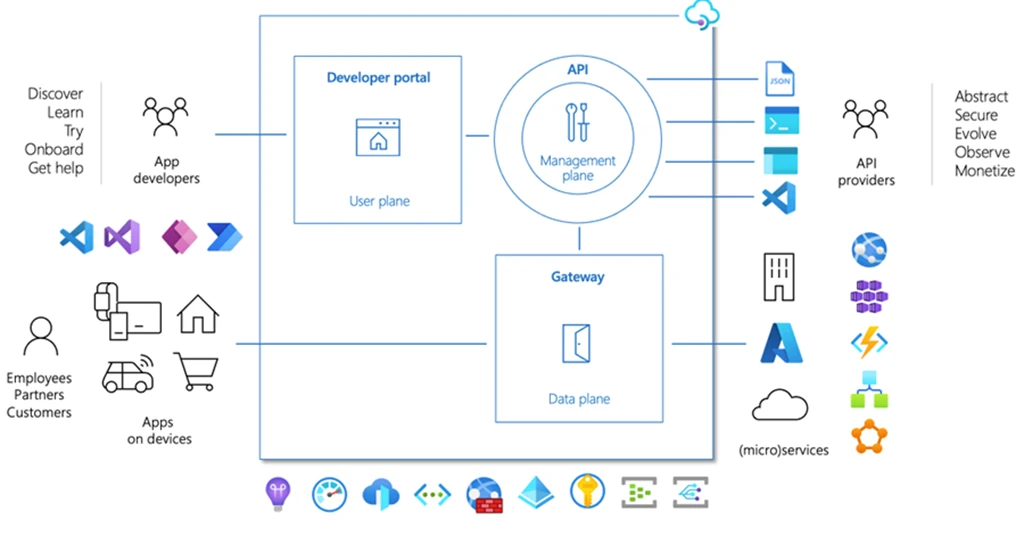
When deploying an Azure API Management instance in Azure customers get three main building blocks:
- A developer portal (also called user plane) for allowing internal and external users to find documentation, test APIs, get access to APIs, and see basic usage data among other features.
- An API gateway (also called data plane), which contains the main networking component that exposes API implementations, applies API policies, secures APIs, and captures metrics and logs of usage among other features.
- Finally, a Management Plane, which is used through the Azure Portal, Azure Resource Manager (ARM), Azure Software Development Kits (SDKs), Visual Studio and Code extensions, and command-line interfaces (CLIs) that allow to manage and enforce permissions to the other components. Examples of this are setting up APIs, configuring the infrastructure, and defining policies.
In the case of the self-hosted gateway, we provide customers with a container image that hosts a version of our API Gateway. Customers can run multiple instances of this API Gateway in non-Azure environments and the only requirement is to allow outbound communications to the Management Plane of an Azure API Management instance to fetch configuration and expose APIs running in those non-Azure environments.
Supported Azure API Management tiers
The self-hosted gateway v2 is now generally available and fully supported. However, the following conditions apply:
- You need an active Azure API Management instance; this instance should be on the Developer tier or Premium tier.
- In the developer tier, in this case the feature is free for testing, with limitations of one active instance.
- In the Premium tier, you can run as many instances as you want. Learn more about pricing at our pricing table.
- Azure API Management will always provision an API Gateway in Azure, which we typically call our managed API gateway.
- Be aware that there are differences in features between our various API gateway offerings. Learn more about the differences in our documentation.
Pricing and gateway deployment
In the case of the self-hosted gateway, we can define a self-hosted gateway by assigning a name to our gateway, a location (which is a logical grouping that aligns with your business, not an Azure region), a description, and finally what APIs we want to expose in this gateway. This allows us to do physical isolation of APIs at the gateway level, which is only possible in the self-hosted gateway at this moment. This combination of location, APIs, and hostname is what defines a self-hosted gateway deployment, this “self-hosted gateway deployment” should not be confused with a Kubernetes “deployment” object.
For example, using a single deployment, where the same APIs are configured in all locations:
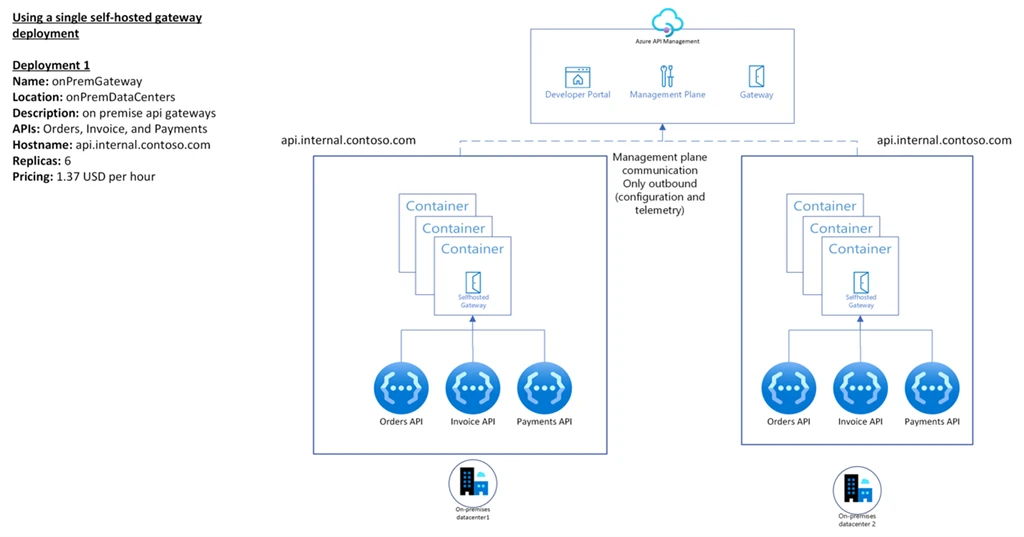
However, you can also create multiple self-hosted gateway deployments to have more granular control over the different APIs that are being exposed:

Supportability and shared responsibilities
Another important aspect is the support, in the case of the self-hosted gateway, the infrastructure is not necessarily managed by Azure, therefore as a customer you have more responsibilities to ensure the proper functioning of the gateway:
| Microsoft Azure | Shared Responsibilities | Customers |
| Managed service service level agreements (SLA), for the management plane, access to configuration and ability to receive telemetry. | Securing self-hosted gateway communication with Configuration endpoint: the communication between the self-hosted gateway and the configuration endpoint is secured by an access token, this token expires automatically every 30 days and needs to be updated for the running containers. | Gateway hosting, deploying, and operating the gateway infrastructure: virtual machines with container runtime or Kubernetes clusters. |
| Gateway maintenance, bug fixes and patches to container image. | Keeping the gateway up to date: regularly updating the gateway to the latest version and latest features. | Network configuration, necessary to maintain management plane connectivity and API access. |
| Gateway updates, performance, and functional improvements to container image. | Gateway SLA, capacity management, scaling, and uptime | |
| Keeping the gateway up to date, regularly updating the gateway to the latest version and latest features. | ||
| Providing diagnostics data to support, collecting, and sharing diagnostics data with support engineers | ||
| Third party open-source software (OSS ) software components, adding additional layers like Prometheus, Grafana, service meshes, container runtimes, Kubernetes distributions, proxies are customer responsibility. |
New features and capabilities of v2 and v1 retirement
When using the latest versions of our v2 container image, tag 2.0.0 and or higher, you would be able to use the following features:
- Opentelemetry metrics: the self-hosted gateway can be configured to automatically collect and send metrics to an OpenTelemetry Collector. This allows you to bring your own metrics collection and reporting solution for the self-hosted gateway. Here you can find a list of supported metrics.
- New image tagging: we provide four tagging strategies to meet your needs regarding updates, stability, patching, and production environments.
- Helm chart: a new deployment option with multiple variables for you to configure at deployment time like backups, logs, OpenTelemetry, ingress, probes, and also Distributed Application Runtime (DAPR) configurations. This helm chart together with our sample Yaml files can be used for automated deployments with continuous integration and continuous delivery (CI and CD ) tools or even Gitops tools.
- Artifact registry: you can find all our artifacts in our centralized Microsoft Artifact Registry for all the container images provided by Microsoft.
- New EventGrid events: a new batch of supported EventGrid events related to the self-hosted gateway operations and configurations. The full list of events can be found here.
Please remember that we will be retiring support for the v1 version of our self-hosted gateway, so this is the perfect time to upgrade to v2. We also provide a migration guide and a guide for running the self-hosted gateway in production.