During Microsoft Build we announced the preview of the visual interface for Azure Machine Learning service. This new drag-and-drop workflow capability in Azure Machine Learning service simplifies the process of building, testing, and deploying machine learning models for customers who prefer a visual experience to a coding experience. This capability brings the familiarity of what we already provide in our popular Azure Machine Learning Studio with significant improvements to ease the user experience.
Visual interface
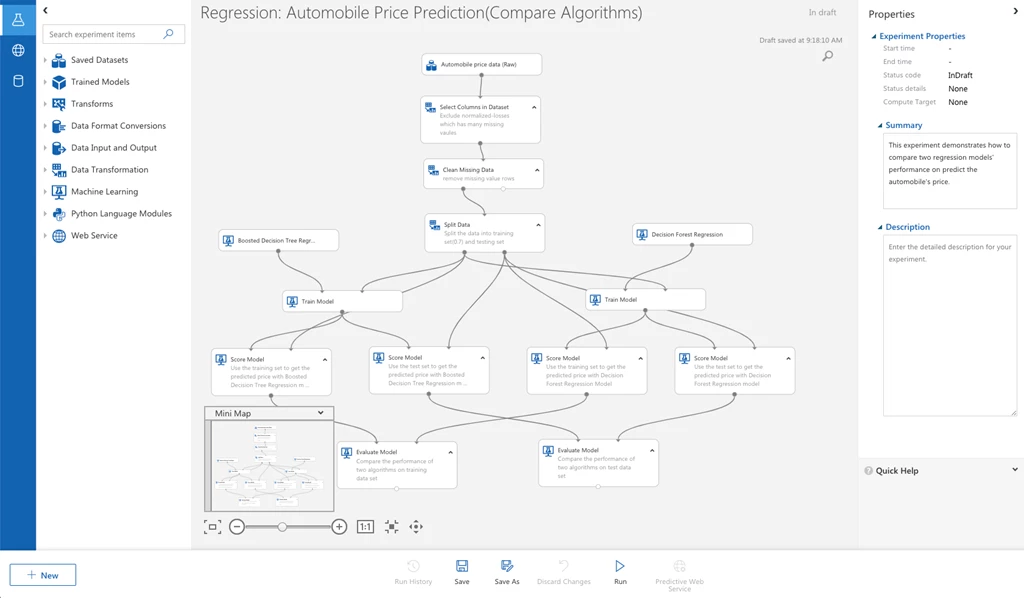
The Azure Machine Learning visual interface is designed for simplicity and productivity. The drag-and-drop experience is tailored for:
- Data scientists who are more familiar with visual tools than coding.
- Users who are new to machine learning and want to learn it in an intuitive way.
- Machine learning experts who are interested in rapid prototyping.
It offers a rich set of modules covering data preparation, feature engineering, training algorithms, and model evaluation. Another great aspect of this new capability is that it is completely web-based with no software installation required. All of this to say, users of all experience levels can now view and work on their data in a more consumable and easy-to-use manner.
Scalable Training
One of the biggest challenges data scientists previously faced when training data sets was the cumbersome limitations to scaling. If you were to start by training on a smaller model and then had a need to expand it due to an influx of data, or complex algorithms you would be required to migrate your entire data set to continue your training. With the new visual interface for Azure Machine Learning we’ve replaced the back end to reduce these limitations.
An experiment authored in the drag-and-drop experience can run on any Azure Machine Learning Compute cluster. As your training scales up on larger data sets or complex models, the Azure Machine Learning compute can autoscale from single node to multi node each time an experiment is submitted to run. With autoscaling you can now start with small models and not worry about expanding your production work with bigger data. By removing scaling limitations, data scientists now can focus on their training work.
Easy deployment
Deploying a trained model to a production environment previously required knowledge of coding, model management, container service, and web service testing. We wanted to provide an easier solution to this challenge so that these skills are no longer necessary. With the new visual interface, customers of all experience levels can deploy a trained model with just a few clicks. We will discuss how to launch this interface later in this blog.
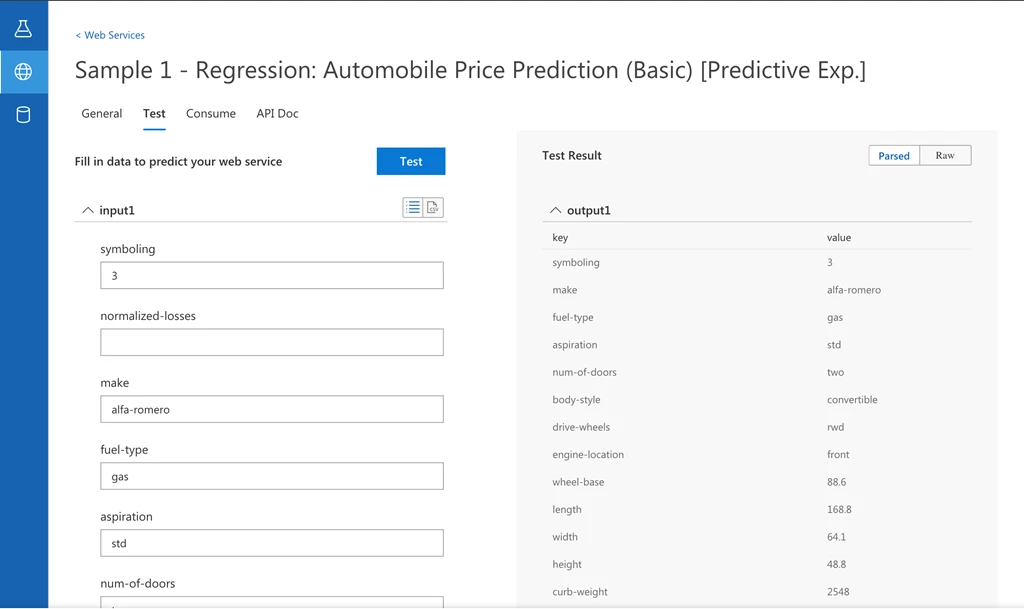
Once a model is deployed, you can test the web service immediately from this new user visual interface. Now you can test to make sure your models are correctly deployed. All web service inputs are now pre-populated for convenience. The web service API and sample code are also automatically generated. These procedures normally used to take hours to perform, but now with the new visual interface it can all happen within just a few clicks.
Full integration of Azure Machine Learning service
As the newest capability of Azure Machine Learning service, the visual interface brings the best of Azure Machine Learning service and Machine Learning Studio together. The assets created in this new visual interface experience can be used and managed in the Azure Machine Learning service workspace. These include experiments, compute, models, images, and deployments. It also natively inherits the capabilities like run history, versioning, and security of Azure Machine Learning service.
How to use
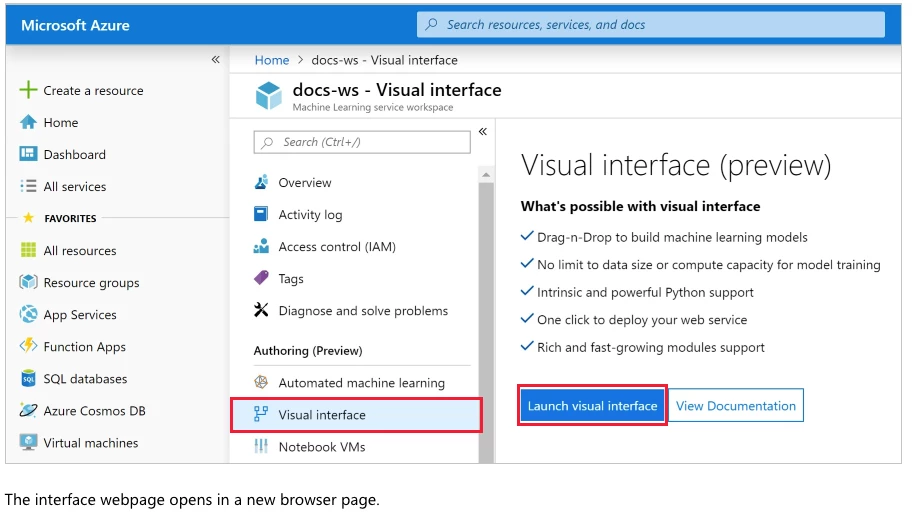
See for yourself just how easy it is to use this interface with just a few clicks. To access this new capability, open your Azure Machine Learning workspace in the Azure portal. In your workspace, select visual interface (preview) to launch the visual interface.
Get started today
- Learn more about Azure Machine Learning service.
- Get started with a free trial today.
- If you’re interested in learning how to train and deploy with the interface you can read our quickstart and watch our visual interface tutorial.