To get the most out of your Azure investment and run as efficiently as possible, we recommend that you regularly review and optimize your resources for high availability, security, performance, and cost. That’s why we created Azure Advisor, a free Azure service that helps you quickly and easily optimize your Azure resources with personalized recommendations based on your usage and configurations.
But with so many priorities vying for your attention, it can be easy to miss remediating your Advisor recommendations. So, what’s a good way to stay on top of these critical optimizations that can save you money, boost performance, strengthen your security posture, and increase uptime?
Get notified about new recommendations with Advisor alerts
Advisor now offers user-configurable alerts so you can get automatically notified as soon as your best practice recommendations become available. Advisor alerts will allow you to act more quickly and efficiently to optimize your Azure resources and stay on top of your new recommendations.
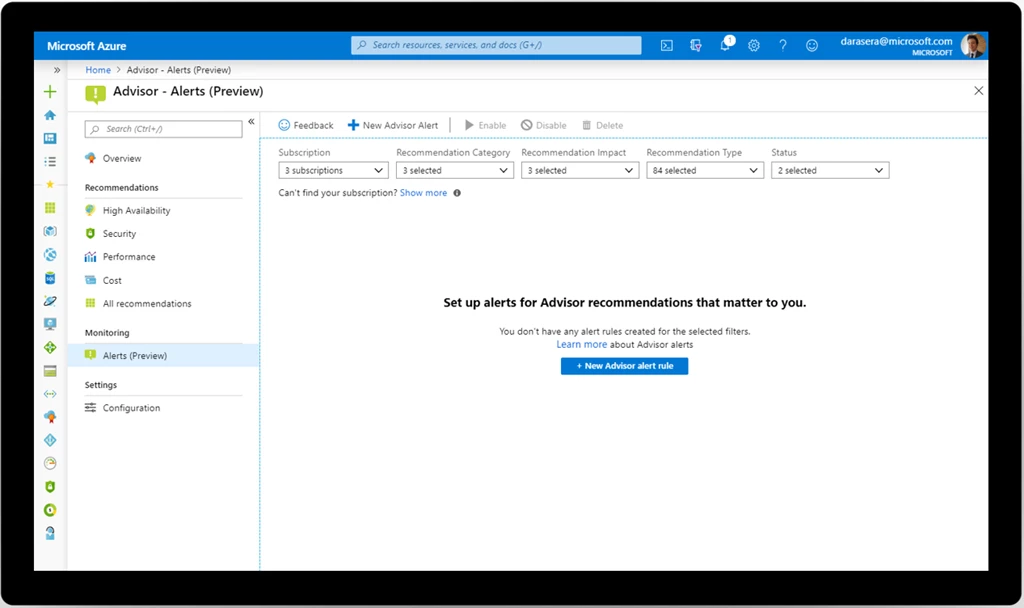
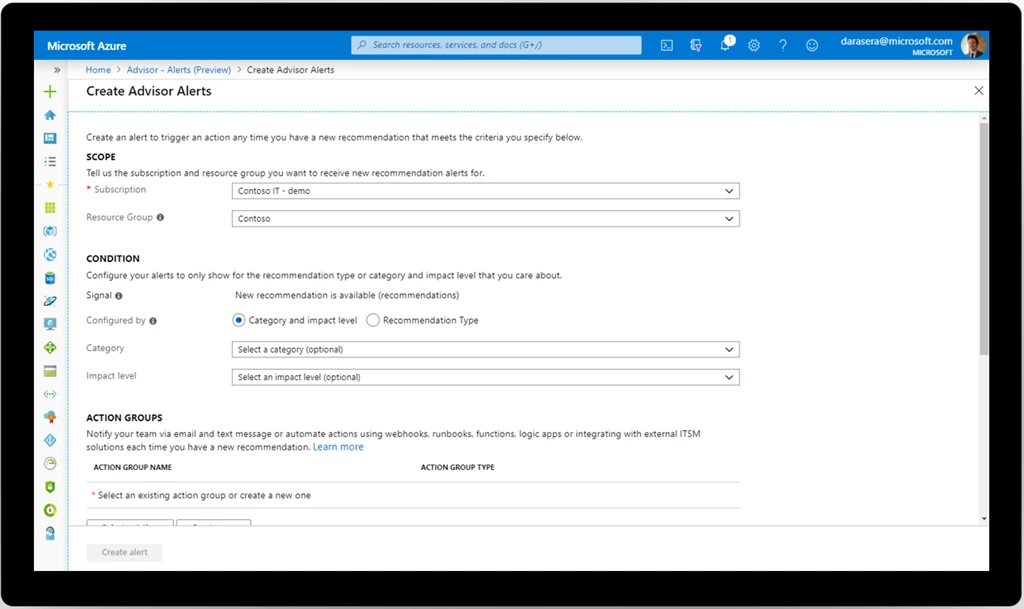
You can configure these alerts to be triggered based on several factors:
- Recommendation category – high availability, performance, or cost.
- Business impact – high, medium, or low.
- Recommendation type – for example, right-size or shutdown underutilized virtual machines (VMs,) enable VM backup, or use availability sets to improve fault tolerance.
You can also choose from a wide range of notification options, including email, SMS, push notification, webhook, IT service management integration with popular tools like ServiceNow, Automation runbooks, and more. Your notification preferences are configured using action groups, so you can repurpose any action groups you’ve already set up, such as those for your custom Azure Monitor alerts or Azure Service Health alerts.
Best practices for your Advisor alerts
As you get started with Advisor alerts, we have three tips for you.
First, start simple by choosing a few high impact recommendations that are important to your organization, based on your business goals and priorities. For example, you might have a leadership mandate to reduce costs by a certain percentage, in which case you might decide that “Right-size or shutdown underutilized VMs” is a critical recommendation for you. Then create an alert for that set of recommendations. You can always change your alert or add more later.
Second, consider who is right person to notify about new recommendations and the best way to notify them. It’s best to notify the individual or team who has the permission and authority to remediate the recommendation, to streamline the process. In keeping with the “start simple” principle, you may wish to begin with email notifications, which are the most basic to configure and the least intrusive to receive. Again, you can always modify your preferences later.
Finally, once you’ve tackled the first two tips and are comfortable with Advisor alerts, start to explore automation scenarios. For example, you can automatically route a new best practice recommendation through your ticketing system and assign it to the right team for remediation. In some cases, you can even use a combination of Advisor alerts and Automation runbooks to automatically remediate the recommendation.
Get started with Advisor alerts
Visit Advisor in the Azure portal to review your recommendations and start setting up your Advisor alerts. For more in-depth guidance, visit the Advisor documentation. Let us know if you have a suggestion for Advisor by submitting an idea in our forums here.