Backup industry is migrating from tapes towards disks and cloud, making it more feasible to leverage technology to achieve efficient utilization of network, storage, and human resources. This results in benefits such as lesser capital expense, faster recovery times and higher data security. Here we will discuss how Incremental Backups, a technology leveraged by Microsoft Azure Backup, delivers greater network and storage savings.
Kinds of backup
The different kinds of backup vary in terms of storage consumption, time to recover (RTO) and network consumption. Hence, it is imperative that you choose right backup solution to keep the overall backup TCO low. This section details out various kinds of backup and their impact on overall cost. As an example, let us take a data source, A, made up of blocks A1, A2, … A10, which needs to be backed up monthly. Block A2, A3, A4, A9 change in the first month, and A5 changes the next month.
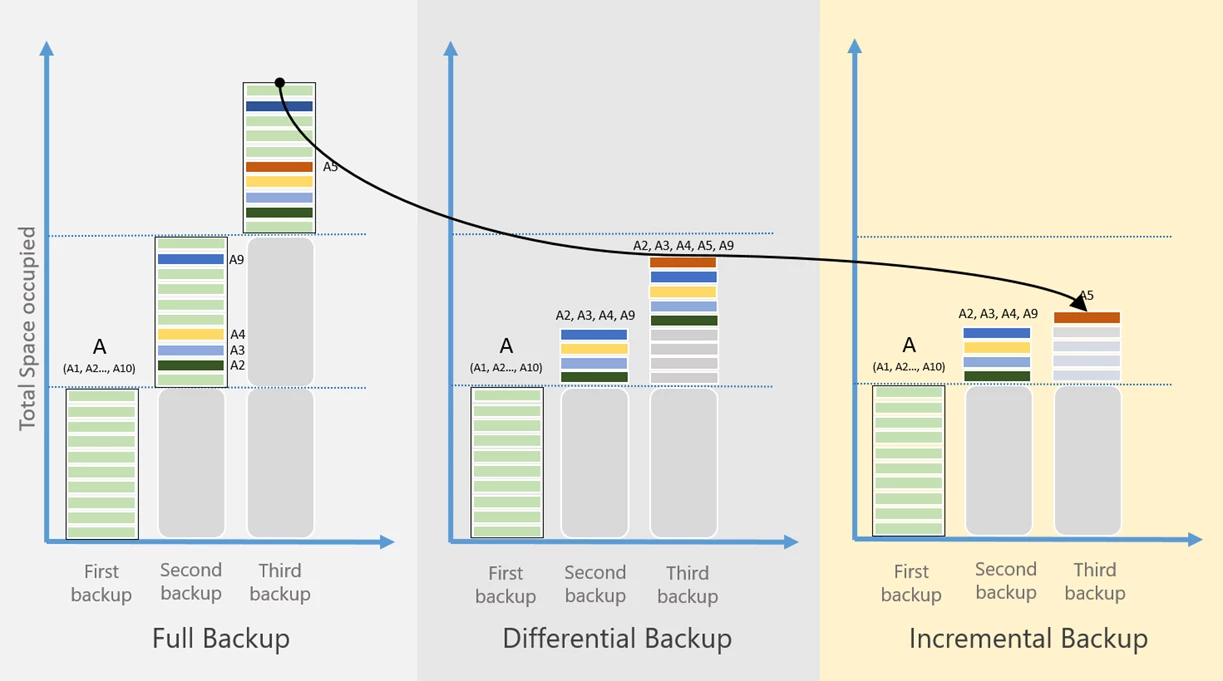
In Full Backups, a copy of the whole data source is stored for every backup.This leads to high network and storage consumption due to transfer of full copies every time.
Differential backups store only the blocks that have changed since the initial full backup, resulting in lesser network and storage consumption. Hence, after the initial copy, only the blocks that have changed since then are backed up for every subsequent backup. This avoids redundant copies of unchanged data, but is inefficient since the blocks that remain unchanged between further backups are transferred and stored as well.
Hence, after the first month, the changed blocks A2, A3, A4 and A9 will be backed up, and the following month, they will be backed up again, along with changed block, A5. These blocks will continue to be backed up until the next full backup is taken. Taking a full backup is a way to keep the size of the differential backups in check.
This used to be beneficial earlier, when manual intervention was required to restore from tapes: it needed lesser storage than full backup, and required merging just two tapes to create a recovery point. However, since backups can now be managed through a single console, storing unchanged blocks is inefficient. This is addressed with Incremental Backups, using which Microsoft Azure Backup creates recovery points.
Incremental Backups achieve high storage and network efficiency by storing only the blocks that change since the previous backup. This also negates any need to take regular full backups as was needed in Differential backups. Therefore, after the initial full backup, Microsoft Azure Backup will mark A2, A3, A4 and A9 as changed and send them to be stored. The following month, only the changed block, A5 will be transferred and stored. This leads to storage and network savings due to lesser data being transferred. With copies of lesser data being maintained for a long period, the TCO of backup decreases considerably.
With the technology used at Microsoft, even with Incremental Backups, the restores take constant time: no matter which recovery point you restore, they would all happen equally fast.
Microsoft Azure Backup leverages Incremental Backup technology, providing you secure, pay-as-you-go, highly scalable services to suit different requirements. In addition to Incremental Backups, these products also use compression, network throttling and offline seeding to further optimize resource consumption. All this is done while maintaining full copy fidelity for recovery, thus ensuring that even if a recovery point is corrupted, other recovery points are not affected.
Get started
Some resources to help you get started include:
- More about Microsoft Azure Backup offerings
- IaaS VM Backups: Get app-consistent backups of Azure Virtual Machines
- Microsoft Azure Backup Agent: Backup Windows Servers and clients to Azure
- Microsoft Azure Backup Server: Full fidelity support for heterogeneous workloads
- System Center Data Protection Manager: System Center component targeted at enterprises
- Hybrid IT Cloud Management: Management anywhere, any cloud, any platform
- Get started with a Free Trial Azure Subscription
In the coming blog post, we will discuss more about how Microsoft Azure Backup gives you full fidelity backups and keeps RTOs constant with incremental backups.