As the technology requirements of your business or practice grow and change over time, deploying business-critical applications can increase complexity and overhead substantially. To help manage this ever-growing complexity, we are pleased to announce the introduction of the Microsoft Azure Well-Architected Framework. Following industry standards and terms, the Azure Well-Architected Framework provides a set of Azure architecture best practices to help you build and deliver great solutions.
The Azure Well-Architected Framework is divided into five pillars of architectural best practices: cost management, operational excellence, performance efficiency, reliability, and security. These pillars help you effectively and consistently optimize your workloads against Azure best practices and the specific business priorities that are relevant to you or your customers’ cloud journey.
Get started with the Azure Well-Architected Framework:
- Read the framework content, reference material, and samples available in the Azure Architecture Center.
- Take the Azure Well-Architected Review on Microsoft Assessments.
- Learn how to Build great solutions with the Microsoft Azure Well-Architected Framework on Microsoft Learn.
Here is how each of these modalities can help you improve your workloads and grow your business.
Get started
Designing and deploying a successful workload in any environment can be challenging. This is especially true as agile development and DevOps/SRE practices begin to shift responsibility for security, operations, and cost management from centralized teams to the workload owner. This transition empowers workload owners to innovate at a much higher velocity than they could achieve in a traditional data center, but it creates a broader surface area of topics that they need to understand to produce a secure, reliable, performant, and cost-effective solution.
As an example, consider a Dev/Test workload that you’ve deployed as a simple proof of concept to measure the feasibility of Azure. If you’ve never had to manage the security, cost, performance, and reliability constraints for a workload, how do you ensure that your proof of concept is valid? How do you know you’re even asking the right questions or reviewing the metrics that you have available? The Azure Well-Architected Framework helps you make all the appropriate considerations for your workload.
For existing workloads, an additional tool that aligns with the Azure Well-Architected Framework is Azure Advisor. The guidance provided by Azure Advisor helps you pinpoint specific resources in your application that can be improved across the five pillars. Additionally, recommendations are prioritized according to our best estimate of significance to your environment, and you can share them with your team or stakeholders.
Review your workloads consistently
The Azure Well-Architected Review is designed to help you evaluate your workloads against the latest set of Azure best practices. It provides you with a suite of actionable guidance that you can use to improve your workloads in the areas that matter most to your business. Every customer is on a unique cloud journey, so we designed the Azure Well-Architected Review to be tailored to an individual company’s needs. You can evaluate each workload against only the pillars that matter for that workload, so when evaluating one of your mission-critical workloads, you might examine reliability, performance efficiency, and security first and then later come back and look at the other pillars to improve your operational efficiency and cost footprint.
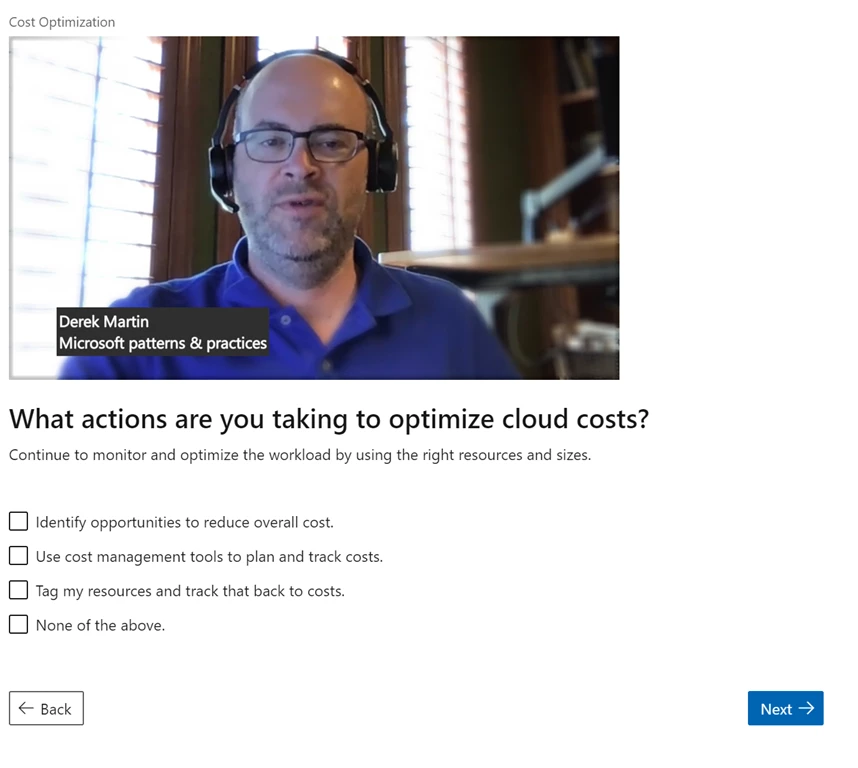
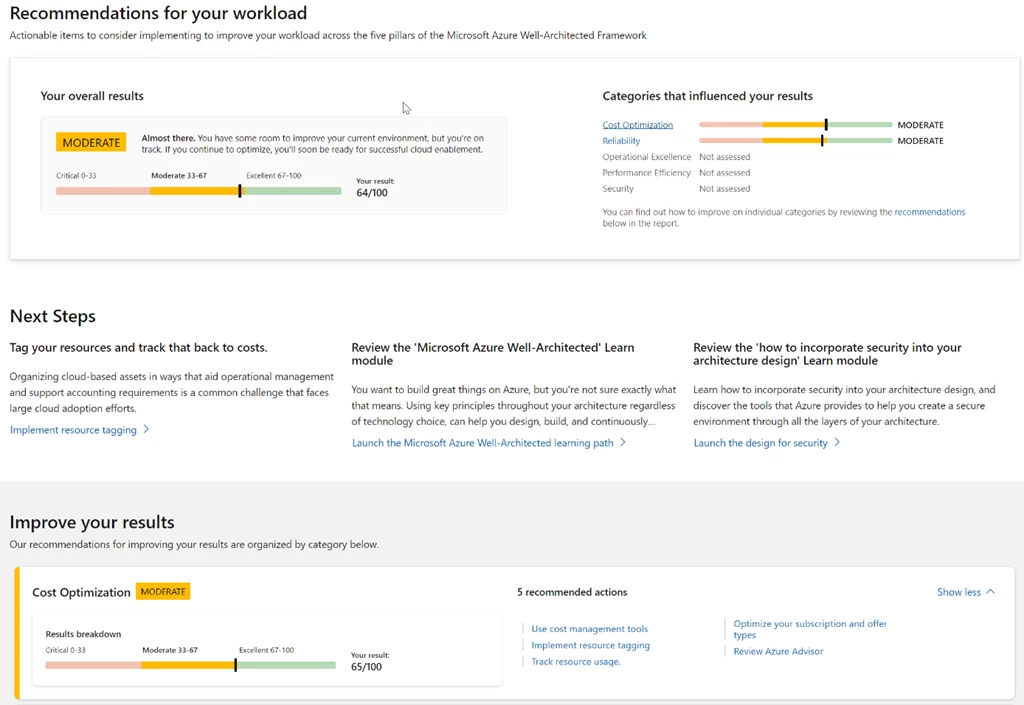
As you complete the assessment, you’re provided a score for each pillar that you chose to evaluate and an aggregate score across the entire workload. You also receive a set of actionable recommendations that you can follow to better align the workload with your business priorities.
At the current pace of technical innovation, having a well-architected workload is a moving target. As best practices and technology evolve, business priorities change, or other factors shift, what was best for your workload may move right along with it. To continuously meet these targets and requirements, update your process to regularly review and monitor your or your customers’ most important workloads to ensure that they’re reliable, secure, and operating as expected.
Learn how to build great solutions
At Microsoft Build 2020, we introduced the Build great solutions with the Microsoft Azure Well-Architected Framework learning path, which you’ll find helpful if you’re new to building solutions in the cloud or prefer a more interactive experience. This learning path consists of six modules: an overview of the framework along with one module for each pillar that provides a high-level conceptual overview without getting bogged down in the specific details of workload optimization.

Next steps
For a quick introduction to the Azure Well-Architected Framework please visit us at this session, or explore one of the modalities that we’ve detailed above.
We’re rapidly iterating to build out Azure Well-Architected across each of the channels we’ve detailed. If you have feedback, please reach out to us via GitHub, Facebook, and Twitter.