Today, I am thrilled to announce the general availability of Global VNet Peering in all Azure public regions, empowering you to take the ease, simplicity, and isolation of VNet peering to the next level.
Azure’s Virtual Network (VNet) is a logical isolation of Azure which enables you to securely connect Azure resources to each other. VNet lets you create your own private space in Azure – your own network bubble, as I like to call it.
With Global VNet Peering available, you can enable connectivity across all Azure public regions without additional bandwidth restrictions and as always keeping all your traffic on the Microsoft Backbone. Global VNet Peering provides you with the flexibility to scale and control how workloads connect across geographical boundaries, unlocking and applying global scale to a plethora of scenarios such as data replication, database failover, and disaster recovery through private IP addresses. You can also share resources across different business unit VNets, the hub-and-spoke model, as we refer to it, through a global peering connection. As your organization grows across geographic boundaries, you can continue to share resources like firewalls or other virtual appliances via peering.
We announced VNet peering at Microsoft Ignite 2017 bringing you the ability to connect two virtual networks within any Azure region through the Azure backbone network. Once peered, the two virtual networks appear as one for a coherent connectivity experience – an expansion of your network bubble, so to speak. While the VNets are still managed as separate resources, the virtual machines in the peered networks can communicate with each other directly through their private IP addresses – no gateways, no public IP addresses, no internet, no extra hops. The limitation back then, was that both VNets needed to be in the same region, and with this announcement, that limitation have been lifted.
Details
- You can peer across VNets in any Azure public regions with non-overlapping address spaces.
- You can globally peer across deployment models. Classic VNets can be peered to Resource Manager VNets.
- You can globally peer across subscriptions.
- When peering two virtual networks, a peering must be configured for each virtual network in the peering. You see one of the following types for peering status:
- Initiated: When you create the peering to the second virtual network from the first virtual network, the peering status is Initiated.
- Connected: When you create the peering from the second virtual network to the first virtual network, its peering status is Connected. If you view the peering status for the first virtual network, you see its status changed from Initiated to Connected. The peering is not successfully established until the peering status for both virtual network peerings is Connected.
- Traffic across globally peered links is completely private and stays on the Microsoft Backbone.
- Germany, China, and Azure Government regions are not currently supported.
For more information, check out our requirements section of our documentation.
Get started today
Setting up a Global VNet peering connection is as easy as two steps. Check the video below out to set up a Global VNet peering connection in the Azure portal.
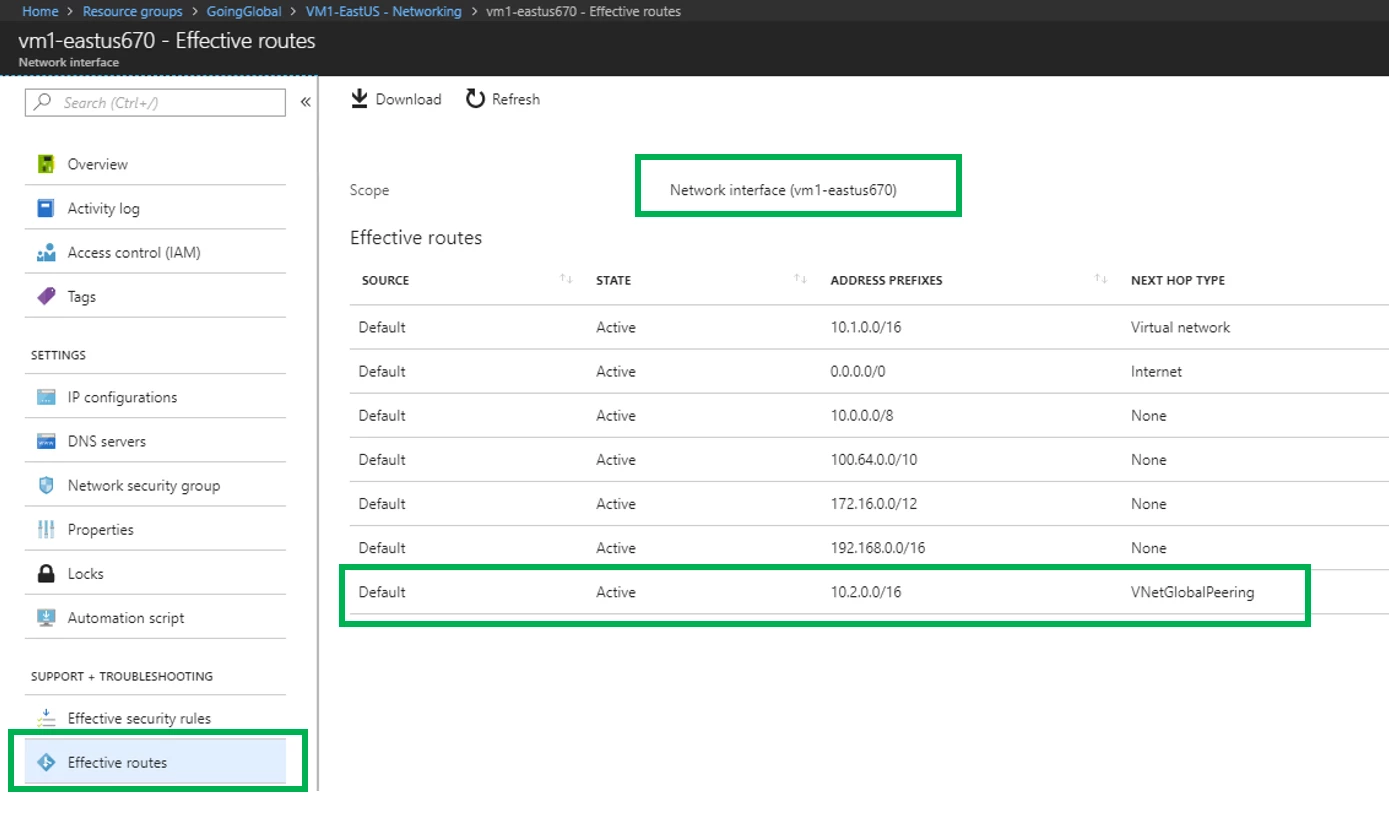
And that’s it! Just two clicks. Azure automatically adds the routes for you making it easy to manage. See the snapshot of the Effective routes of a VM residing in a globally peered VNet.
Go global with Global VNet peering! Feel free to join the conversation on twitter @AnaviNahar!
For more information, please visit the Global VNet Peering website.
Pricing | Create, change, delete a virtual network peering | VNet Peering Overview | Service Update
*This blog will not be updated. Please refer to documentation and service updates for the latest scoop!