This blog post was co-authored by Matthew Fuller Co-Founder & VP at Starburst
Microsoft and Starburst are excited to announce that Starburst Presto has been added to the Azure HDInsight Application Platform. With the Azure HDInsight Application Platform, Microsoft has enabled a broad set of big data and advanced analytics solutions so customers can deploy them with a single click.
Presto is a fast and scalable distributed SQL query engine. Architected for the separation of storage and compute, Presto can easily query data in Azure Blob Storage, Azure Data Lake Storage, SQL and NoSQL databases, and other data sources.
Adding Presto gives HDInsight users two things:
-
A fast, scalable, interactive SQL interface to data in Azure Blob and Azure Data Lake Storage.
-
An easy way to create queries that integrate data in Azure Blob and Azure Data Lake Storage with other sources by leveraging Presto’s vast portfolio of data connectors.
The new Presto option complements other existing open source components on HDInsight such as HBase, Storm, Spark, R, Kafka, and Interactive Query. This further enables customers to use the open source tools most suited for their workloads.
Starburst Presto distribution delivers fast performance (enabled via cost-based query optimization), enhanced security features, and integration with Azure and HDInsight services such as:
-
Azure Blob Storage
-
Azure Data Lake Storage
-
External Hive Metastore
-
Microsoft PowerBI
Starburst Presto on Azure HDInsight can be found on the Azure Marketplace. The rest of this post describes architecture concepts and how to get started with Starburst Presto on Azure HDInsight.
How it works
Presto is deployed as an application on Azure HDInsight and can be configured to immediately start querying data in Azure Blob Storage or Azure Data Lake Storage. Leveraging the external metastore feature on HDInsight, it allows Presto to share metadata with other clusters such as Hive and Spark.
Presto for HDInsight can be used with tools such as Microsoft’s PowerBI and Tableau. We’ve also packaged it in the open source Apache Superset for Business Intelligence which is installed and running automatically when choosing Presto on HDInsight. It’s an easy visual way to try out Presto for the first time.
The Presto Coordinator and Worker architecture is similar to HDInsight’s Head node and Worker nodes architecture. When deploying Presto as an application on HDInsight, the Presto coordinator is deployed to one of HDInsight’s head nodes and the Presto workers are deployed on HDInsight’s worker nodes. Additionally, an edge node that is deployed contains the Presto Command Line Interface (CLI) and Apache Superset.
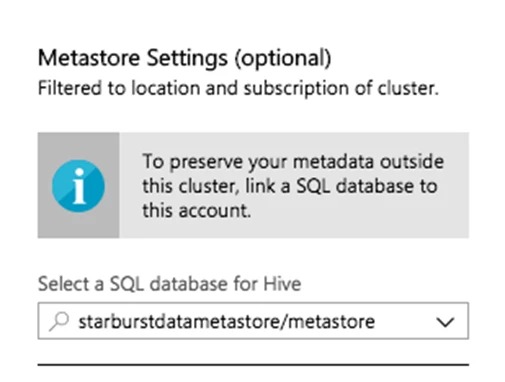
One incredibly useful feature is the ability to connect to an external Hive Metastore. It shares metadata between different tools such as Presto, Hive, and Spark, and it’s independent of the Presto cluster lifecycle. This allows you to shutdown the Presto HDInsight cluster when not in use to save costs.
Another useful feature in HDInsight is the ability to manage clusters by scaling up or down. Presto was architected from the ground up for separation of storage and compute. This allows Presto to work seamlessly with HDInsight to elastically scale up or down depending on your business demands.
Starburst also provides a set of Script Actions for common operations such as updating the Presto configurations. For example, you may want to configure a new connector to query from Microsoft SQL Server. This allows you run federated queries between the RDBMS and Azure Blob storage. You can read more about the script actions in our documentation. Also refer to our GitHub for the current Script Actions, contributions are welcome!
Getting started with Presto on HDInsight
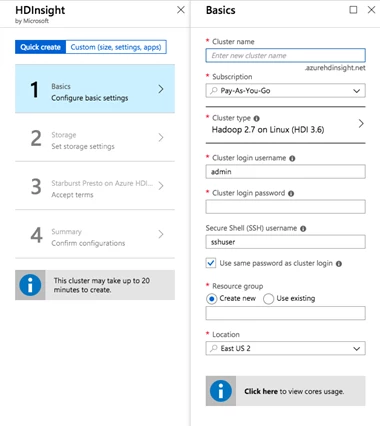
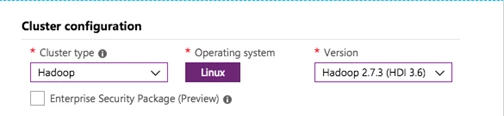
Starburst Presto can be selected as an application on Azure HDInsight. Simply choose Starburst Presto and continue with the HDInsight setup.
Additionally, Starburst Presto on Azure HDInsight can be found on the Azure Marketplace which redirects you to the Azure Portal with Presto for HDInsight specific parameters pre-filled, creating an even simpler setup experience for users.
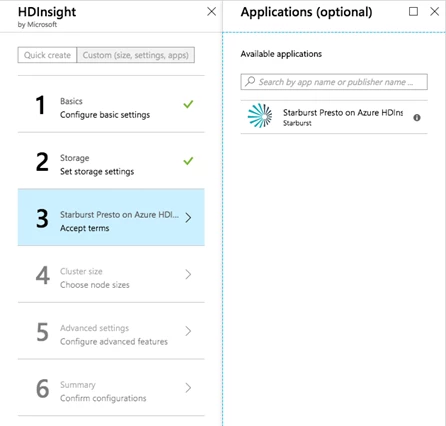
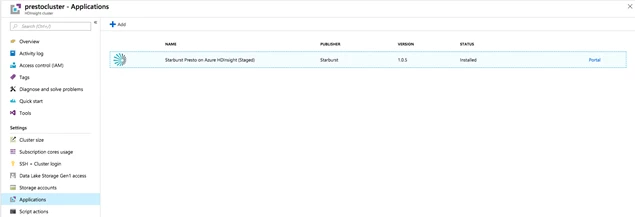
Once HDInsight and Presto are deployed, you can view Presto as an installed application
Configuring Starburst Presto support for Azure Data Lake Storage and Azure blobs
Presto for HDInsight can be configured to query Azure Blob Storage and Azure Data Lake Storage. Azure Blobs are accessed via the Windows Azure Storage Blob (WASB). This layer is built on top of the HDFS APIs and allows for the separation of storage from the cluster. This is key for scaling Presto and HDInsight independently of storage. During setup, simply choose the desired storage account and we’ll configure it automatically for you.
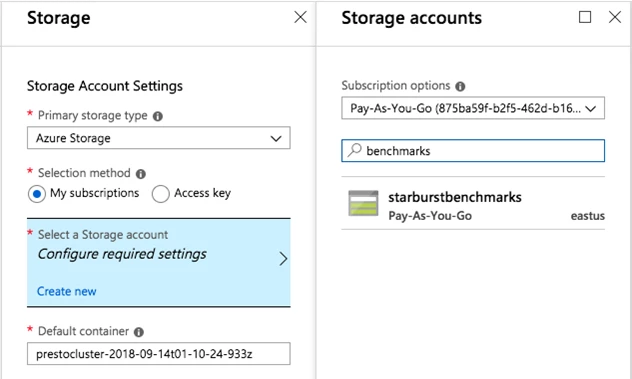
If you were to do it manually your hive.properties, your Presto configuration file would look something like:
hive.azure.wasb-storage-account=
hive.azure.wasb-access-key=
Similarly, for Azure Data Lake Storage your hive.properties, your Presto configuration would look something like:
hive.azure.adl-client-id=
hive.azure.adl-credential=
hive.azure.adl-refresh-url=
Performance benchmark results
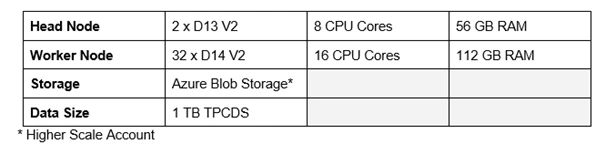
As part of the preparation for Presto on Azure HDInsight, Starburst revisited the previously published HDInsight benchmark Azure HDInsight Performance Benchmarking: Interactive Query, Spark and Presto. At the time, Presto did not support all of the TPC-DS queries nor did it have its Cost Based Optimizer. In our updated benchmarking, we’re using a much more recent version of Presto (0.203) that can run the entire TPC-DS query set. For our experiments, we used the same cluster size and data size as the original blog post:
We ran a benchmark derived from the TPC-DS benchmark with the default configuration and with the Cost Based Optimizer (CBO) enabled. When we ran the tests again with the CBO disabled, the first thing we noticed was that seven of the queries failed to complete. Without the CBO, Presto (or any other SQL engine) does not have enough information to create an efficient query plan. In the cases where the queries failed, Presto ran suboptimal plans resulting in an insufficient amount of resources.
This is still much better than in than in the original blog in which Presto could only run 45 queries. And now with the CBO, all queries complete.
Next, we looked at the total completion time of the benchmark. You’ll see that the CBO improves the performance on average by approximately 2.4 times.
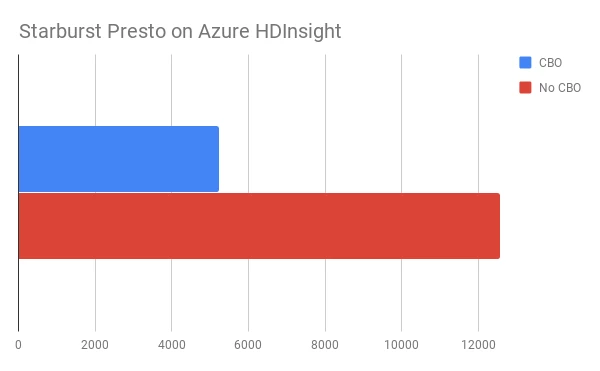
Please note, that these are unaudited results and as such are not comparable with any officially published TPC-DS results.
We will examine results further for a closer look into Starburst Presto’s performance in a future post.
Conclusions and next steps
HDInsight provides a number of open source engines. Each tool has a specific fit depending on the use case. If interactive SQL analytics are needed, Presto is the best fit. Additionally, Presto has the unique ability to federate across different data sources in Azure.
In an upcoming release, Starburst will integrate with the HDInsight Enterprise Security Package to automatically secure and configure your Presto cluster out of the box. This will include Authentication and Authorization with Active Directory and Apache Ranger integration.
Additionally, we plan to integrate Presto with other Microsoft services in Azure, continuing to build more connectors such as for Azure Cosmos DB and SQL Data Warehouse.
At Starburst and Microsoft, we’re committed to advancing the open source Presto project forward. Give Presto a try today on Azure Marketplace!