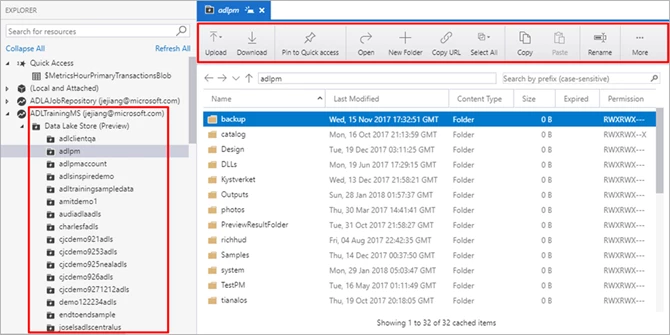
Providing a rich GUI for Azure Data Lake Storage resources management has been a top customer ask for a long time, we are thrilled to announce the public preview for supporting Azure Data Lake Storage (ADLS) in the Azure Storage Explorer (ASE). With the release of ADLS resources in ASE, you can freely navigate ADLS resources, you can upload and download folders and files, you can copy and paste files across folders or ADLS accounts and you can easily perform CRUD operations for your folders and files. Azure Storage Explorer not only offers a traditional desktop explorer GUI for dragging, uploading, downloading, copying and moving your ADLS folders and files, but also provides a unified developer experiences of displaying file properties, viewing folder statistics and adding quick access. With this extension you are now able to browse ADLS resources along-side existing experiences for Azure Blobs, tables, files, queues and Cosmos DB in ASE.
Key customer benefits
- Offers a one-stop shop to manage Azure Storage Resources including ADLS
- Enables direct connect through Azure AD Authentication
- Provides traditional explorer experiences for file movement, file/folder upload and download with great scalability
- Delivers better accessibility for file navigation and data management capability with reliable performance
Summary of key features
- ADL hyperlink support – Copy and open ADL hyperlink with Storage Explorer with one click
- Local and attach – View ADLS resources shared by others through ACL
- Resources navigation – Browse ADLS files and folders across ADL accounts under your subscriptions
- File/Folder CRUD Operations – Support recursive folder and multi-selected files
- Desktop Explorer experience – Drag and drop, add folder to quick access, recent locations
- Activity log – Display log information in the lower right pane to view activity status
- Resource Properties – Display folder statistics and file property
Get started
Install Azure Storage Explorer: [Windows], [Mac], [Linux]
For more information about Cosmos DB in ASE, please see:
- Azure Storage Explorer: Get started with Storage Explorer
- User Manual: Manage Azure Data Lake Store resources with Storage Explorer
- Azure Data Lake Store: Azure Data Lake Store Overview
- Demo Video: https://youtu.be/tq8yEwRCi5I
Learn more about today’s announcements on the Azure blog. Discover more Azure service updates.
If you have questions, feedback, comments, or bug reports, please use the comments below or send a note to adldevtool@microsoft.com