Azure Cognitive Services provides Text Analytics APIs that simplify extracting information from text data using natural language processing and machine learning. These APIs wrap pre-built language processing capabilities, for example, sentiment analysis, key phrase extraction, entity recognition, and language detection.
Using Text Analytics, businesses can draw deeper insights from interactions with their customers. These insights can be used to create management reports, automate business processes, for competitive analysis, and more. One area that can provide such insights is recorded customer service calls which can provide the necessary data to:
- Measure and improve customer satisfaction
- Track call center and agent performance
- Look into performance of various service areas
In this blog, we will look at how we can gain insights from these recorded customer calls using Azure Cognitive Services.
Using a combination of these services, such as Text Analytics and Speech APIs, we can extract information from the content of customer and agent conversations. We can then visualize the results and look for trends and patterns.
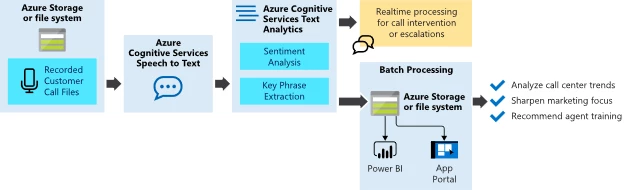
The sequence is as follows:
- Using Azure Speech APIs, we can convert the recorded calls to text. With the text transcriptions in hand, we can then run Text Analytics APIs to gain more insight into the content of the conversations.
- The sentiment analysis API provides information on the overall sentiment of the text in three categories positive, neutral, and negative. At each turn of the conversation between the agent and customer, we can:
- See how the customer sentiment is improving, staying the same, or declining.
- Evaluate the call, the agent, or either for their effectiveness in handling customer complaints during different times.
- See when an agent is consistently able to turn negative conversations into positive or vice versa and identify opportunities for training.
- Using the key phrase extraction API, we can extract the key phrases in the conversation. This data, in combination with the detected sentiment, can assign categories to a set of key phrases during the call. With this data in hand, we can:
- See which phrases carry negative or positive sentiment.
- Evaluate shifts in sentiment over time or during product and service announcements.
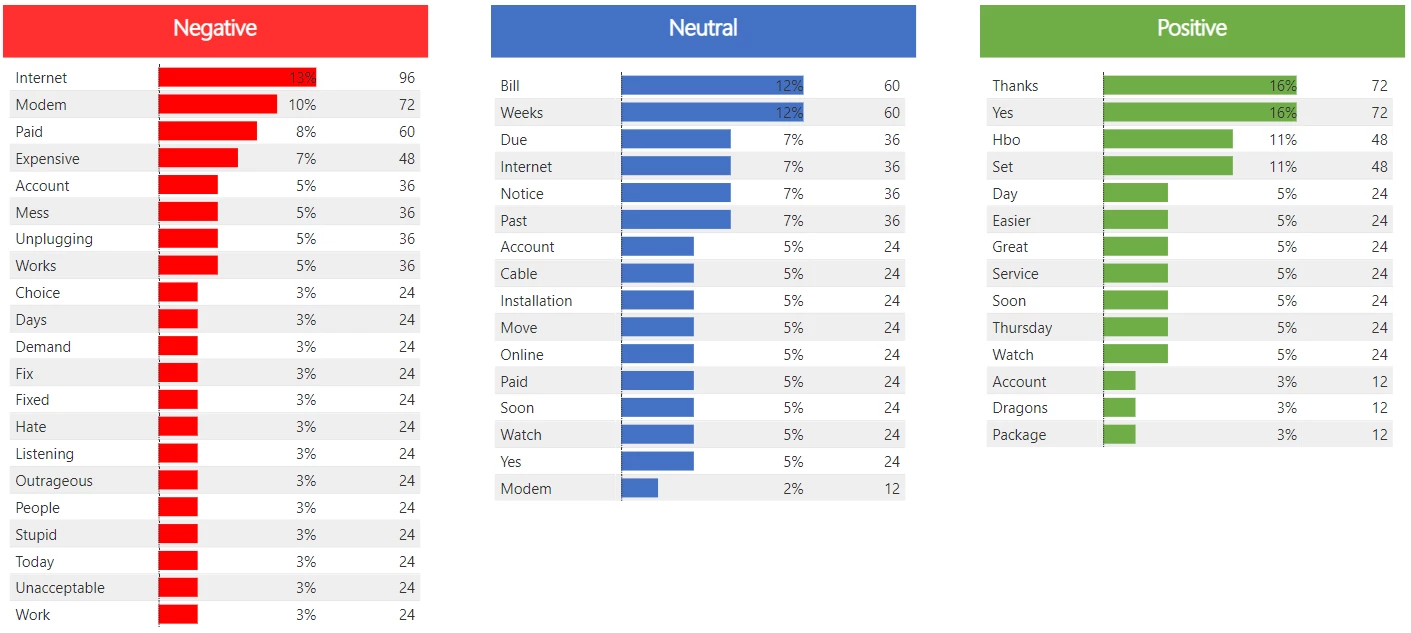
- Using the entity recognition API, we can extract entities such as person, organization, location, date time, and more. We can use this data, for example, to:
- Tie the call sentiment to specific events such as product launches or store openings in an area.
- Use customer mentions of competitors for competitive intelligence and analysis.
- Lastly, Power BI can help visualize the insights and communicate the patterns and trends to drive to action.
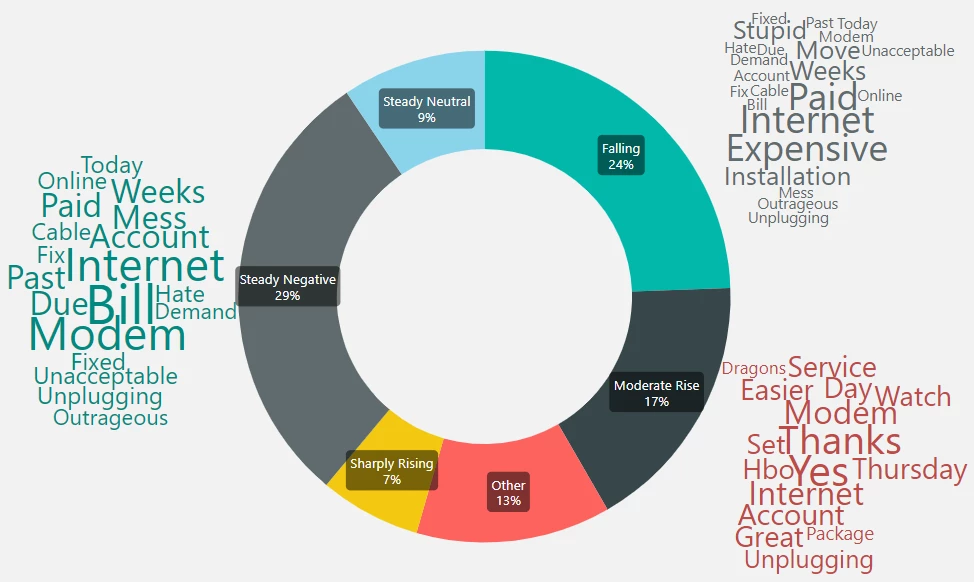
Using the Azure Cognitive Services Text Analytics, we can gain deeper insights into customer interactions and go beyond simple customer surveys into the content of their conversations.
A sample code implementation of the above workflow can be found on GitHub.