We are pleased to share the capability to rewrite HTTP headers in Azure Application Gateway. With this, you can add, remove, or update HTTP request and response headers while the request and response packets move between the client and backend application. You can also add conditions to ensure that the headers you specify are rewritten only when the conditions are met. The capability also supports several server variables which help store additional information about the requests and responses, thereby enabling you to make powerful rewrite rules.

Figure 1: Application Gateway removing the port information from the X-Forwarded-For header in the request and modifying the Location header in the response.
Rewriting the headers helps you accomplish several important scenarios. Some of the common use cases are mentioned below.
Remove port information from the X-Forwarded-For header
Application gateway inserts X-Forwarded-For header to all requests before it forwards the requests to the backend. The format of this header is a comma-separated list of IP:Port. However, there may be scenarios where the backend applications require the header to contain only the IP addresses. One such scenario is when the backend application is a Content Management System (CMS) because most CMS are not able to parse the additional port information in the header. For accomplishing such scenarios, you can set the header to the add_x_forwarded_for_proxy server variable which contains the X-Forwarded-For client request header without the port information.
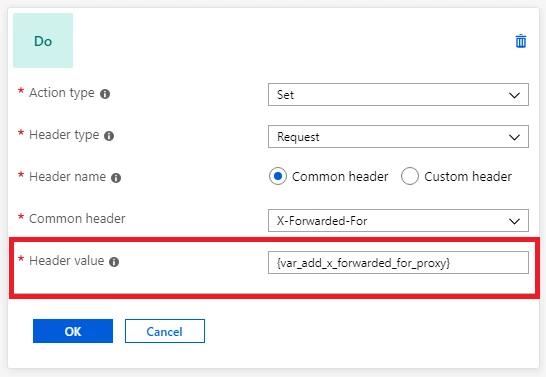
Figure 2: Application Gateway configuration for removing the port information from the X-Forwarded-For header.
Better integration with App service and other multi-tenant backends
When a backend application sends a redirection response, you may want to redirect the client to a different URL than the one specified by the backend application. One such scenario is when an app service is hosted behind an application gateway.
Since app service is a multi-tenant service, it uses the host header in the request to route to the correct endpoint. App services have a default domain name of *.azurewebsites.net (say contoso.azurewebsites.net) which is different from the application gateway’s domain name (say contoso.com). Since the original request from the client has application gateway’s domain name contoso.com as the host name, the application gateway changes the hostname to contoso.azurewebsites.net, so that the app service in the backend can route it to the correct endpoint. But when the app service sends a redirection response, it uses the same hostname in the location header of its response as the one in the request it receives from the application gateway. Therefore, when the app service performs a redirection to its relative path (redirect from /path1 to /path2), the client will make the request directly to contoso.azurewebsites.net/path2, instead of going through the application gateway (contoso.com/path2). This will bypass the application gateway which is not desirable.
This issue can be resolved by setting the hostname in the location header to the application gateway’s domain name. To do this, you can create a rewrite rule with a condition that evaluates if the location header in the response contains azurewebsites.net and performs an action to rewrite the location header to have application gateway’s hostname.
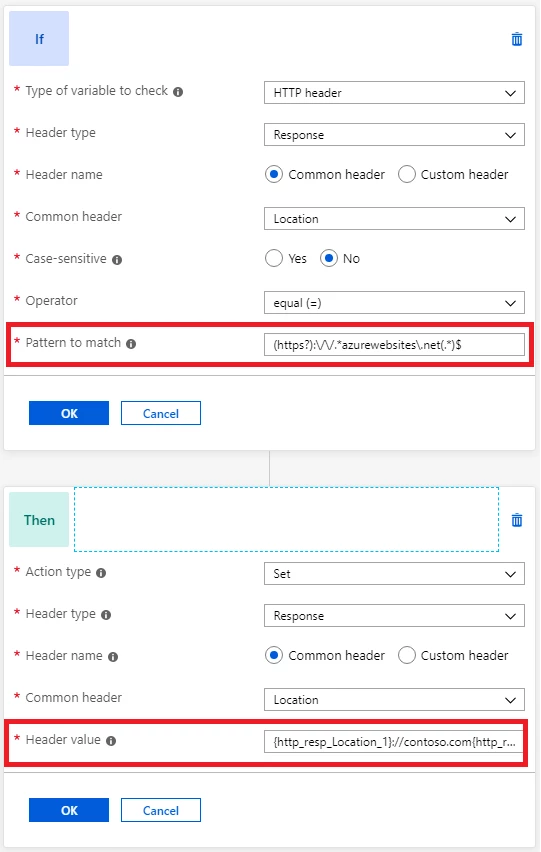
Figure 3: Application Gateway configuration for modifying the location header.
Implement security-related HTTP headers to prevent vulnerabilities
Several security vulnerabilities can be fixed by implementing necessary headers in the application response. Some of these security headers are X-XSS-Protection, Strict-Transport-Security, Content-Security-Policy, X-Frame-Options, etc. You can use application gateway to set these headers for all responses.
Get started
You can learn more about HTTP header rewrite with Application Gateway and find detailed instructions about how to configure HTTP header rewrite in Application Gateway.
Please send your feedback
There are a few different routes to provide feedback:
- UserVoice: Post new ideas for Application Gateway on our UserVoice page.
- Join our cohort: We’re always interested in having new customers join our cohorts to get early access to new features and help us improve Application Gateway going forward. If you are interested in joining our cohorts, simply fill out this quick form.