Skip to main content Explore View all products (200+) Microsoft Foundry Azure Copilot GitHub Copilot Azure Kubernetes Service (AKS) Azure Cosmos DB Azure Database for PostgreSQL Azure Arc Microsoft Fabric Linux virtual machines in Azure Foundry Models Foundry Agent Service Foundry IQ Foundry Tools Foundry Control Plane Observability in Foundry Control Plane Azure OpenAI in Foundry Models Azure Speech in Foundry Tools Azure Machine Learning View all databases Azure Cosmos DB Azure DocumentDB Azure SQL Azure Database for PostgreSQL Azure Managed Redis Microsoft Fabric Azure Databricks Linux virtual machines in Azure Windows Server on Azure Azure Functions Azure Virtual Machine Scale Sets Azure API Management Azure Container Apps Azure Kubernetes Service (AKS) Azure Kubernetes Fleet Manager Azure Container Registry Azure Red Hat OpenShift Azure Container Instances Azure Container Storage Azure Arc Azure Local Microsoft Defender for Cloud Azure Monitor Microsoft Sentinel Azure Migrate View all solutions (40+) Cloud solutions for small and medium businesses Cloud migration and modernization center Data analytics for AI Azure Databases AI apps and agents Microsoft Marketplace Microsoft Sovereign Cloud AI apps and agents Responsible AI with Azure AI Infrastructure Data analytics for AI Machine learning operations (MLOps) Low-code application development on Azure Integration Services Serverless computing DevOps Migration and modernization center .NET apps migration Databases on Azure Linux on Azure Oracle on Azure SAP on the Microsoft Cloud Adaptive cloud High-performance computing (HPC) Infrastructure as a service (IaaS) Resiliency Azure Essentials Frontier Accelerate for Azure FinOps on Azure Microsoft Marketplace Azure pricing overview Create an Azure account Free Azure services Flexible purchase options Pricing calculator FinOps on Azure Maximize ROI from AI Azure savings plans Azure reservations Azure Hybrid Benefit Virtual Machines Azure SQL Microsoft Foundry Microsoft Fabric Azure Kubernetes Service (AKS) Microsoft Defender for Cloud View more Software Development Companies Microsoft Marketplace Find a partner Resources for Azure partners Get started with Azure Customer stories Analyst reports, white papers, and e-books Videos Learn more about cloud computing Documentation Explore Azure portal Developer resources Quickstart templates Resources for startups Developer community Students Azure for partners Blog Events and Webinars Learn Support Contact Sales Get started with Azure Sign in

Attackers commonly target open ports on Internet-facing virtual machines (VMs), spanning from port scanning to brute force and DDoS attacks. In case of a successful brute force attack, an attacker can compromise your VM and establish a foothold into your environment. Once an attacker is in your environment, he can profit from the compute of that machine or use its network access to perform lateral attacks on other networks.

One way to reduce exposure to an attack is to limit the amount of time that a port on your virtual machine is open. Ports only need to be open for a limited amount of time for you to perform management or maintenance tasks. Just-In-Time VM Access helps you control the time that the ports on your virtual machines are open. It leverages network security group (NSG) rules to enforce a secure configuration and access pattern.

Today we are excited to announce the public preview of configuring Just-In-Time VM Access from the virtual machine blade to make it even easier for you to reduce your exposure to threats.
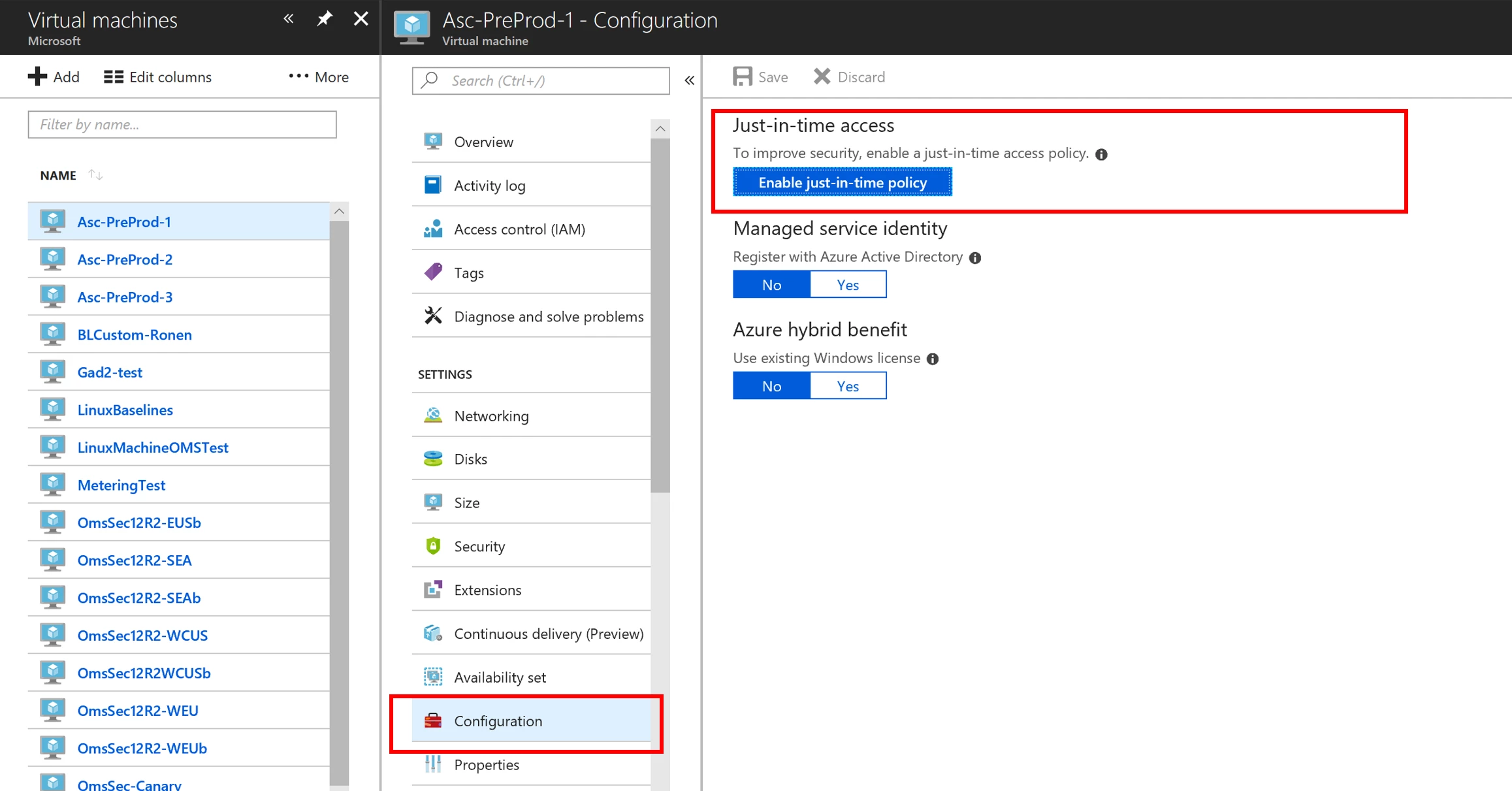
Just-In-Time VM access

In one simple click, a Just-In-Time VM access policy is applied to a VM. This will configure a policy that locks down the machine RDP or SSH ports, depending on the OS of the respected VM. When an authorized user wants access to the ports for management or maintenance purposes, he or she can use Just-In-Time VM Access to request access to those ports for up to 3 hours. After 3 hours, the management ports will automatically be locked down to help reduce those ports susceptibility to an attack.

While setting Just-in-Time VM Access is already available as a feature in Azure Security Center, we added it to the virtual machine experience to make it easier for you to protect your management ports from attacks while you are configuring other settings in the virtual machine blade.

To get started with Just-in-Time VM Access, you can start your free 60-day trial of Azure Security Center today. If you are currently using the Security Center Free tier, you can simply upgrade your subscription to the Standard Tier to take advantage of Just-In-Time VM Access.
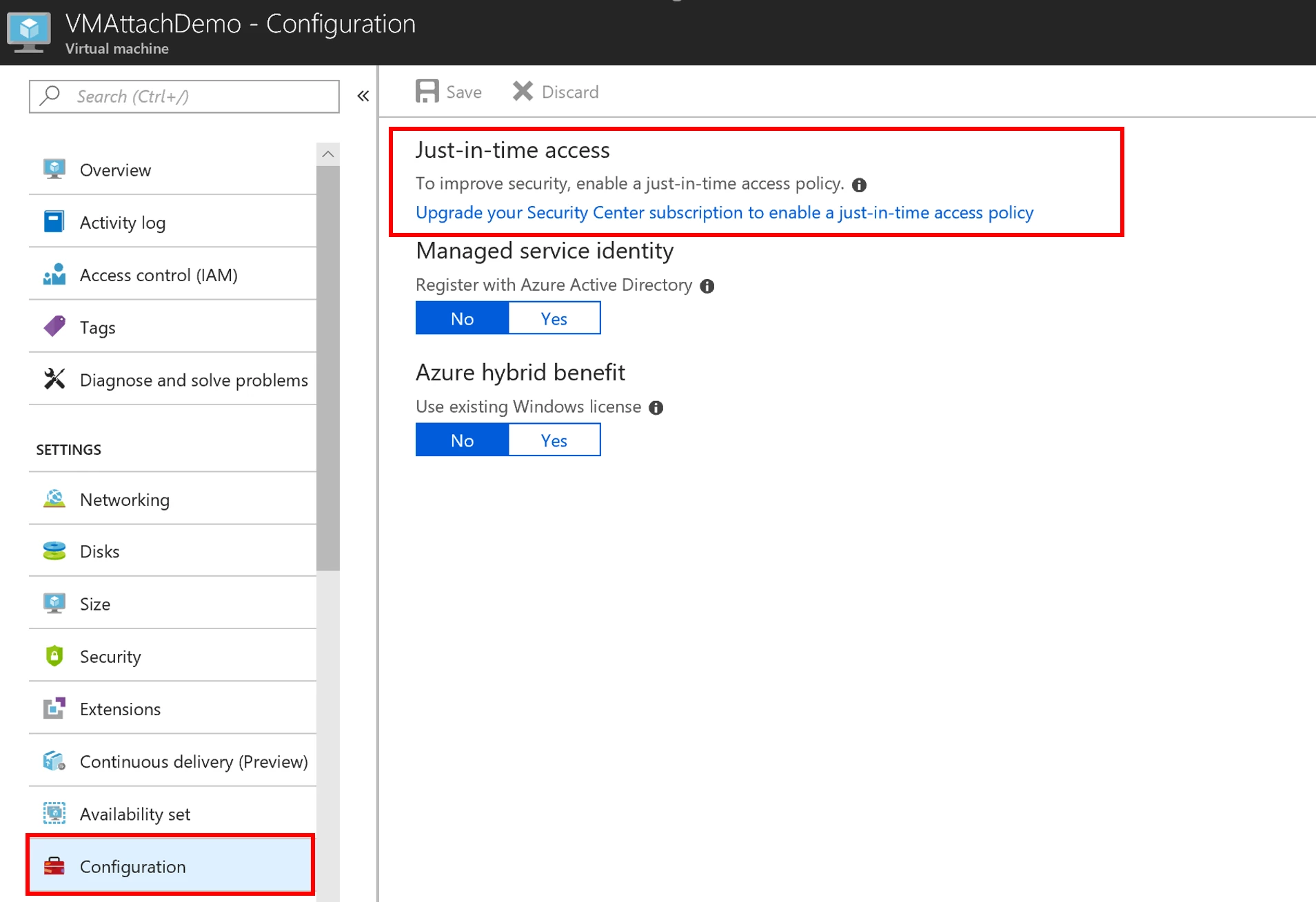
Just-in-time access

To learn more about Just-in-Time VM Access, visit the documentation.

WE ARE MICROSOFT

Explore Microsoft Foundry

The future of AI starts here. Envision your next great AI app with the latest technologies. Get started with Azure.





