Network security policies are a critical component of modern IT environments, especially with the increasing adoption of cloud workloads. As workloads move to the cloud, network security policies like Azure Firewall policies evolve and adapt to the changing demands of the infrastructure. These policies can be updated multiple times a week, making it challenging for IT security teams to optimize the Firewall rules.
As the number of network and application rules grow over time, they can become suboptimal, resulting in degraded firewall performance and security. For instance, high volume and frequently hit rules may be unintentionally deprioritized, leading to potential performance gaps. Similarly, after migrating an application to a different network, firewall rules referencing older networks may not be deleted, creating security risks.
Optimizing Azure Firewall policies is a challenging task for any IT team, particularly for large, geographically dispersed organizations. It can be a manual and complex process, involving multiple teams across the world. Any updates to these policies can be risky and potentially impact critical production workloads, causing serious downtime. At Microsoft, we strive to help enterprises to manage and secure their environments at scale.
Today, we are excited to announce the general availability of Policy Analytics for Azure Firewall to help IT teams manage the rules in the Azure Firewall policy over time. This feature provides critical insights and surfaces recommendations for optimizing Azure Firewall policies to strengthen security posture. Policy Analytics can detect suboptimal rules and suggest changes to improve performance and security. It can also detect and recommend the deletion of rules referencing older networks that are no longer in use.
Optimize Azure Firewall rules with Policy Analytics
Policy Analytics helps IT teams address these challenges by providing visibility into traffic flowing through the Azure Firewall. Key capabilities available in the Azure portal include:
Policy insight panel: Aggregates policy insights and highlights policy recommendations to optimize your Azure Firewall policies.
Firewall flow logs: Displays all traffic flowing through the Azure Firewall alongside hit rate and network and application rule match. This view helps identify top flows across all rules. You can filter flows matching specific sources, destinations, ports, and protocols.
Rule analytics: Displays traffic flows mapped to destination network address translation (DNAT), network, and application rules. This provides enhanced visibility of all the flows matching a rule over time. You can analyze rules across both parent and child policies.
Single-rule analysis: The single-rule analysis experience analyzes traffic flows matching the selected rule and recommends optimizations based on those observed traffic flows.
Deep dive into network rule hits
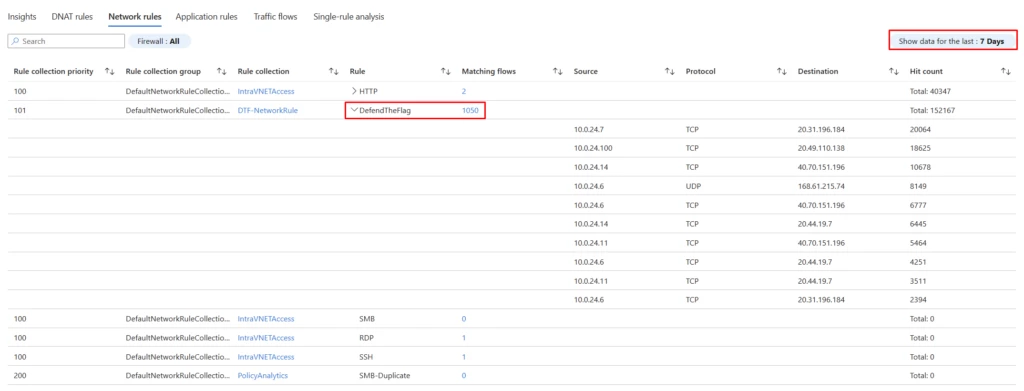
Let’s look into the network rule hits. Here we have selected to analyze the hits of our network rules. The time granularity on the right-hand side (highlighted in red) can be set from one day to 30 days. We can expand the rules to see the top 10 flows based on the hit count or drill down on the number of matching flows to see all the flows.
In the below example, we see rule “DefendTheFlag” had 1,500 unique flows in the last seven days, with a total of 152,167 hits. To get visibility into the top flows that generated the traffic, we can expand the rule and continue looking deeper to uncover additional insights. You can review the flows to decide if they must be continued to be allowed or blocked and update the rules appropriately.
Deep dive into single-rule analysis
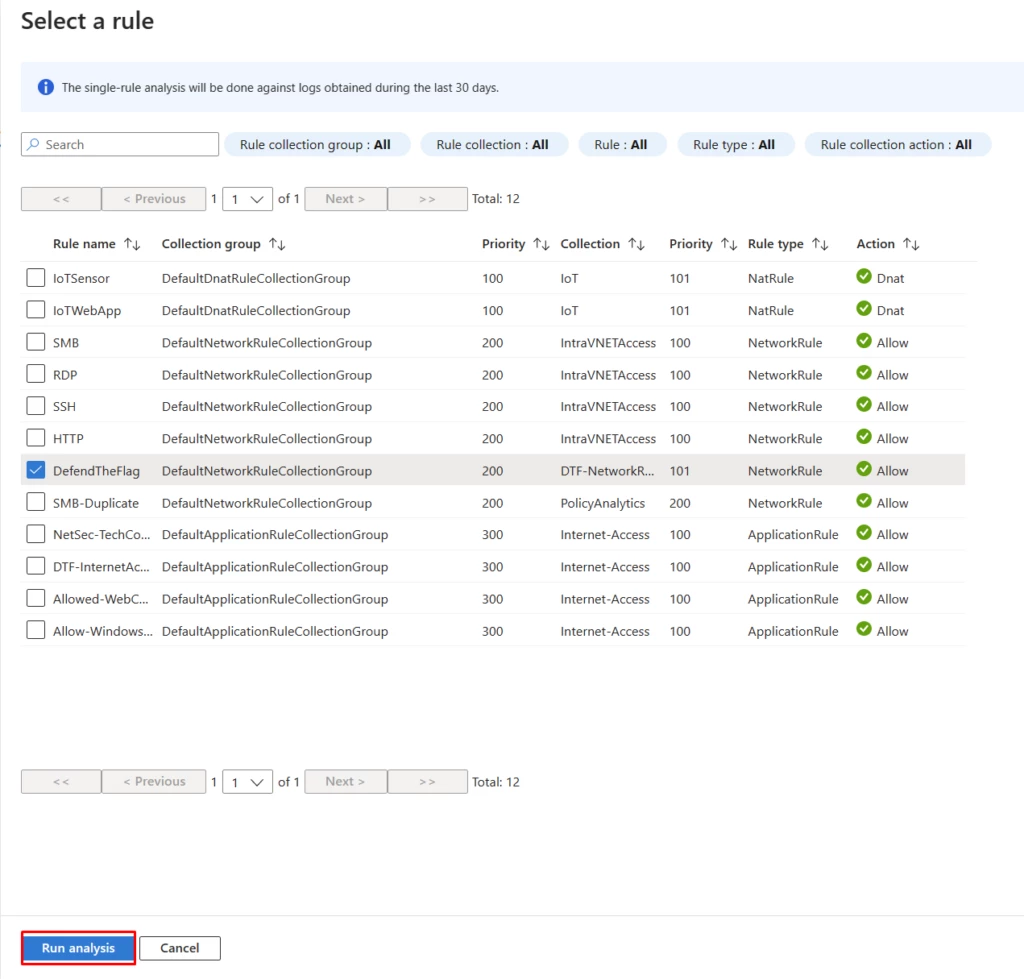
Let’s investigate single-rule analysis. Here we select a rule of interest to analyze the matching flows and optimize thereof. Users can analyze Azure Firewall rules with a few easy clicks.
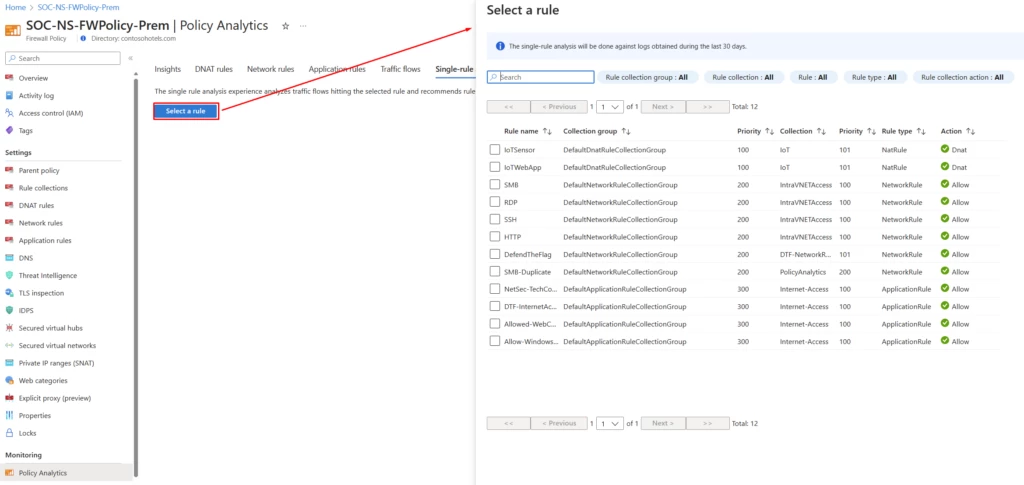
With Policy Analytics for Azure Firewall, you can perform rule analysis by picking the rule of interest. You can pick a rule to optimize, for instance, you may want to analyze rules with a wide range of open ports or a large number of sources and destinations.
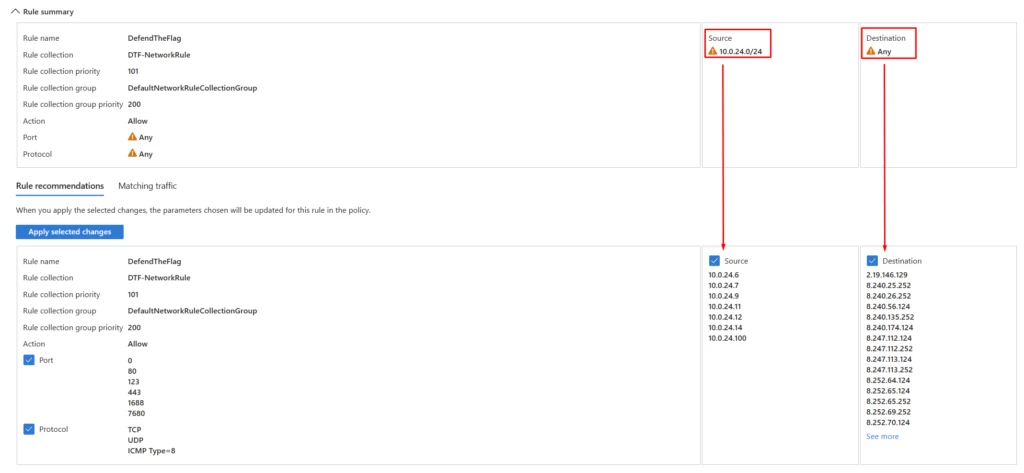
Policy Analytics surfaces the recommendations based on the actual traffic flows. You can review and apply the recommendations, including deleting rules which don’t match any traffic or prioritizing them lower. Alternatively, you can lock down the rules to specific ports, IPs, fully qualified domain names (FQDNs), or URLs matching traffic.
Pricing
Policy analytics is a priced feature, with new pricing in effect for general availability. The number of firewalls attached to the policy does not affect the pricing for Policy Analytics.
For more pricing details, please refer to the Azure Firewall Manager pricing page.
Next steps
Policy Analytics for Azure Firewall simplifies firewall policy management by providing insights and a centralized view to help IT teams have better and consistent control of Azure Firewall.
To learn more about Policy Analytics, see the following resources:
- Read the Tech Community blog to explore Policy Analytics in more detail.
- Get started with Azure Firewall and Policy Analytics.
- Learn how Microsoft IT is leveraging policy analytics.
- Firewall Manager documentation.
- Azure Firewall Standard features on Microsoft Learn.
- Azure Firewall Premium features on Microsoft Learn.