This post is part 2 of a two-part series about how organizations use Azure Cosmos DB to meet real world needs, and the difference it’s making to them. In part 1, we explored the challenges that led the Microsoft Office Licensing Service team to move from Azure Table storage to Azure Cosmos DB, and how it migrated its production workload to the new service. In part 2, we examine the outcomes resulting from the team’s efforts.
Strong benefits with minimal effort
The Microsoft Office Licensing Service (OLS) team’s migration from Azure Table storage to Azure Cosmos DB was simple and straightforward, enabling the team to meet all its needs with minimal effort.
An easy migration
In moving to Azure Cosmos DB, thanks to its Table API, the OLS team was able to reuse most of its data access code, and the migration engine they wrote to avoid any downtime was fast and easy to build.
Danny Cheng, a software engineer at Microsoft, who leads the OLS development team explains:
“The migration engine was the only real ‘new code’ we had to write. And the code samples for all three parts are publicly available, so it’s not like we had to start from scratch. All in all, the migration tooling we developed took three developers about four weeks each.”
Virtually unlimited throughput
Today, database throughput is no longer an issue for the OLS team. With Table storage, the team faced a throughput limit of 20,000 operations per second per storage account, which forced them to maintain each of their 18 tables in a different storage account to achieve maximum throughput. The team now maintains one Azure Cosmos DB account, which has no upper limit on throughput and can support more than 10 million operations per second per table—all dedicated and backed by SLAs.
Guaranteed high availability
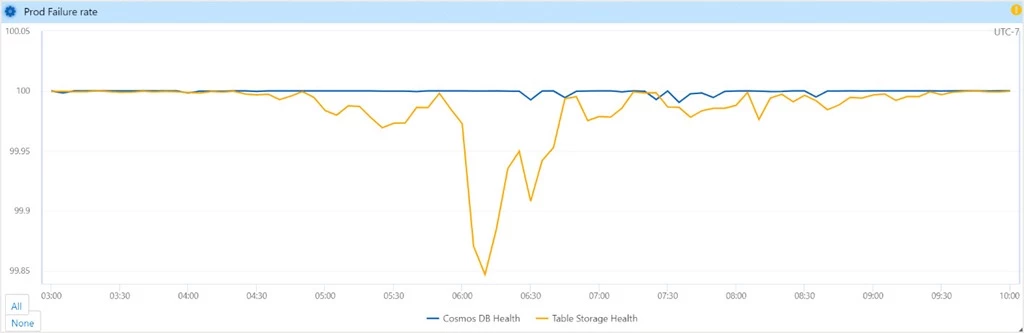
Azure Cosmos DB gives the OLS team a 99.999 percent read availability SLA for all multi-region accounts. This has led to a significant increase in storage quality-of-service (QoS), as illustrated in the following metrics captured using internally developed tooling.
“During peak traffic hours, Azure Cosmos DB delivers much better storage QoS than we were seeing with Table storage,” says Cheng. “Today we’re seeing five nines, when in the past we were at about three nines.”

Automatic failover
The OLS team can now configure automatic or manual failovers to help protect against the unlikely event of a regional outage, with all SLAs maintained. The team can also prioritize failover order for its multi-region accounts and can manually trigger failover to test the end-to-end availability of OLS.
“We’ve configured automatic failover, but the service is so reliable that we haven’t needed it yet,” says Cheng.
Lower latency
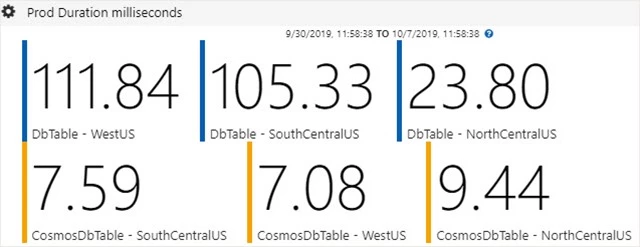
Table storage provided the OLS team with no upper bounds on latency. In contrast, Azure Cosmos DB provides single-digit latency for reads and writes, backed with a guarantee of <10 millisecond latency for reads and writes at the 99th percentile, at any scale, anywhere in the world. The following metrics illustrate the differences in latency that the OLS service is seeing between Table storage and Azure Cosmos DB. (DbTable is Azure Table storage and CosmosDbTable is the Azure Cosmos DB Table API.)
Turnkey data distribution
With Table storage, options for global distribution were limited. What’s more, the OLS team couldn’t implement failover on its own. With Azure Cosmos DB, the team now enjoys distribution to any number of regions—including multi-master capabilities, which when enabled will let any regions accept write operation.
“Just by clicking on the map, data can be automatically replicated to any Azure region in the world,” says Cheng. “This feature is very convenient, and we plan to put it to use soon.”
Other technical benefits
In addition to the above, Azure Cosmos DB provides the OLS team with some additional advantages over Table storage:
Automatic indexing. With Table storage, primary indexes are limited to PartitionKey and RowKey, and there are no secondary indexes. Azure Cosmos DB provides automatic and complete indexing on all properties by default, with no index management.
Faster query times. With Table storage, query execution uses the index for the primary key and scans otherwise. With Azure Cosmos DB, queries can take advantage of automatic indexing on all properties for faster query times.
Consistency. With Table storage, the OLS team was limited to strong consistency within the primary region and eventual consistency within the secondary region. With Azure Cosmos DB, they can choose from well-defined consistency levels, enabling them to optimize tradeoffs between read consistency and latency, availability, and throughput while they were designing the solution.