
Today, we’re excited to introduce instant access support for incremental snapshots of Premium SSD v2 (Pv2) and Ultra Disk, delivering an industry-leading snapshot experience where creation, disk restore, and production-ready performance all happen instantly.
Instant access snapshots of Pv2 and Ultra Disk are usable immediately upon creation, allowing you to restore new disks without waiting for snapshots to be ready. Newly restored disks also deliver near-full performance from the start, allowing applications to resume operations immediately.
For mission-critical workloads, speed matters—especially when every minute of downtime or degraded performance has real business impact. Whether you’re rolling out critical application updates, recovering unexpected issues, scaling stateful workloads, or refreshing environments for development and testing, snapshots play a central role in keeping your business moving forward.
Standard incremental snapshots have long provided a cost-effective method to protect data and create point-in-time disk copies for these workflows. However, this came with tradeoffs: after snapshot creation, data must be fully copied before snapshots can be used to restore disks, and disks must fully hydrate to reach full performance.
With instant access snapshots, that wait is gone.
As soon as snapshots are created, you can restore new disks from them with near-full performance from the start. This means faster recovery, faster scaling, and faster iteration—redefining what customers should expect from snapshot operations in cloud.
Instant access snapshot in action
When creating incremental snapshots of Pv2 and Ultra Disk, you can opt in to enable instant access using the existing snapshot API. Once enabled, snapshots enter the Instant Access state at creation and can be used to create new disks right away with fast restore performance.
Instant access snapshots come with the following benefits:
- Instant availability: Instant access snapshots are available to restore new disks immediately upon creation, eliminating the wait time for background data copy to snapshot in Standard storage.
- Fast restore: Disks restored from instant access snapshots hydrate rapidly and deliver near-full performance with single-digit millisecond read latencies and sub-millisecond write latencies from the start.
- Incremental storage: Instant access snapshots store only the incremental changes made to the source disk after snapshot creation, avoiding the need for a full base snapshot to keep your storage costs low.
- Cross-zonal restore: Like incremental snapshots in Standard storage, instant access snapshots support restoring disks into a different availability zone within the same region, providing flexibility for deployment and recovery.
These benefits make instant access snapshots best suited for time-sensitive scenarios where immediate availability and performance are essential.
Common use cases include:
- Fast rollback: Before deploying major software upgrades, you can use instant access snapshots to create an immediate recovery point. If issues occur such as accidental deletes, you can restore disks from snapshots to quickly rollback changes, maintain business continuity, and minimize downtime.
- Uninterrupted maintenance: Instant access snapshots let you begin maintenance immediately after snapshot creation—without waiting for them to become ready. This reduces application downtime and keeps large systems within tight maintenance windows.
- Rapid scale-out: You can scale stateful applications by leveraging instant access snapshots to create multiple disk copies of your primary instance in seconds, such as adding secondary SQL Server replicas. You can also create copies across availability zones within the same region quickly to achieve high availability and resiliency.
- Refresh secondary environments: Instant access snapshots let you copy production disks and spin up secondary environments for development and testing in seconds. This ensures your test environment is always in sync with production and delivers high performance right away.
Here’s what instant access snapshots looks like in practice
For Azure Database Services such as PostgreSQL, instant access snapshots are a core building block for backup, recovery, and scaling. Consider a SaaS provider running PostgreSQL for a customer-facing application. During peak business hours, read traffic spikes requiring rapid scale-out of read capacity. With instant access snapshots, the Azure Database Service can create snapshots from the existing instance and quickly create new disks and instances with zero wait time. This allows new read replicas to be brought online much faster than traditional snapshot workflows, immediately serving read traffic with low latency and allowing the application to absorb traffic surges on demand.
The customer perspective below demonstrates how instant access snapshots transform their day-to-day operations:
For Providence, instant access snapshots have transformed how we refresh our Epic training and support environments. Instead of waiting on long background copy processes for snapshot creation and disk hydration, our teams can create fully usable disks immediately for the day’s training and support workflows. The ability to refresh downstream environments quickly has been a massive boost to our operational efficiency and has significantly improved the experience for our end users.
— Chris Calas, Senior Principal Service Engineer, Providence
At Microsoft Ignite 2025, instant access support for incremental snapshots is highlighted as a key innovation by Azure Storage product leaders, underscoring Azure’s focus on mission-critical workloads.
How instant access snapshots improve disk restore performance
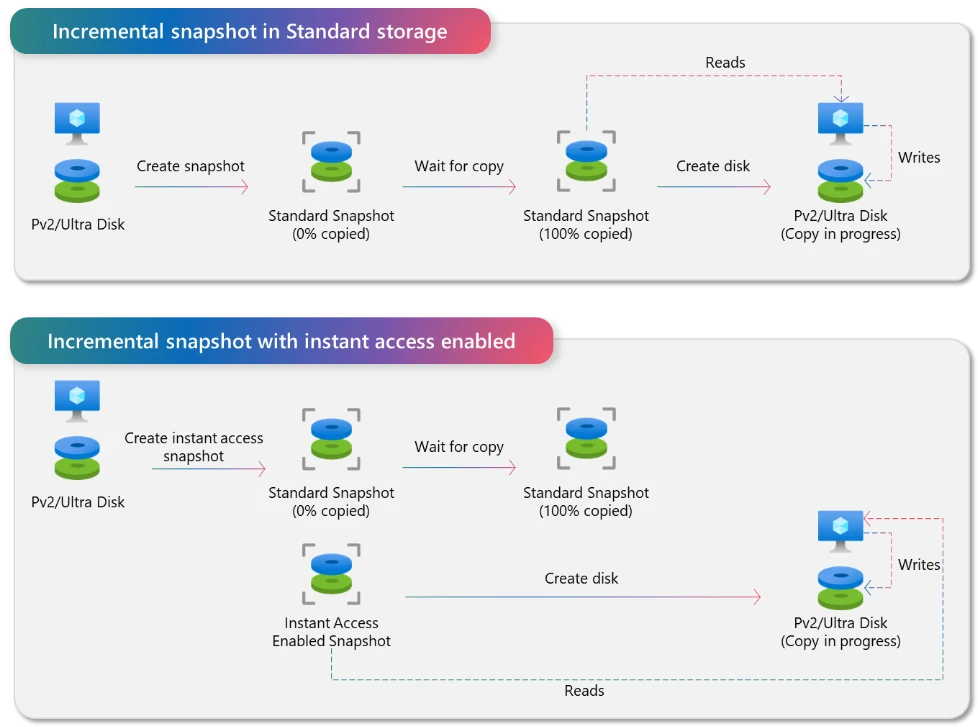
Standard incremental snapshots for Pv2 and Ultra Disk are designed to optimize cost efficiency and durability by storing point-in-time data in Standard Zone-Redundant Storage (ZRS). This approach provides strong resilience and is well suited for long-term backups and protection against zonal disasters. Once snapshot data has been fully copied into Standard ZRS, it becomes available for restoring new disks. A disk restored from a Standard storage snapshot can be used immediately, but until the background data copy to the disk completes, reads are served from Standard storage, resulting in slower performance and a longer copy time.
Incremental snapshots with instant access enabled take a different approach to optimize instant availability and restore performance. With instant access snapshots, point-in-time data captured remains in the same high-performance storage location as the source disks for the duration specified. As a result, snapshots are available to restore new disks immediately upon creation, without waiting for snapshot background data copy to be completed. Newly restored disks from instant access snapshots benefit from high hydration bandwidth and low latency from the start, as data is served directly from instant access snapshots.
When snapshots are created with instant access enabled, the system begins copying the data to Standard storage in parallel. This ensures that once the instant access duration expires, a fully hardened Standard ZRS snapshot is automatically available, without requiring any additional action.
This architecture enables faster recovery, quicker environment refreshes, and more predictable performance for time-sensitive operations.
How to create instant access snapshots
Instant access snapshots are not a separate snapshot resource class to manage. They are incremental snapshots that temporarily enter Instant Access state for the specified duration. When this duration expires, snapshots automatically transition out of the Instant Access state and continue as Standard ZRS snapshots for better reliability and long-term retention.
If you are already familiar with creating incremental snapshots with existing Azure Snapshot API, enabling instant access support will feel completely natural. The same commands and API endpoints apply; the only difference is a single additional parameter that defines how long the snapshots remain in the Instant Access state. The Azure CLI example below illustrates how to enable instant access when creating incremental snapshots.
Here’s how you create incremental snapshots using Azure CLI today:
< az snapshot create –resource-group <rg-name> –name <snapshot-name> –source <disk-id> –incremental true >
To enable instant access, simply include the InstantAccessDurationMins parameter:
< az snapshot create –resource-group <rg-name> –name <snapshot-name> –source <disk-id> –incremental true –InstantAccessDurationMins 300 >
The technical demo video below demonstrates how to create instant access snapshots and restore disks in Azure Portal. You will also learn how to easily integrate this capability into your existing snapshot workflow.
Availability and pricing
Instant access support for incremental snapshots of Premium SSD v2 and Ultra Disk is available in all Azure regions where these disk types are supported, ensuring the capability is available wherever supported mission-critical workloads run.
Instant access support uses a simple, usage-based billing model that charges only for the additional storage capacity consumed and for each restore operation. This approach keeps costs closely aligned with your actual usage, making cloud spend easier to understand and forecast. For full pricing details, see Managed Disk Pricing.
Getting started
As organizations continue to run increasingly time-sensitive mission critical workloads in Azure, instant access support for incremental snapshots of Premium SSD v2 and Ultra Disk provides a practical way to improve recovery time, streamline operations, and scale with confidence.