Back in October 2015, I wrote a blog post discussing our investments regarding FreeBSD running on Hyper-V as a virtual machine. We have done a tremendous amount of work over the past couple of years to make FreeBSD a 1st class VM guest on Hyper-V, enabling performant networking and storage capabilities that for the first time, made it possible to run production FreeBSD workloads in Hyper-V environments. Completing this work at this time made it possible for Microsoft to declare official support FreeBSD as a guest on Hyper-V, meaning customers could call Microsoft Support if needed.
One of our primary reasons for making these investments in FreeBSD on Hyper-V was to enable FreeBSD VMs to run in Azure, as Hyper-V is the virtualization platform for Azure. You may be wondering, “Why is it so important for FreeBSD to run in Azure?” Many top-tier virtual appliance vendors base their products on the FreeBSD operating system. Over the past 2 years, we’ve worked closely with Citrix Systems, Array Networks, Stormshield, Gemalto and Netgate to bring their virtual appliances to the Azure Marketplace, and we’re continuing to work with a long list of others for future offerings. However, if you wanted to run your own FreeBSD image in Azure, your only option so far was to bring a custom image from outside of Azure.
Today, I’m excited to announce the availability of FreeBSD 10.3 as a ready-made VM image available directly from the Azure Marketplace. This means that not only can you quickly bring-up a FreeBSD VM in Azure, but also that in the event you need technical support, Microsoft support engineers can assist.
Here’s how easy it is to get up and going through the Azure portal. Simply click on the +New on the left pane (or the marketplace tile on your dashboard), type “FreeBSD 10.3” in the search text box, and you’re there.
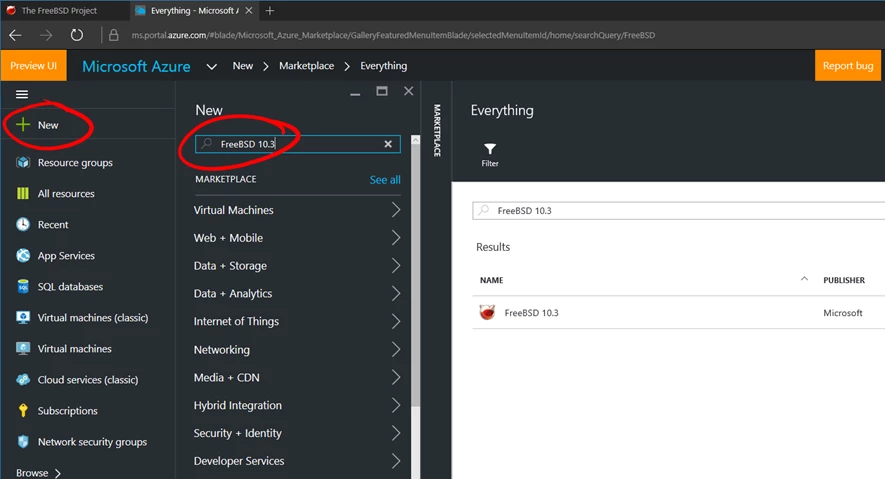
As the above screenshot illustrates, Microsoft is the publisher of the FreeBSD image in the marketplace rather than the FreeBSD Foundation. The FreeBSD Foundation is supported by donations from the FreeBSD community, including companies that build their solutions on FreeBSD. They are not a solution provider or an ISV with a support organization but rather rely on a very active community that support one another. In order to ensure our customers have an enterprise SLA for their FreeBSD VMs running in Azure, we took on the work of building, testing, releasing and maintaining the image in order to remove that burden from the Foundation. We will continue to partner closely with the Foundation as we make further investments in FreeBSD on Hyper-V and in Azure.
It’s quite a significant milestone for FreeBSD community and for Microsoft to publish a supported FreeBSD image on Azure Marketplace. We really appreciate Microsoft’s commitment and investment in FreeBSD project”.
– Justin T. Gibbs, President of FreeBSD Foundation
What’s Different About the FreeBSD 10.3 Image from Microsoft?
The majority of the investments we make at the kernel level to enable network and storage performance were up-streamed into the FreeBSD 10.3 release, so anyone who downloads a FreeBSD 10.3 image from the FreeBSD Foundation will get those investments from Microsoft built in to the OS. There are some exceptions where we included some important fixes that weren’t complete in time to make the FreeBSD 10.3 release – you can get the details of those additional commits here.
In addition, we have added the Azure VM Guest Agent, which is responsible for communication between the FreeBSD VM and the Azure Fabric for operations such as provisioning the VM on first use (user name, password, hostname, etc) as well as enabling functionality for selective VM Extensions.
What About Older Versions of FreeBSD?
While we support FreeBSD on Hyper-V back to 10.3, we do provide selective ports of some drivers all the way back to 8.4. The FreeBSD on Hyper-V Technet article lists the feature support we have on older versions. Having said that, it’s definitely possible to bring your own FreeBSD VM image from an older version, with the provided ports and installed Azure VM Agent, into Azure for your use, however your mileage may vary in terms of performance and stability. For example, our measured networking throughput on a 10Gb network on FreeBSD 10.1 was 2Gbps. With 10.3, we’ve been able to achieve over 9Gbps in testing
What’s Next?
As for future versions of FreeBSD, our intent is to stay current and make available the latest releases shortly after they are released by the FreeBSD Release Engineering team. We are continuing to make investments to further tune performance on storage, as well as adding new Hyper-V features – stay tuned for more information on this!