
With the release of the Basic, Standard, and Premium Azure SQL Database service tiers, we provide built-in backup and restore capabilities. These new capabilities help reduce the need to perform manual backups for disaster recovery, recovery of accidental data corruption, and recovery of deleted data, using the Import/Export service.
The table below is a quick comparison of the Import/Export and the built-in backup restore capabilities.
|
Designed for Disaster Recovery |
Support PITR |
No operational overhead |
Transactional consistent backups |
No additional cost |
Restore to On-Premises | |
|
DB Export |
No |
No |
Export needs to be externally triggered |
Required DB copy before backup. |
Storage and extra DB cost. |
Yes |
|
Built-in Backup |
Yes |
Yes |
Yes |
Yes |
Yes |
No |
What are Azure SQL Database Built-in Backups?
Basic, standard, and premium databases are backed up automatically in Azure SQL Database. These backups are retained for 7 days, 14 days, and 35 days respectively. With these backups Azure SQL Database supports two restore capabilities.
- Point in Time Restore allows a database to be restored to any point in time, up to the millisecond, within a database’s retention period.
- Geo-Restore utilizes a database’s latest geo-redundant backup to recover a database. This means a database can be recovered in the event of a regional outage with the 1 hour old geo-redundant backup.
How was Export used for Backup?
Before the built-in backup capabilities were available, Export was used as a mechanism for backing up a database.
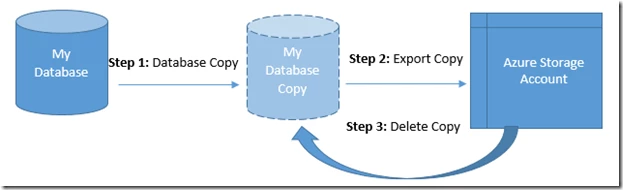
The process for creating a BACPAC file using export is the following:
The copy of the database is used to guarantee transaction consistency of the BACPAC file. This copy is treated as a second database and is billed as such.
Geo-Restore vs Hourly Export
Matching the functionality of Geo-Restore would require an export to be taken every hour. Every hour a database copy would need to be made then exported into geo-redundant storage. Depending on the size of the database and its schema, it may take longer than 1 hour to complete the export.
Over the course of a month, the costs end up being roughly the same as running an entire second database just for backup, and even with all the extra management work, you still may not even be able to meet the same recovery point objective (RPO) that Geo-Restore offers.
Point in Time Restore vs Export
Point in Time Restore allows you to restore a database to any point in time, up to the millisecond, within the database’s retention period. The Export technology cannot provide the same fine restore granularity.
Conclusions
The built-in backup and restore capabilities offered by Azure SQL Database provide great functionality for recovering from disaster and human error (oops mistakes). Accomplishing these same functionalities with Import/Export could be costly and incur a lot of operational overhead.
Import/Export cannot entirely be replaced by the built-in backups. Import/Export, along with client tools like SSDT and SSMS, is still recommended for migrating data in and out of Azure SQL Database.
It’s time to reduce your operational overhead by moving to Basic, Standard, or Premium databases and stopping manual backup with Export!
What’s next?
Learn how to use Azure SQL Database built-in restore capabilities.
Learn more about the built-in restore capabilities.






