
Azure IoT Edge is a fully managed service that allows you to deploy Azure and third-party services—edge modules—to run directly on IoT devices, whether they are cloud-connected or offline. These edge modules are container-based and offer functionality ranging from connectivity to analytics to storage—allowing you to deploy modules entirely from the Azure portal without writing any code. You can browse existing edge modules in the Azure Marketplace.
Today, we’re excited to offer the open-source Azure IoT Edge runtime preinstalled on Ubuntu virtual machines to make it even easier to get started, simulate an edge device, and scale out your automated testing.
Why use virtual machines?
Azure IoT Edge deployments are built to scale so that you can deploy globally to any number of devices and simulate the workload with virtual devices which is an important step to verify if your solution is ready for mass deployment. The easiest way to do this is by creating simulated devices with Azure virtual machines (VMs) running the Azure IoT Edge runtime to scale your testing from the earliest stages of development—even before you have production hardware.
Azure VMs are:
• Scalable/automatable: deploy as many as you need
• Persistent: cloud- managed, rather than locally
• Flexible: any operating system and elastic resources
• Easy to use: deploy with simple command line instructions or template
Azure IoT Edge on Ubuntu VM
On first boot, the Azure IoT Edge on Ubuntu VM preinstalls the latest version of the Azure IoT Edge runtime, so you will always have the newest features and fixes. It also includes a script to set the connection string and then restarts the runtime, which can be triggered remotely through the Azure VM portal or Azure command line, allowing you to easily configure and connect the IoT Edge device without starting a secure shell (SSH) or remote desktop session. This script will wait to set the connection string until the IoT Edge client is fully installed so that you don’t have to build that into your automation.
The initial offering is based on Ubuntu Server 16.04 LTS, but other operating systems and versions will be added based on user feedback. We’d love to hear your thoughts in the comments.
Getting started
You can deploy the Azure IoT Edge on Ubuntu VM through the Azure Marketplace, Azure Portal, or Azure Command-line. Let me show you how to use the Azure Marketplace and the Portal.
Azure Marketplace
The quickest way to set up a single instance is to use the Azure Marketplace:
1. Navigate to the Marketplace with our short link or by searching “Azure IoT Edge on Ubuntu” on the Azure Marketplace
2. Select “GET IT NOW” and then “Continue” on the next dialog.
3. Once in the Azure Portal, select “Create” and follow the wizard to deploy the VM.
- If it’s your first time trying out a VM, it’s easiest to use a password and enable the SSH in the public inbound port menu.
- If you have a resource intensive workload, you should upgrade the virtual machine size by adding more CPUs and/or memory.
4. Once the virtual machine is deployed, configure it to connect to your IoT Hub by:
- Copying your device connection string from your IoT Edge device created in your IoT Hub (You can follow the “Register a new Azure IoT Edge device from the Azure portal” how-to guide if you aren’t familiar with this process)
- Selecting your newly created virtual machine resource from the Azure Portal and opening the “run command” option
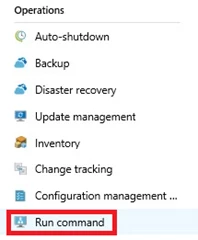
- Select the “RunShellScript” option

- Execute the script below via the command window with your device connection string:/etc/iotedge/configedge.sh “{device_connection_string}”
- Select “Run”
- Wait a few moments, and the screen should then provide a success message indicating the connection string was set successfully.
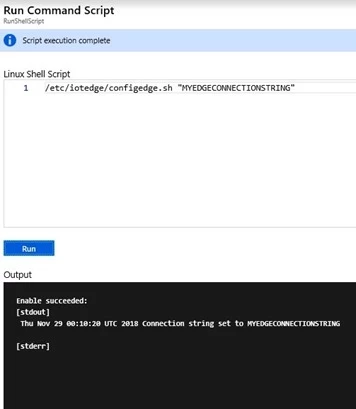
5. Voila! Your IoT Edge on Ubuntu VM is now connected to IoT Hub
Azure portal
If you’re already working in the Azure portal, you can search for “Azure IoT Edge” and select “Ubuntu Server 16.04 LTS + Azure IoT Edge runtime” to begin the VM creation workflow. From there, complete steps 3-5 in the Marketplace instructions above.
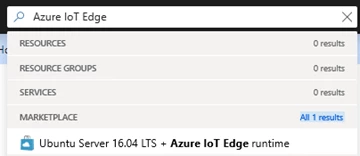
If you’d like to learn how you can deploy these virtual machines at scale, check out the “Deploy from Azure CLI” section in the Run Azure IoT Edge on Ubuntu Virtual Machines article.
I also joined the IoT Show to talk more about this new offer and gave a live walkthrough, check it out:
Now that you have created an IoT Edge device with your virtual machine and connected it to your IoT Hub, you can deploy modules to it like any other IoT Edge device. For example, if you go to the IoT Edge Module Marketplace and select the “Simulated Temperature Sensor,” you can deploy this module to the new device and see data flowing in just a few clicks! Next, try deploying your own workloads to the virtual machine and let us know how we can further simplify your IoT Edge testing experience in the comments section below or on user voice.
Get started with Azure IoT Edge on Ubuntu virtual machines today!






