The Cloud Cost Management (CCM) APIs provides a rich set of APIs to get detailed reporting on your Azure usage and charges. We continue to make the APIs more relevant and with the growing adoption of tags in Azure, we’re announcing the support for tags in both the Usage Details API and the Budgets API. Our support for tags will continue to improve across all the APIs where a group or filter by tags is applicable. This release only supports tags for subscriptions in Enterprise Agreements (EA), in future releases we plan to support other subscription types as well.
Tags in usage details
The usage details API today supports filters for the following dimensions, date range, resource groups and instances. With the most recent release we will now support tags as well. The support for tags is not retroactive and will only apply to usage reported after the tag was applied to the resource. Tag based filtering and aggregation is supported by the $filter and $apply parameters respectively. We will continue to add additional dimensions that can be used to filter and aggregate costs over time.
Tags in budgets
Budgets can be created at the subscription or a resource group level and support filters to scope the budget to a specific set of resources. Today, filters support resource groups, instances and meters and with this release will also include tags. Scoping a budget to a tag or a set of tags will continue to leverage filters. Filters currently only support basic operations, but in future releases will be more expressive and enable finer grain scoping of budgets based on supported dimensions.
Tags in Power BI
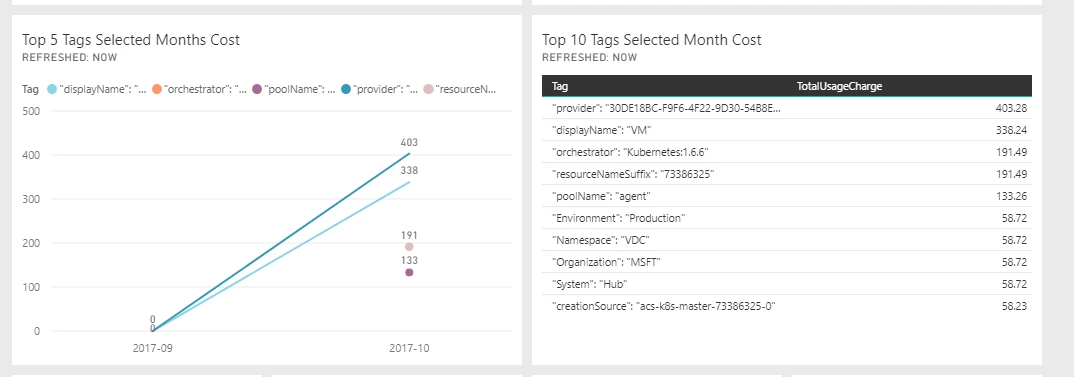
The Power BI content pack is also being updated to add tags based reporting on costs. The content pack enables cost aggregation by tag and will continue to evolve and support other dimensions as they are added.
Constraints
Support for tags has a few nuances that customers need to be aware of as they start using this feature:
- Tags based aggregation and filtering is only available for EA customers.
- The aggregation and filtering of tags will be available for all usage data starting September 1, 2017. Any usage data prior to September 1, 2017 will not return cost aggregation by tags.
- Tags cannot be applied retroactively for cost rollups. For instance adding a tag to an existing resource will not result in any usage from that resource prior to the application of the tag to be attributed to the tag.
The usage details calls are supported in the ARM APIs as well as the Key based APIs. For subscription and resource group scoped calls, the APM APIs should be where you get the usage details. For customers looking for tags based aggregation and filtering at a node in the management hierarchy, the Key based APIs will be where you get the usage details. As always, we’d like to hear from you on your experience with the APIs or any ideas you have on making the APIs more useful.