Skip to main content Explore View all products (200+) Microsoft Foundry Azure Copilot GitHub Copilot Azure Kubernetes Service (AKS) Azure Cosmos DB Azure Database for PostgreSQL Azure Arc Microsoft Fabric Linux virtual machines in Azure Foundry Models Foundry Agent Service Foundry IQ Foundry Tools Foundry Control Plane Observability in Foundry Control Plane Azure OpenAI in Foundry Models Azure Speech in Foundry Tools Azure Machine Learning View all databases Azure Cosmos DB Azure DocumentDB Azure SQL Azure Database for PostgreSQL Azure Managed Redis Microsoft Fabric Azure Databricks Linux virtual machines in Azure Windows Server on Azure Azure Functions Azure Virtual Machine Scale Sets Azure API Management Azure Container Apps Azure Kubernetes Service (AKS) Azure Kubernetes Fleet Manager Azure Container Registry Azure Red Hat OpenShift Azure Container Instances Azure Container Storage Azure Arc Azure Local Microsoft Defender for Cloud Azure Monitor Microsoft Sentinel Azure Migrate View all solutions (40+) Cloud solutions for small and medium businesses Cloud migration and modernization center Data analytics for AI Azure Databases AI apps and agents Microsoft Marketplace Microsoft Sovereign Cloud AI apps and agents Responsible AI with Azure AI Infrastructure Data analytics for AI Machine learning operations (MLOps) Low-code application development on Azure Integration Services Serverless computing DevOps Migration and modernization center .NET apps migration Databases on Azure Linux on Azure Oracle on Azure SAP on the Microsoft Cloud Adaptive cloud High-performance computing (HPC) Infrastructure as a service (IaaS) Resiliency Azure Essentials Frontier Accelerate for Azure FinOps on Azure Microsoft Marketplace Azure pricing overview Create an Azure account Free Azure services Flexible purchase options Pricing calculator FinOps on Azure Maximize ROI from AI Azure savings plans Azure reservations Azure Hybrid Benefit Virtual Machines Azure SQL Microsoft Foundry Microsoft Fabric Azure Kubernetes Service (AKS) Microsoft Defender for Cloud View more Software Development Companies Microsoft Marketplace Find a partner Resources for Azure partners Get started with Azure Customer stories Analyst reports, white papers, and e-books Videos Learn more about cloud computing Documentation Explore Azure portal Developer resources Quickstart templates Resources for startups Developer community Students Azure for partners Blog Events and Webinars Learn Support Contact Sales Get started with Azure Sign in

Attackers commonly target cloud environments with Brute Force or Port Scanning attacks, typically against management ports like RDP and SSH that are left open to enable administrators access. In addition to detecting and alerting you to these attacks, Azure Security Center just released a new Just-In-Time (JIT) VM Access mechanism. JIT VM Access, now in public preview, significantly reduces your exposure to these attacks by enabling you to deny persistent access while providing controlled, audited access to VMs when needed.

Based on the security policy you set, Azure Security Center can recommend that JIT Access be enabled on your existing VMs and any new ones that are created. When JIT VM Access is enabled, Azure Security Center locks down inbound traffic to defined ports by creating Network Security Group rule(s). You can request access to the VM when needed, which opens the needed port for an approved amount of time, from approved IP addresses, and only for users with proper permissions. Requests are logged in the Azure Activity Log, so you can easily monitor and audit access. You can also enable JIT VM Access, configure policies and request access through Powershell cmdlets.

Enable JIT VM Access and Apply policies

In the JIT VM Access blade, administrators can easily enable JIT VM Access for all or select VMs. They can configure the policy that will determine the ports to be protected, allowed protocols, IP addresses from which these ports can be accessed, and the maximum time window for which a port can be opened. The policy will determine which options are available to users when they request access.
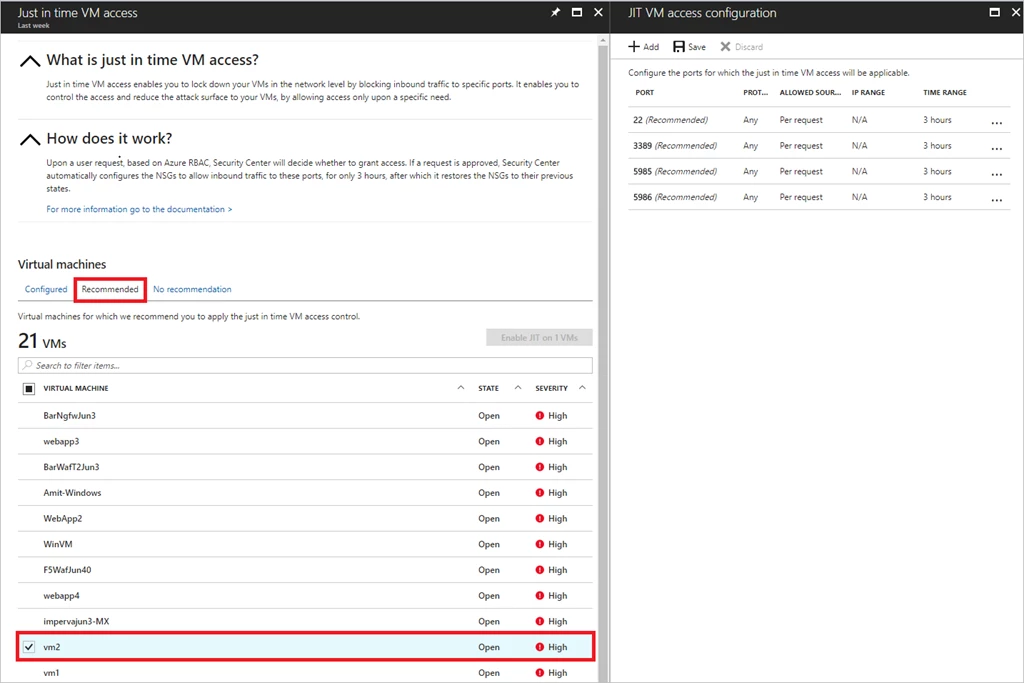
just-in-time-vm-access

Requesting JIT Access to a VM

Anyone with the right permissions (based on Azure RBAC), can request access to a VM. Based on the JIT VM Access policy, they can select the ports they need access to, from which IPs, and for what timeframe. Access is automatically granted.
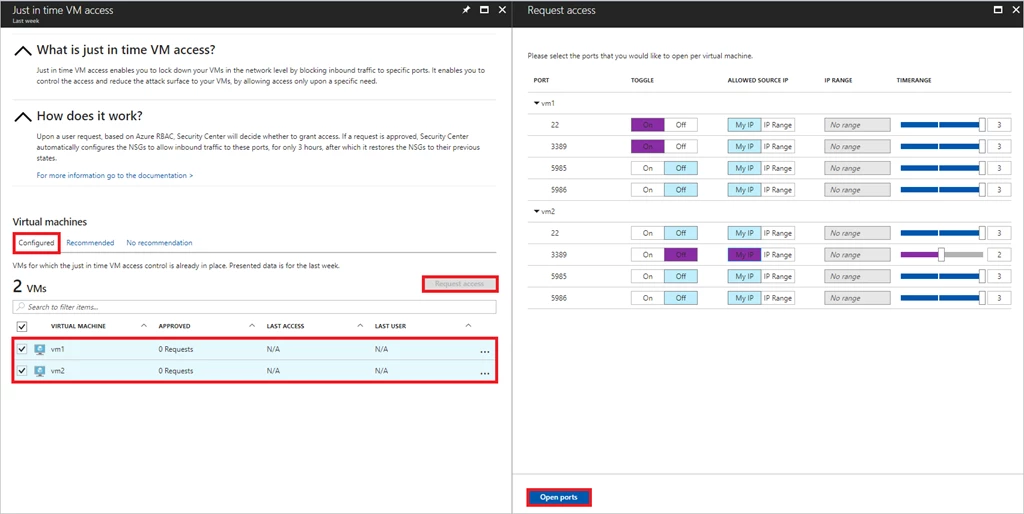
just-in-time-vm-access-2

These new capabilities are available within the standard pricing tier of Azure Security Center, and you can try it for free for the first 60 days.

To learn more about JIT VM Access, watch the microlearning video or see the documentation.

WE ARE MICROSOFT

Explore Microsoft Foundry

The future of AI starts here. Envision your next great AI app with the latest technologies. Get started with Azure.





