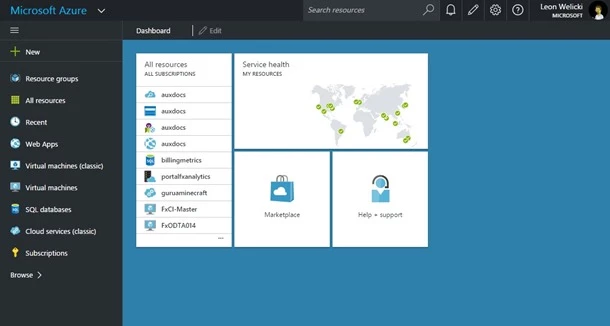
We are excited to announce that as of today, portal.azure.com (codename Ibiza), has achieved general availability (GA) status and is the default portal for Azure!
GA release of the portal was a quality driven release rather than date driven. It has been a long journey and we could not have gotten here without your continuous feedback and contributions. We had set a quality bar for ourselves in terms of usability, performance and reliability that we needed to meet in order to make the portal generally available. Our team has been hard at work improving on those areas and we are proud to share that we have met those quality bars.
Azure portal is a great example of building a large, global, scalable and available cloud user experience on Azure. A few numbers to show this:
- 2.5 billion monthly requests
- 22 million blades opened monthly
- Fast growing marketplace with more than 3500 items
- Support for 18 languages
- Available in 20 geographies
- More than 1800 blades across +75 experiences
- In last six months, improved startup performance around 50% and average resource blade performance 300%
The utilization numbers above are growing at an accelerated pace. As part of getting to GA the portal has been prepared to address these growth patterns.
Performance
This has been a key area of feedback and one where we have been focusing much of our efforts. We’ve been improving performance across all areas, specifically focusing on portal startup, performance of resource blades, and core portal experiences (like All resources). Measurements were done based on real usage (using telemetry) across all users and geographies. We tracked median and 95 percentile for each focus area.
As a result, you will enjoy of a faster experience with the portal. A few numbers:
• We improved portal startup +50%
• On average we improved resource blade (Web App, VM, and SQL) load +300%
Reliability
Every vertical experience in the portal (App Service, IaaS, SQL, etc.) is what we call an “extension.” These extensions are loaded in the portal when needed (for example, if you want to manage a SQL database we will load the SQL extension on demand).
In this release we focused on driving the success of loading extensions to 99.9% across all experiences and we are proud to share that we met that goal.
Usability
We received a lot of usability feedback from you. That feedback definitely helped to shape our various updates this year. The sections below shows some of the things that you told us and what features we delivered in the portal in response to your feedback.
“Make it easier to find my resources”
Search in the top bar
We added a search box in the top bar enabling you to search through all of your resources.
List of resources accessible from the left navigation
Your resources are always available, one click away. Also, the browse list (available from the left navigation area) provides access to all Azure services in a filterable list.
Improvements to Browse resource experience
Filtering by name and subscription is now enabled within browse and allows to choose your columns. When browsing through resources and click on a resource, the browse blade is automatically collapsed to a list that displays only resource names. If you close the resource blade, then the browse blade is restored. This experience makes it easier to both navigate through a list of resources and focus on one resource.
Recently accessed resources
We added a recently used category to browse and made it available in the default left navigation area.
Show All resources in the default dashboard
We added the All resources tile to the default dashboard for quicker access to your resources.
“Make it easier to learn how to manage my resources”
Consistent Settings experience across resources
Every resource blade shows a companion resource Settings blade that contains all configurable aspects of the resource. That blade is also searchable and has the same interaction model across all resource types.
Consistent Essential information in every resource blade
Every resource blade displays essential information at the top of the blade using the same visual elements.
Simplified resource blades
We simplified the resource blades to have fewer tiles for faster performance and less clutter. We also made it easier to add tiles to your blade if you need them.
Make it more obvious when actions happen
Improved visibility and discoverability of notifications that convey important events about your resources. We added toast notifications, moved notifications to a standard position, and added contextual notifications.
Provide contextual information
The top bar provides useful conventional visual artifacts that help you navigate through the portal. It provides information about your navigation path (breadcrumb) and access to common portal functionality (settings, notifications, login, etc.).
“Reduce the clicks and visual elements needed to get work done”
Reduce clicks to key tasks (browse, notifications)
Make browse front and center, reducing clicks and blades to get to your resources; bring marketplace search earlier in the flow.
Do more from the browse list: add columns, commands, and create new resources
Browse view can be enriched with additional columns, so you can see all details without having to open the resource blade. Similarly, commands can be executed from that blade. New resources can be created directly from the browse blade.
Navigation bar customization
Left navigation bar can be customized to bring the services you care about front and center, always one click away.
Dashboard customizations
Dashboard can be fully customized to bring resources and information that you care about front and center, one click away.
Keyboard shortcuts
Accelerated use of common portal functionality.
“Get to all my resources from a single portal”
All Azure services available from “Browse”
The Browse experience in the Azure portal provides access to the full Azure offering, which includes services in the Azure portal and in the Azure classic portal
Support more services and features in the portal
We have been constantly bringing more services and features to the Azure portal. The full list is available here.
Are you done with the portal?
No, not at all! It is important to mention that general availability does not mean that our commitment to improving user experience, quality and agility will be reduced. On the contrary, we will keep innovating and improving at an even faster pace than we have been in the past.
Our top priorities remain the same:
- Bring all services to the new portal; check out what’s available now here
- Continue improving performance and reliability
- Continue improving the user experience and usability based on your feedback (ex. addressing horizontal scrolling)