Azure Stream Analytics is a serverless PaaS service in Azure to run real-time analytics on fast moving streams of data. Today, we are excited to announce several new features in Azure Stream Analytics.
In public preview
Session window
Native support for windowing functions is a key capability in Azure Stream Analytics that helps developers author complex stream processing logic on temporal windows. Historically, Stream Analytics offered Tumbling, Hopping and Sliding windows to perform temporal operations on streaming data. Today, we announce a brand new window type known as session window. Unlike the three existing window types, a session window creates dynamic temporal windows of variable sizes based on the batches of incoming data. It therefore allows users to filter out periods of time where there is no data. With three main parameters: timeout, maximum duration and partitioning key (optional), it helps developers easily build solutions for scenarios such as clickstream analytics, connected car telemetry and many more.
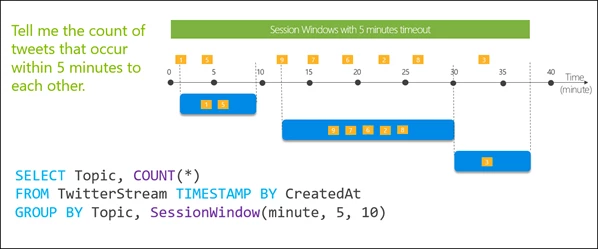
Example of a session window with a 5 minutes timeout
In private preview
C# custom code support for Stream Analytics jobs on IoT Edge
Last year we introduced JavaScript User-Defined functions. Since then, we heard from many customers that they wanted to use several other languages for extensibility. Today we are pleased to announce the support of C# custom code in Azure Stream Analytics for IoT Edge. With Visual Studio support for query authoring and ease of deployment provided by IoT Edge, it will enable users to author rich streaming pipelines. In addition to the simplicity of our SQL language, this will enable users to leverage existing code and libraries, or develop new logic that will run directly in the streaming engine.
Blob output partitioning by custom attribute
It is now possible to partition your Azure Stream Analytics output to Blob storage based on any column in the query. Previously, only {date} and {time} partitioning were supported. This feature is designed to greatly improve downstream data-processing workflows by allowing more fine-grained control over the blob output. The partition key can be a column from the input stream or it may be a field in the query itself. For instance, one could simply set the Path Prefix field in Blob output to {client_id} in a real-time application for customer intelligence.
Updated Built-In ML models for Anomaly Detection
This feature has been in public preview for several months. Acting on valuable customer feedback we are adding ML model support for ‘spike’ and ‘dip’ detection in addition to currently available Bi-directional, Slow positive and Slow negative trends detection. We are also improving anomaly scores normalization to help customers interpret the results better.
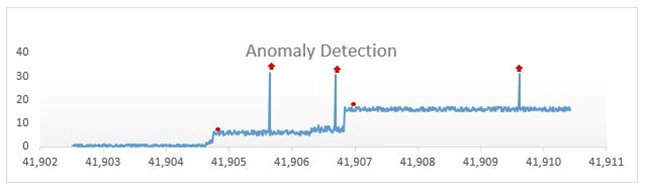
Level change anomalies indicated by red dots and spike anomalies indicated by red arrows
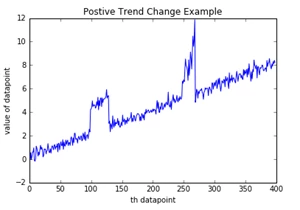
Positive trend change anomaly
Keep the feedback and ideas coming
Azure Stream Analytics team is highly committed to listening to your feedback and let the user voice dictate our future investments. We welcome you to join the conversation and make your voice heard via our UserVoice.