Resources hosted on Azure App Service are at the forefront as attackers are constantly on the lookout for vulnerabilities in web applications. Dormant domains are a permanent resident on the checklist of both opportunistic and target-oriented attackers. To reduce potential attack surface, Azure App Service enforces domain verification when binding custom domain to an App service resource.
In this blog, we discuss how Azure Defender for App Service identifies any Domain Name System (DNS) entries remaining in your DNS registrar when an App Service website is decommissioned—these are known as dangling DNS entries. When you remove a website and don’t remove its custom domain from your DNS registrar, the DNS entry is pointing at a non-existent resource and your subdomain is vulnerable to a takeover. We recommend that you implement processes to prevent dangling DNS entries and prevent subdomain takeovers.
General introduction: Dangling DNS
Dangling DNS starts when custom DNS from your domain’s DNS zone is mapped to a DNS CNAME record of an Azure resource that is no longer provisioned, leaving the associated domain “dangling”. This dangling DNS entry, also known as a dangling domain, leaves the domain vulnerable to a malicious action known as a subdomain takeover.
When a subdomain takeover occurs, a malicious actor takes control of the domain which was previously associated with your deprovisioned Azure resource. By gaining control, malicious actors can intercept traffic intended for that endpoint and or offer malicious contraband content from that endpoint. The potential impact may vary depending on the architecture of your application.
Azure Defender for App Service
Azure Defender for App Service uses the scale of the cloud to identify attacks targeting applications running over App Service. Attackers probe web applications to find and exploit weaknesses. Before being routed to specific environments, requests to applications running in Azure go through several gateways, where they’re inspected and logged. This data is then used to identify exploits and attackers, and to learn new patterns that will be used later.
By leveraging the visibility that Azure has as a cloud provider, Azure Defender for App Service analyzes App Service internal logs to identify attacks across multiple targets. For example, consider an attack methodology that demonstrates widespread scan which originated from distributed sources. This type of attack typically comes from a wide set of IPs and shows patterns of crawlers, while the attackers search for a vulnerable page or plugin. This type of attack cannot be identified from the standpoint of a single host.
Dangling DNS protection
Azure Defender for App Service introduces protection against dangling DNS for customers who have previously bound custom domain to their App Service hosted application. This work covers both Azure DNS managed domains as well as ones that are managed through external domain registrars. We detect dangling DNS even when it is not the CNAME itself that is dangling but a service further along the line pointing to a decommissioned web site which doesn’t exist. An example for this is a custom domain which points to an existing Azure Traffic Manager which points to a deleted web site.
Azure Defender for App Service monitors deprovisioning of websites and verifies that no alias records have remained. In cases where invalid domain configuration is found, a security alert will be raised so users can quickly remediate a newly created vulnerability. Azure Defender for App Service presents two types of alert:
- Dangle DNS record detected for a recently decommissioned App Service resource that has a valid DNS pointer (also known as “dangling DNS” entry). This leaves the user susceptible to subdomain takeover.
- Potential dangle DNS record detected for a recently decommissioned App Service resource that has a valid DNS pointer (also known as “dangling DNS” entry). In this case, a TXT record with the Domain Verification ID was found. There is currently no immediate risk of a subdomain takeover, however it is recommended to remove CNAME pointers for decommissioned App Service resources.
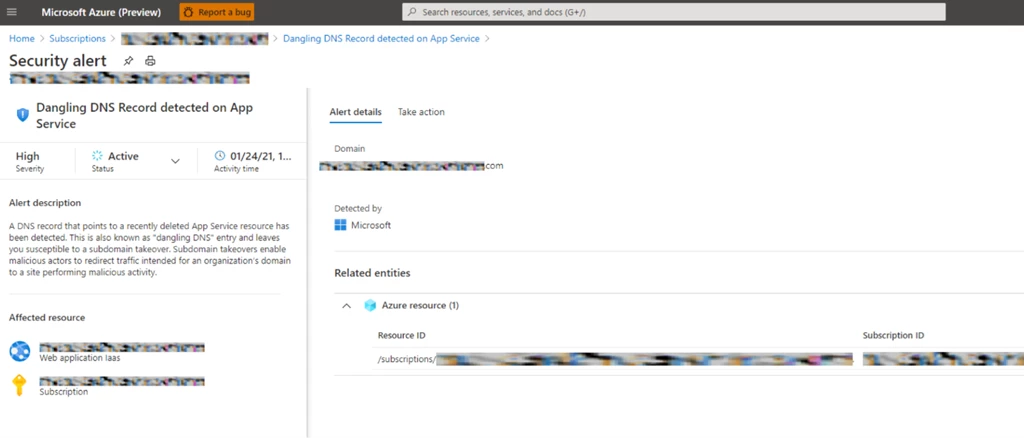
Prevent dangling DNS entries
Ensuring that your organization has implemented processes to prevent dangling DNS entries and the resulting subdomain takeovers is a crucial part of your security strategy.
Some Azure services offer features to aid in creating preventative measures and are detailed below. Other methods to prevent this issue must be established through your organization’s best practices or standard operating procedures.
Learn more about dangling DNS and the threat of subdomain takeover, in the prevent dangling DNS entries and avoid subdomain takeover documentation.
Next steps
- Learn more on Azure Defender for App Service and identifying attacks targeting App Service.
- For a list of the Azure App Service alerts, see the reference table of alerts.