This blog was co-authored by Gopikrishna Kannan, Principal Program Manager, Azure Networking.
Network security policies are constantly evolving to keep pace with the demands of workloads. With the acceleration of workloads to the cloud, network security policies—Azure Firewall policies in particular—are frequently changing and often updated multiple times in a week (in many cases several times in a day). Over time, the Azure Firewall network and application rules grow and can become suboptimal, impacting the firewall performance and security. For example, high volume and frequently hit rules can be unintentionally prioritized lower. In some cases, applications are hosted in a network that has been migrated to a different network. However, the firewall rules referencing older networks have not been deleted.
Optimizing Firewall rules is a challenging task for any IT team. Especially for large, geographically dispersed organizations, optimizing Azure Firewall policy can be manual, complex, and involve multiple teams across the world. Updates are risky and can potentially impact a critical production workload causing serious downtime. Well, not anymore!
Policy Analytics has been developed to help IT teams manage Azure Firewall rules over time. It provides critical insights and recommendations for optimizing Azure Firewall rules with a goal of strengthening your security posture. We are now excited to share that Policy Analytics for Azure Firewall is now in preview.
Optimize Azure Firewall rules with Policy Analytics
Policy Analytics helps IT teams address these challenges by providing visibility into traffic flowing through the Azure Firewall. Key capabilities available in the Azure Portal include:
- Firewall flow logs: Displays all traffic flowing through the Azure Firewall alongside hit rate and network and application rule match. This view helps identify top flows across all rules. You can filter flows matching specific sources, destinations, ports, and protocols.
- Rule analytics: Displays traffic flows mapped to destination network address translation (DNAT), network, and application rules. This provides enhanced visibility of all the flows matching a rule over time. You can analyze rules across both parent and child policies.
- Policy insight panel: Aggregates policy insights and highlights policy recommendations to optimize your Azure Firewall policies.
- Single-rule analysis: The single-rule analysis experience analyzes traffic flows matching the selected rule and recommends optimizations based on those observed traffic flows.
Deep dive into single-rule analysis
Let’s investigate single-rule analysis. Here we select a rule of interest to analyze the matching flows and optimize thereof.
Users can analyze Firewall rules with a few easy clicks.
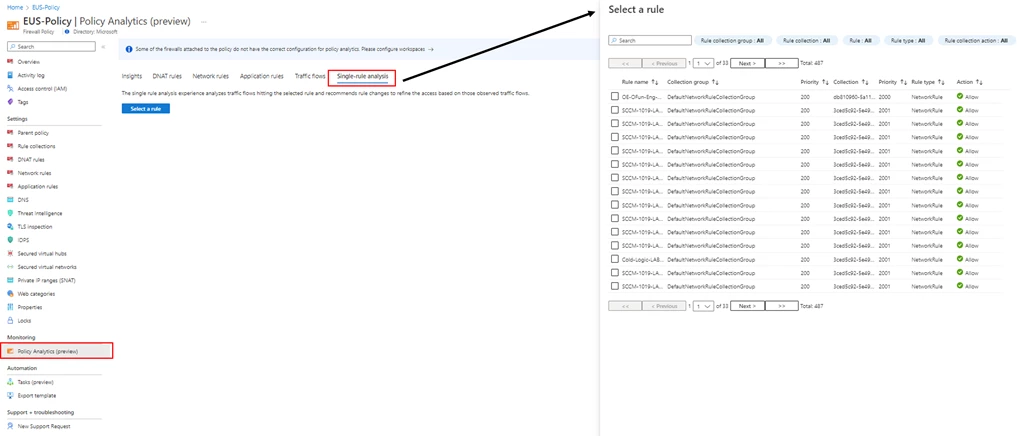
Figure 1: Start by selecting Single-rule analysis.
With Policy Analytics, you can perform rule analysis by picking the rule of interest. You can pick a rule to optimize. For instance, you may want to analyze rules with a wide range of open ports or a large number of sources and destinations.
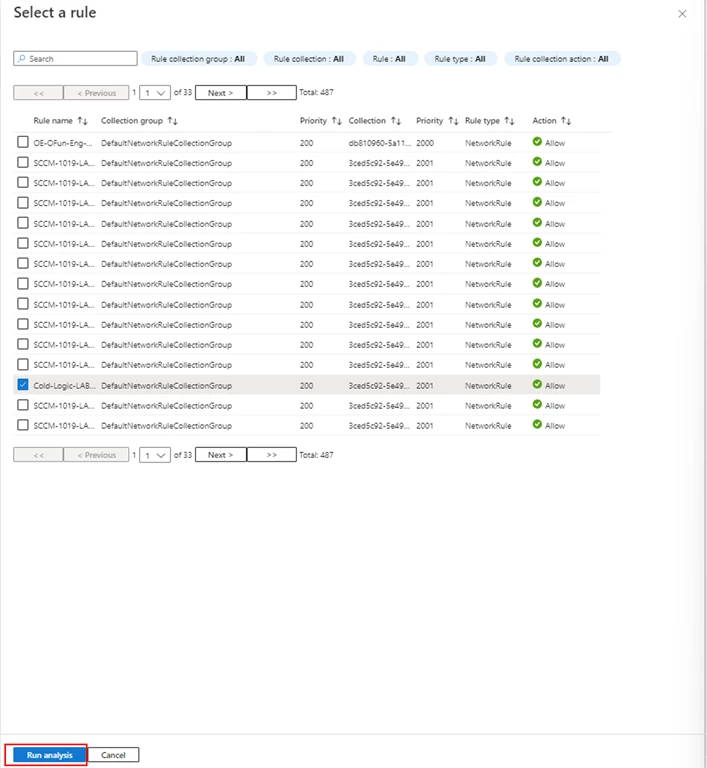
Figure 2: Select a rule and Run analysis.
Policy Analytics surfaces the recommendations based on the actual traffic flows. You can review and apply the recommendations, including deleting rules which don’t match any traffic or prioritizing them lower. Alternatively, you can lock down the rules to specific ports matching traffic.
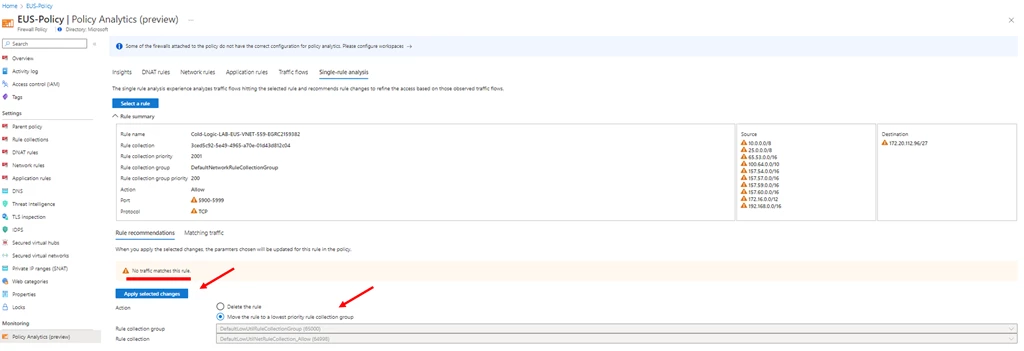
Figure 3: Review the results and Apply selected changes.
Pricing
While in preview, enabling Policy Analytics on a Firewall Policy associated with a single firewall is billed per policy as described on the Azure Firewall Manager pricing page. Enabling Policy Analytics on a Firewall Policy associated with more than one firewall is offered at no additional cost.
Next steps
Policy Analytics for Azure Firewall simplifies firewall policy management by providing insights and a centralized view to help IT teams have better and consistent control of Azure Firewall. To learn more about Policy Analytics, see the following resources:
- Get started with Azure Firewall and Policy Analytics.
- Watch this video for a detailed walkthrough of the Policy Analytics capabilities.
- Firewall Manager documentation.
- Azure Firewall Standard features, Microsoft Learn.
- Azure Firewall Premium features, Microsoft Learn.