
Securely manage remote connectivity at scale
Security is at the forefront of user and administrator connectivity to cloud services. As enterprises continue to move mission-critical applications to the cloud, the need for secure, scalable, and reliable remote public connectivity and jumpbox services increases. With this shift, enterprises are moving away from exposing public IP addresses on virtual machines (VMs) and cloud infrastructure running their applications, and instead, are relying on managed jumpbox services to facilitate user connectivity. Fundamentally, remote connectivity and managed jumpbox services need to provide four core capabilities:
- Secure public access that minimizes the exposure of public IP addresses and entry points to the target applications.
- Single deployments that manage connectivity across local or connected Virtual (private) Networks.
- Infrastructure scaling capabilities that manage the number of concurrent remote connections.
- Metrics, monitoring, and alerting on the infrastructure facilitating remote connectivity.
Secure public access
Traditional (on-premises) jumpbox solutions are often deployed to a semi-trusted management network. This network is separate from the local network containing application services and private endpoints. The public IP address of the jumpbox solution is defined in the management network and connectivity to applications and private endpoints in the target local network are enabled via a virtual private network (VPN) solution. Users then connect to the private IP address of the jumpbox solution in the management network and establish remote connectivity to the destination application via the VPN connection. Alternatively, some enterprises deploy applications to the management network and expose public IP addresses on the VMs hosting the target applications, and users establish Remote Desktop Protocol (RDP) and Secure Shell (SSH) connections directly to the application. However, this approach broadens the potential attack surface by scaling out public IP addresses to any VM requiring remote user connectivity. Ultimately, the need for trusted and secure access is critical for enterprise workloads.
Azure Bastion is a fully managed jumpbox-as-a-service that provides secure RDP and SSH connectivity to VMs deployed in any local or peered Azure Virtual Networks. Remote connectivity is established directly from the Azure Portal, over a transport layer security (TLS) connection, to the public IP address of Azure Bastion. From there, Azure Bastion establishes RDP and SSH sessions to the private IP address of the target VMs in the local or peered Virtual Network. As customers deploy additional VMs to their Virtual Networks, Azure Bastion facilitates remote connectivity to both the existing and newly configured VMs, using a single public IP address. Additionally, customers can configure Network Security Groups (NSGs) to restrict inbound public access to the public IP address of Azure Bastion, creating a more secure access perimeter.
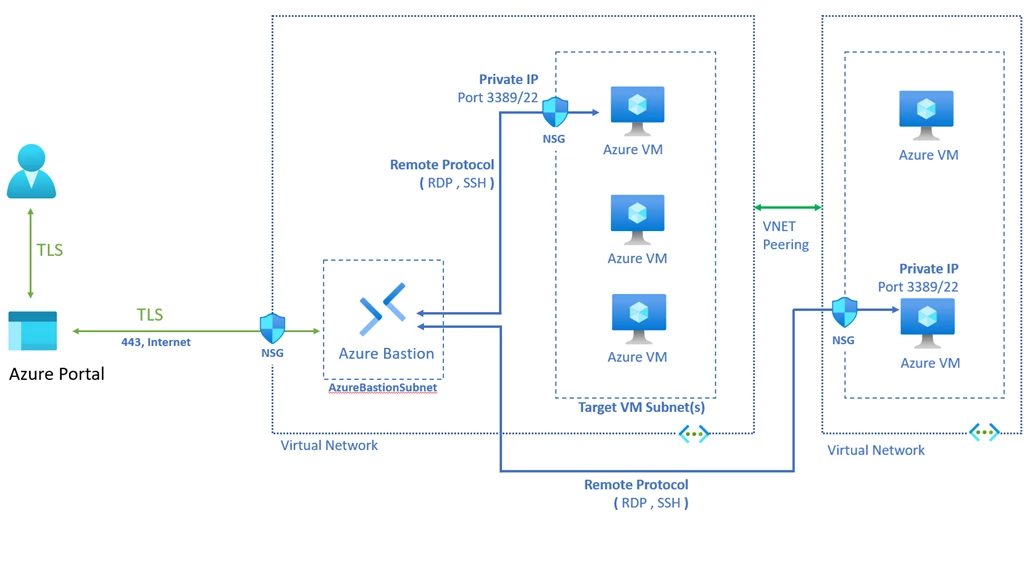
Single deployment that manages connectivity across local or connected Virtual Networks
Modern enterprises often leverage a hub-and-spoke topology when building application services. This type of architecture centralizes management Network Virtual Appliances (NVAs) and jumpbox services in a hub network and applications are deployed to connected spoke networks. Application traffic then traverses the hub network before reaching the target spoke application.
With Azure Bastion and Virtual Network peering, customers can continue to facilitate remote connectivity from a hub-and-spoke architecture within Azure. Specifically, customers can deploy Azure Bastion to a hub Virtual Network and configure application VMs in the spoke networks. Once the customer configures Virtual Network peering between the hub and spoke networks, Azure Bastion can manage RDP and SSH connectivity to VMs within the local hub Virtual Network and across the peer to VMs in the application spoke Virtual Networks.
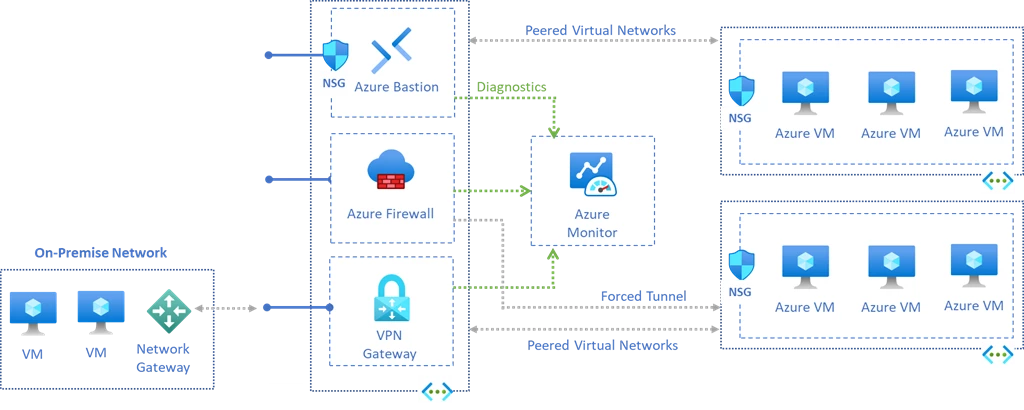
Infrastructure scaling capabilities
One of the primary reasons enterprises are shifting mission-critical workloads to the cloud is to take advantage of platform-as-a-service (PaaS) infrastructure scaling capabilities. Specifically, with the click of a button, customers can scale-up and scale-out infrastructure to meet any increase in demand or traffic to their applications. Furthermore, as customers deploy additional applications to spoke networks, the volume of traffic traversing the hub network increases. As a result, the infrastructure facilitating NVAs and jumpbox services deployed to the hub network needs to be able to scale to serve the additional workload(s).
Azure Bastion now supports manual host scaling. When customers deploy a Standard Azure Bastion, they can configure between 2 and 50 scale units. Additionally, customers can manage the number of instances in the Azure Bastion configuration blade after the resource is created. RDP and SSH are usage-based protocols. Depending on the number of concurrent sessions and the workloads of each session, customers may need to scale out additional instances to serve application connectivity. Specifically, as customers either deploy additional applications to the spoke network(s) and or peer additional spoke networks to the hub network, they may need to scale out host instances to maintain Azure Bastion connectivity. Ultimately, support of both Virtual Network peering and host scaling enables Azure Bastion to manage remote connectivity globally.
Metrics monitoring and alerting
Another key benefit of cloud services is near-to-real-time metrics, monitoring, and alerting on the performance, availability, and traffic of infrastructure-as-a-service (IaaS) and PaaS resources. Enterprises often monitor and enable custom alerting on metrics within these three categories to proactively detect any performance issues—and more importantly, to scale-out infrastructure services as application demand increases, prior to any potential outages.
With Azure Bastion and Azure Monitor, customers can enable alerting across availability, performance, and traffic metrics. With these capabilities, customers can monitor central processing unit (CPU) utilization, memory utilization, session count, and split by host instance to gauge when to scale out host instances.
For a full view of supported metrics, refer to how to configure monitoring and metrics for Azure Bastion using Azure Monitor.
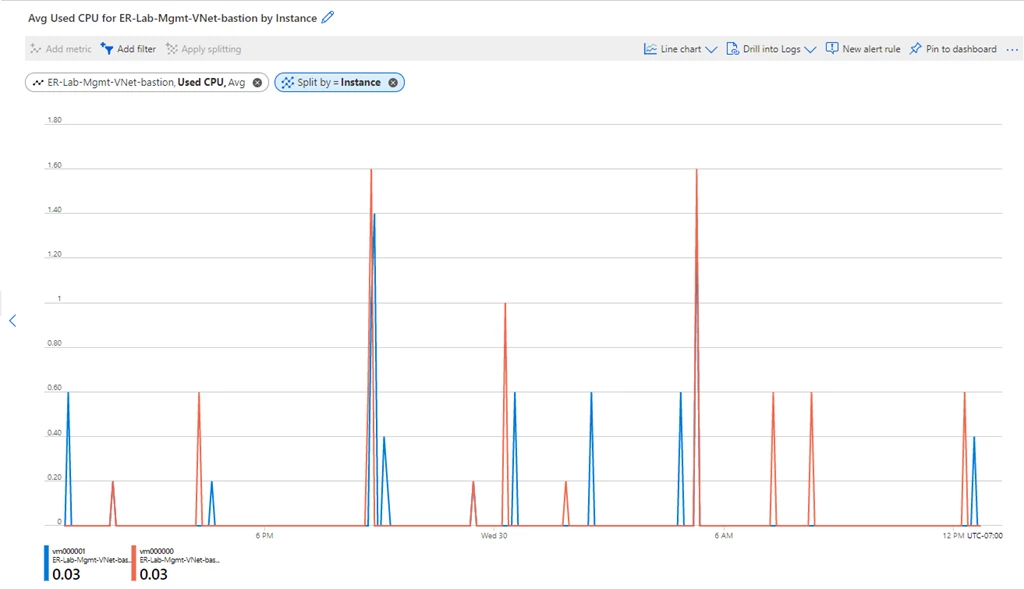
Deploy, manage, and monitor infrastructure with the click of a button
With these changes to Azure Bastion, customers can now reliably manage secure remote connectivity to applications at scale. As enterprises continue to shift production workloads to the cloud, it is imperative that cloud providers invest in PaaS offerings that expose the underlying platform benefits to customers. Ultimately, enterprises should be able to deploy, manage, and monitor infrastructure with the click of a button—reallocating the effort previously spent on infrastructure management to application development.
For more information about the new Azure Bastion Standard SKU and host scaling capabilities, refer to the Azure Bastion documentation.
Other resources:






