Today we are announcing the preview of a maintenance control feature for Azure Virtual Machines that gives more control to customers with highly sensitive workloads for platform maintenance. Using this feature, customers can control all impactful host updates, including rebootless updates, for up to 35 days.
Azure frequently updates its infrastructure to improve the reliability, performance, and security, or to launch new features. Almost all updates have zero impact on your Azure virtual machines (VMs). When updates do have an effect, Azure chooses the least impactful method for updates:
- If the update does not require a reboot, the VM is briefly paused while the host is updated, or it’s live migrated to an already updated host. These rebootless maintenance operations are applied fault domain by fault domain, and progress is stopped if any warning health signals are received.
- In the extremely rare scenario when the maintenance requires a reboot, the customer is notified of the planned maintenance. Azure also provides a time window in which you can start the maintenance yourself, at a time that works for you.
Typically, rebootless updates do not impact the overall customer experience. However, certain very sensitive workloads may require full control of all maintenance activities. This new feature will benefit those customers who deploy this type of workload.
Who is this for?
The ability to control the maintenance window is particularly useful when you deploy workloads that are extremely sensitive to interruptions running on an Azure Dedicated Host or an Isolated VM, where the underlying physical server runs a single customer’s workload. This feature is not supported for VMs deployed in hosts shared with other customers.
The typical customer who should consider using this feature requires full control over updates because while they need to have the latest updates in place, their business requires that at least some of their cloud resources must be updated with zero impact on their own schedule.
Customers like financial services providers, gaming companies, or media streaming services using Azure Dedicated Hosts or Isolated VMs will benefit by being able to manage necessary updates without any impact on their most critical Azure resources.
How does it work?
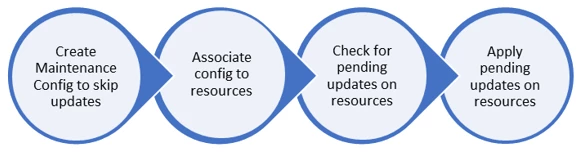
You can enable the maintenance control feature for platform updates by adding a custom maintenance configuration to a resource (either an Azure Dedicated Host or an Isolated VM). When the Azure updater sees this custom configuration, it will skip all non-zero-impact updates, including rebootless updates. For as long as the maintenance configuration is applied to the resource, it will be your responsibility to determine when to initiate updates for that resource. You can check for pending updates on the resource and apply updates within the 35-day window. When you initiate an update on the resource, Azure applies all pending host updates. A new 35-day window starts after another update becomes pending on the resource. If you choose not to apply the updates within the 35-day window, Azure will automatically apply all pending updates for you, to ensure that your resources remain secure and get other fixes and features.
Things to consider
- You can automate platform updates for your maintenance window by calling “apply pending update” commands through your automation scripts. This can be batched with your application maintenance. You can also make use of Azure Functions and schedule updates at regular intervals.
- Maintenance configurations are supported across subscriptions and resource groups, so you can manage all maintenance configurations in one place and use them anywhere they’re needed.
Getting started
The maintenance control feature for platform updates is available in preview now. You can get started by using CLI, PowerShell, REST APIs, .NET, or SDK. Azure portal support will follow.
For more information, please refer to the documentation: Maintenance for virtual machines in Azure.
FAQ
Q: Are there cases where I can’t control certain updates?
A: In case of a high-severity security issue that may endanger the Azure platform or our customers, Azure may need to override customer control of the maintenance window and push the change. This is a rare occurrence that would only be used in extreme cases, such as a last resort to protect you from critical security issues.
Q: If I don’t self-update within 35-days what action will Azure take?
A: If you don’t execute a platform update within 35-days, Azure will apply the pending updates on a fault domain by fault domain basis. This is done to maintain security and performance, and to fix any defects.
Q: Is this feature supported in all regions?
A: Maintenance Control is supported in all public cloud regions. Currently we don’t support gov cloud regions, but this support will come later.