Azure Managed Disks provides durable and highly available persistent storage for your virtual machines. We offer three types of disks with different performance characteristics. Premium SSDs deliver provisioned performance and low latency that are most suitable for I/O intensive workloads like databases and online transactional systems. Standard SSDs represent our newly added entry-level SSD tier offering consistent performance at lower IOPS ideal for web servers and data warehouse applications. Standard HDDs are our cost-effective disks offered on magnetic hard drives, which are ideal for dev/test workloads and colder storage.
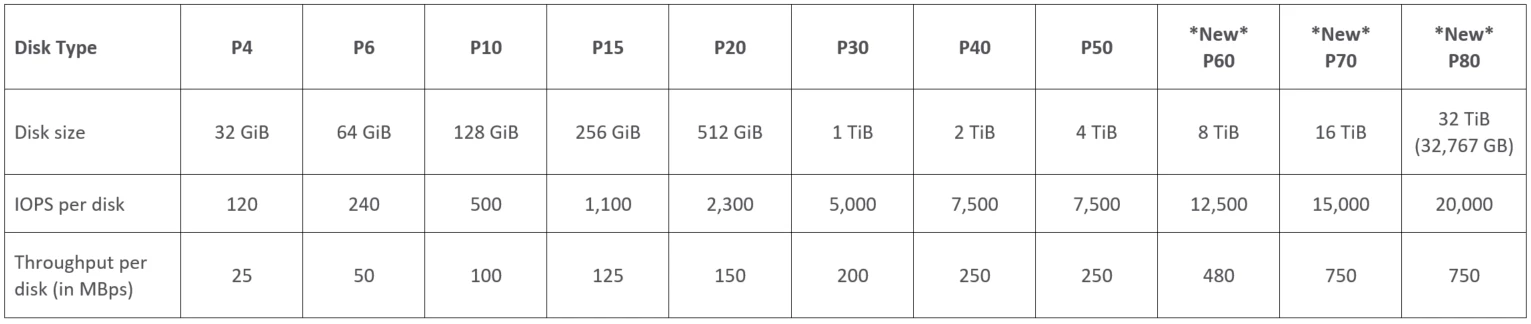
Today, we are excited to announce a significant increase in Azure Managed Disks scalability targets for both capacity and performance for all disk types. We are increasing the max disk size to 32 TiB, and max disk IOPS and bandwidth to 20,000 IOPS and 750 MBps on Premium SSDs. The max disk capacity supported per VM is now 8x larger and provides you more flexibility to scale your storage independent of the VM SKUs. Large disks eliminate the overhead of managing complex RAID implementation on multiple disks. You can now easily migrate applications running on larger disk sizes to Azure without requiring you to stripe multiple Azure Disks. The 3x increase in performance targets for these larger disk sizes extends the capability of running wide arrays of transactional workloads on Premium SSDs and will boost the performance of big data workloads on Standard SSDs.
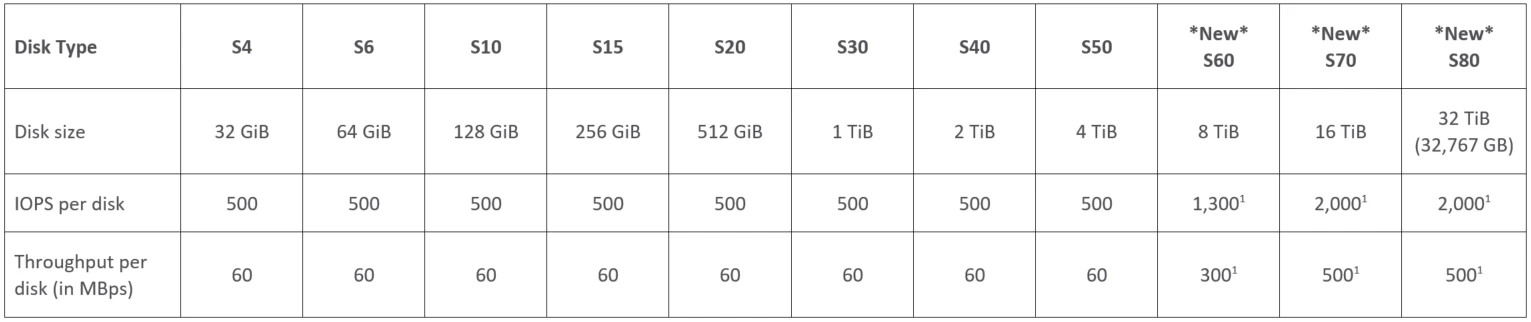
With this release, we are introducing nine new Managed Disks SKUs. You can find the performance targets of the new SKUs in the tables below. To achieve the expected disk IOPS and bandwidth, we recommend that you review our guidance on how to optimize your disk performance.
Premium SSD disks
Premium SSDs are ideal for enterprise applications like Dynamics AX, Dynamics CRM, and database workloads like SQL server, MongoDB that require consistent high performance and low latency.
Standard SSD disks
Standard SSDs are suitable for web servers, low IOPS application servers, and enterprise applications that need consistent performance at lower IOPS levels. Standard SSDs are now available in all Azure production regions.

Standard HDD disks
Standard HDDs based on magnetic drives offer the most cost-effective solution for Dev/Test scenarios.
Note:
- To achieve the target performance of Standard SSD and Standard HDD new disk SKUs, you should use these recommended VM series.
Getting started
Try out the new Managed Disks sizes using Azure Powershell or CLI today! The public preview of larger Managed Disk sizes is available in most Azure regions, with the exception of Azure Government, China, and Germany clouds. Please refer to the Azure Preview guidelines for general information on using preview features. If you are not using Managed Disks, convert from Unmanaged to Managed Disks today and start leveraging these new offerings.
To explore the Azure Disks portfolio visit our page. To learn more about pricing, you can visit the Managed Disks Pricing webpage.
What’s next?
We will announce support for additional scenarios in the near future. Stay tuned. Following are some of the improvements coming up:
- Azure Portal support for larger disk sizes, and ability to upsize existing disks.
- Managed Disks import and export experience to support the larger disk sizes.
- Azure Backup and Azure Site Recovery support for larger disk sizes above 4 TiB.
Preview feedback
We look forward to hearing your feedback on this feature. Please email us at AzureDisks@microsoft.com.
Thanks,
Azure Disks Team