The preview of incremental snapshots of Azure managed disks is now available. Incremental snapshots are a cost-effective point-in-time backup of managed disks. Unlike current snapshots, which are billed for the full size, incremental snapshots are billed for the delta changes to disks since the last snapshot. They are always stored on the most cost-effective storage i.e., standard HDD irrespective of the storage type of the parent disks. Additionally, for increased reliability, they are stored on Zone redundant storage (ZRS) by default in regions that support ZRS. They cannot be stored on premium storage. If you are using current snapshots on premium storage to scale up virtual machine deployments, we recommend you to use custom images on standard storage in Shared Image Gallery. It will help you to achieve a more massive scale with lower cost.
Incremental snapshots provide a differential capability, a unique capability available only in Azure managed disks. It enables customers and independent solution vendors (ISV) to build backup and disaster recovery solutions for managed disks. It allows you to get the changes between two snapshots of the same disk, thus copying only changed data between two snapshots across regions, reducing time and cost for backup and disaster recovery. For example, you can download the first incremental snapshot as a base blob in another region. For the subsequent incremental snapshots, you can copy only the changes since the last snapshot to the base blob. After copying the changes, you can take snapshots on the base blob that represent your point in time backup of the disk in another region. You can restore your disk either from the base blob or from a snapshot on the base blob in another region.
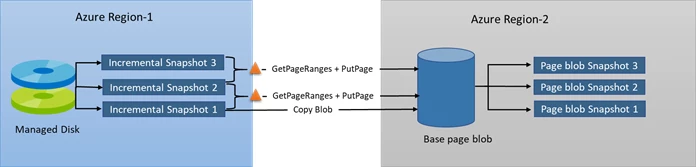
Incremental snapshots inherit all the compelling capabilities of current snapshots. They have a lifetime independent of their parent managed disks, making them available even when the parent managed disk is deleted. Moreover, they are accessible instantaneously meaning you can read the underlying VHD of incremental snapshots or restore disks from them as soon as they are created.
You can create incremental snapshots by setting the new incremental property to true.
az snapshot create
-g yourResourceGroupName
-n yourSnapshotName
-l westcentralus
--source subscriptions/yourSubscriptionId/resourceGroups/yourResourceGroupName/providers/Microsoft.Compute/disks/yourDiskName
--incremental
You can identify incremental snapshots of the same disk by using the SourceResourceId and SourceUniqueId properties of snapshots. SourceResourceId is the Azure Resource Manager (ARM) resource Id of the parent disk. SourceUniqueId is the value inherited from the UniqueId property of the disk. If you delete a disk and then create a disk with the same name, the value of the UniqueId property will change.
az snapshot show -g yourResourceGroupName -nyourSnapshotName--query [creationData.sourceResourceId] -otsvaz snapshot show -g yourResourceGroupName -nyourSnapshotName--query [creationData.sourceUniqueId] -otsv
Availability and pricing
You can now create incremental snapshots and generate SAS URI for reading the underlying data in West Central US region via Azure Compute Rest API version 2019-03-01. You can also use the latest Azure PowerShell SDK, .Net SDK and CLI to perform these operations. The differential capability is supported via the pre-released versions of .NET, Python, and CPP Storage SDKs only. Please email AzureDisks@microsoft.com to get access to these SDKs. We are going to add support for other SDKs and other regions soon.
The per GB pricing of incremental snapshots is the same as the current full snapshots. You can visit the managed disk pricing for more details about the snapshot pricing.