
In the weeks and months we have all been grappling with the global pandemic, there’s no doubt about the impact it has had on the lives of people everywhere. A shift to remote work is one of the widespread effects of the global pandemic, and we heard from organizations around the world who are looking for ways to enable more of their employees to work remotely for their safety and that of the community. With this shift, we’re working to address common infrastructure challenges businesses face when helping employees stay connected at scale.
Common challenges for businesses expanding secure, remote access
One of the major challenges while setting up remote access is providing workers/employees access to key internal resources, which may reside on-premises or Azure, for example, healthcare or government organizations who have sensitive patient or tax information in on-premises datacenters and other sensitive information in Azure.
Another challenge that the businesses around the world now face is how to quickly scale an existing VPN setup, which is typically targeted at a small portion of an organization’s workforce, to now accommodate all or most workers. Even within Microsoft, we’ve seen our typical remote access at 50,000+ employee spike to as high as 128,000 employees while we’re working to protect staff and our communities during the global pandemic.
How Azure VPN can help with secure, remote work at scale
The Azure network is designed to withstand sudden changes in the utilization of resources and can greatly help during periods of peak utilization. The Azure Point-to-Site (P2S) VPN Gateway solution is cloud-based and can be provisioned quickly to cater for the increased demand of users to work from home. It can scale up easily and be turned off just as easily.
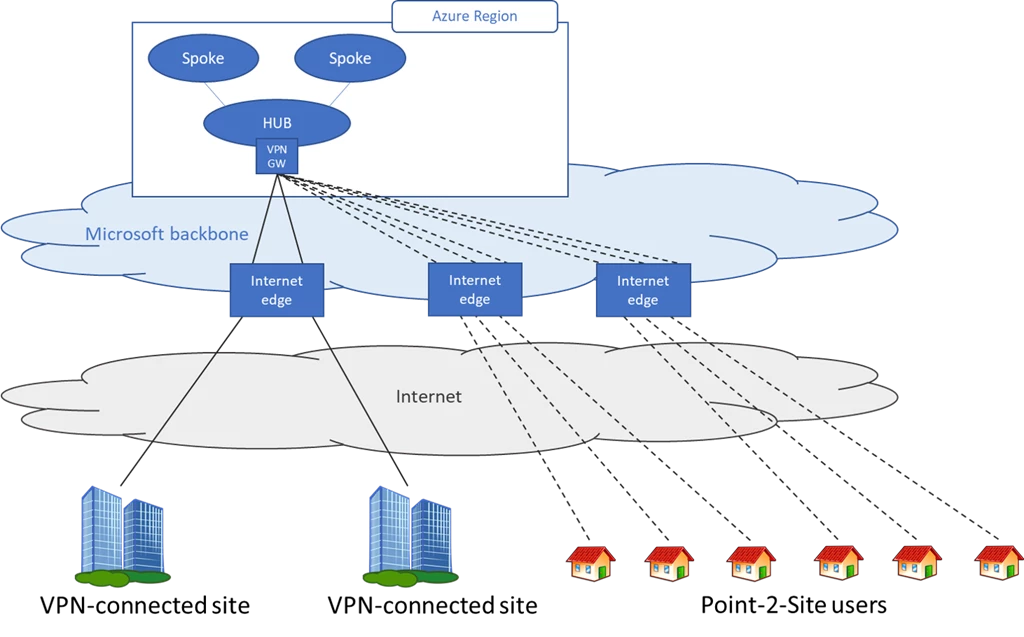
Tips to help you get started with Azure VPN Gateway
Based on the customers we’ve been working with and best practices we’ve established over our years of work with enterprises, here are tips to help your own company get started with Azure VPN Gateway:
- For scenarios where you need to access resources on-premises or in Azure, you can build a VPN Gateway in Azure and connect your existing VPN solution to Azure. This eliminates single point of failure to on-premises and provides nearly limitless scale. See Remote work using Azure VPN Gateway Point-to-Site to help you understand how to set up Azure VPN Gateway and integrate it with your existing setup.
- Use Azure Active Directory (Azure AD), certificate-based authentication, or RADIUS authentication to authenticate users and to validate the status of their device before allowing them on VPN. You can review Create an Azure AD tenant for P2S OpenVPN protocol connections for more details.
- We recommend split tunneling VPN traffic. This allows network traffic to go directly to public resources—such as Office 365 and Windows Virtual Desktops—and prevents internet traffic from having to go back to the corporate office, reducing overall load and bandwidth on your corporate internet links and on-premises VPN infrastructure.
- To improve on-premises to Azure connectivity to support scale, you can work with your local telecommunications provider to temporarily increase connectivity to the internet. This can help scale your connectivity from your office or data center to Microsoft up to 10 Gbps.
- Apply all available security updates to your VPN and firewall devices. The patching and updates for the Azure VPN gateway are managed by Microsoft. For your on-premises devices, please follow the guidance from the device vendor. We’ve brought together tips in this blog post.
How to get started
If you’re not currently using P2S tunnels, please review the following document, evaluate your scenario, and follow the instructions to start using Azure VPN services.






