
Our goal on the Azure Stream Analytics team is to empower developers and make it incredibly easy to leverage the power of Azure to analyze big data in real-time. We achieve this by continuously listening for feedback from our customers and ship features that are delightful to use and serve as a tool for tackling complex analytics scenarios. We are excited to share the public preview of Azure SQL Database as a reference data input for Stream Analytics, which is the most requested feature on UserVoice!
Typical scenarios for reference data
Reference data is a dataset that is static or slow changing in nature which you can correlate with real-time data streams to augment the data. Stream Analytics leverages versioning of reference data to augment streaming data by the reference data that was valid at the time the event was generated.
An example scenario would be storing currency exchange rates in Azure SQL Database which is regularly updated to reflect market trends, and then converting a stream of billing events in different currencies to a standard currency.
In IoT scenarios, you could have millions of IoT devices emitting a stream of events with critical values like temperature and pressure being monitored. Using Stream Analytics, you can join this real-time data stream with metadata about each IoT device stored in Azure SQL Database to define per-device threshold and metadata.
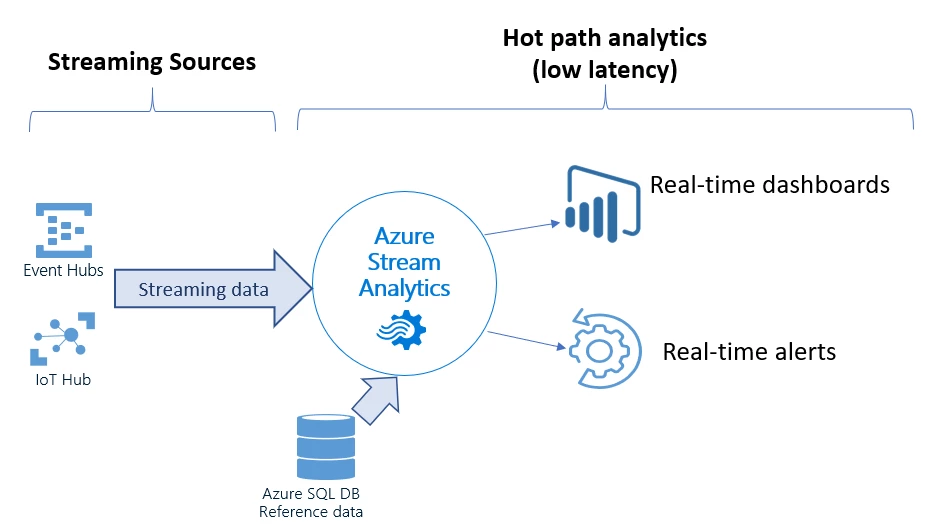
Easily integrate with Azure SQL Database input
Until today, Azure Blob Storage was the only way to store your reference data. We heard from our customers that Azure SQL Database is a natural place to store datasets that need to be used in correlation with real-time data streams.
Instead of writing your logic and building custom pipelines to transfer data periodically from Azure SQL Database to Azure Blob Storage, Stream Analytics now provides out-of-the-box support for Azure SQL Database as reference data input. We knew providing just this capability alone wouldn’t delight our customers. So, we took it one step further and are providing the ability to automatically refresh your reference dataset periodically. You can easily configure this refresh interval when adding your input to the job. The refresh interval can be as short as one minute.
You might have a complex query to pull reference data from Azure SQL Database. In order to preserve the performance of your Stream Analytics job, we also provide the option to fetch incremental changes from your Azure SQL Database by writing a delta query.
Getting started
You can try using Azure SQL Database as a source of reference data input to your Stream Analytics job today. This feature is available for public preview in all Azure regions. This feature is also available in the latest release of Stream Analytics tools for Visual Studio. We hope you take full advantage of this functionality and are excited to see what you build with Stream Analytics.
Providing feedback and ideas
The Azure Stream Analytics team is highly committed to listening to your feedback. We welcome you to join the conversation and make your voice heard via our UserVoice. You can stay up-to-date on the latest announcements by following us on Twitter @AzureStreaming. You can also reach out to us at askasa@microsoft.com.






