
We are excited to announce the public preview of Azure Managed Applications in Azure Marketplace.
Azure Managed Applications provides an ecosystem that enables Managed Service Providers (MSPs), Independent Software Vendors (ISVs), and corporate central IT teams to deliver turnkey solutions through the Azure Marketplace or Service Catalog. Although customers deploy these managed applications in their subscriptions, they don’t have to maintain, update, or service them as a key advantage of this service. The vendors will manage and support these applications. This means that the customers don’t have to invest in building the application specific domain knowledge, which would have been needed to service these applications. It enables customers to automatically acquire application updates without having to worry about troubleshooting and diagnosing issues with the application.
On the other side, it creates a channel to not only sell infrastructure and software through the marketplace, but also a way to attach services and operational support to Azure customers. It enables vendors to bill customers using Azure’s billing system and use templates to manage the lifecycle of deployed applications. These are self-contained and sealed to the customer, allowing the vendors to provide a higher quality of service. Such an ecosystem in Azure not only benefits the PaaS and SaaS vendors, but also corporate central platform teams and System Integrators that wish to package and resell their solutions.
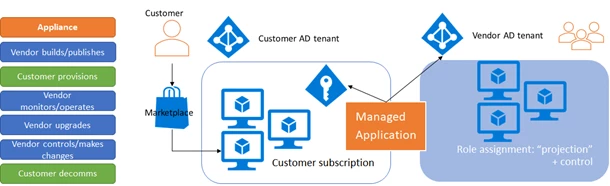
Azure Managed Applications comes in two flavors. One is called Service Catalog Managed Applications and the other is called Azure Marketplace Managed Applications.
Service Catalog
Service Catalog allows organizations to create a catalog of approved solutions for Azure. Maintaining such a catalog of solutions is helpful specially for central IT teams in enterprises as it enables them to ensure compliance with certain organizational standards while providing great solutions for their organization. They can control, update, and maintain these applications. It allows employees in the organization to easily discover the rich set of applications that are recommended and approved by the IT department. The customers will only see the Service Catalog Managed Applications created by themselves or those that have been shared with them by other people in the organization. The publisher can create these Service Catalog Managed Applications using Azure CLI. Customers can consume/create the published managed applications from the Azure portal today. However, the support for publishing Service Catalog Managed Applications is coming to the Azure portal soon!
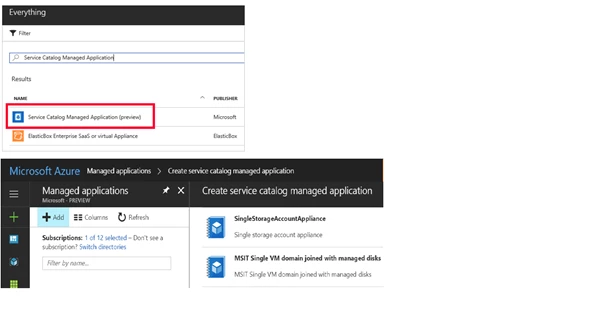
Learn more about how to publish and consume Service Catalog Managed Applications.
Marketplace
The other option is the Azure Marketplace Managed Applications. These applications are available in the marketplace on the Azure portal. Once published by the vendor, these are available for everyone inside or outside of your organization to consume. This enables MSPs, ISVs, and System Integrators (SI’s) to offer their solutions to all Azure customers. The customers get the benefit of leveraging such complex solutions without having to gain a deep understanding and invest in maintaining these. At the time of publishing, the publisher gets the option of making their offer available as a Managed Application or as a Solution template which is the unmanaged equivalent.
The vendors can publish the Managed Applications to Azure Marketplace using the Cloud Partner Portal. The main components of publishing a managed application includes the template files, which describe the resources that will be provisioned, and the UI definition file, which describes how the required inputs for provisioning these resources will be displayed in the portal. The required files are packaged in a .zip file and uploaded through the publishing portal. Pleas note that the “SKU Type” property differentiates a Solution template from a Managed Application. Below is a image of the publishing portal.
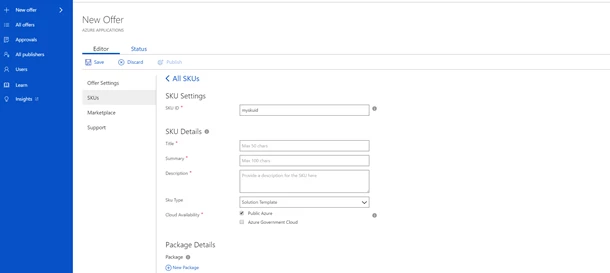
Once the offer is published, it goes through some pre-requisite checks, validations, and other reviews. After all checks have passed, the offer goes live and is made available for public consumption. Learn more and get detailed instructions on how to publish a marketplace managed application.
After the offer goes live, it is visible in the Azure Marketplace and the customers can create an instance of the offer.
Authorizations
As mentioned above, the vendor manages the application which is provisioned by the customer. To enable the vendor to successfully manage the application, the vendor requires certain permissions to the resource group in the customer subscription where these resources will be provisioned. At the time of publishing the managed application, the vendor indicates the Azure AD user, user group, or application which will have certain permissions on the resource group. This is where the resources required by the managed application will be deployed. The permissions granted will typically be one of the Azure RBAC built-in roles.
It was also stated above that the managed applications are self-contained and sealed for the customer. This means that the resource group where the resources will be provisioned are “locked” for the customer. As a result, customers cannot delete or make changes to the resources in this resource group.
Summary
To recap, below is a quick summary explaining the key differences between the two flavors of Managed Applications.
|






