Securing any environment requires multiple lines of defense. Azure Container Registry recently announced the general availability of features like Azure Private Link, customer-managed keys, dedicated data-endpoints, and Azure Policy definitions. These features provide tools to secure Azure Container Registry as part of the container end-to-end workflow.
Customer-managed keys
By default, when you store images and other artifacts in an Azure Container Registry, content is automatically encrypted at rest with Microsoft-managed keys.
Choosing Microsoft-managed keys means that Microsoft oversees managing the key’s lifecycle. Many organizations have stricter compliance needs, requiring ownership and management of the key’s lifecycle and access policies. In such cases, customers can choose customer-managed keys that are created and maintained in a customer’s Azure Key Vault instance. Since the keys are stored in Key Vault, customers can also closely monitor the access of these keys using the built-in diagnostics and audit logging capabilities in Key Vault. Customer-managed keys supplement the default encryption capability with an additional encryption layer using keys provided by customers. See details on how you can create a registry enabled for customer-managed keys.
Private links
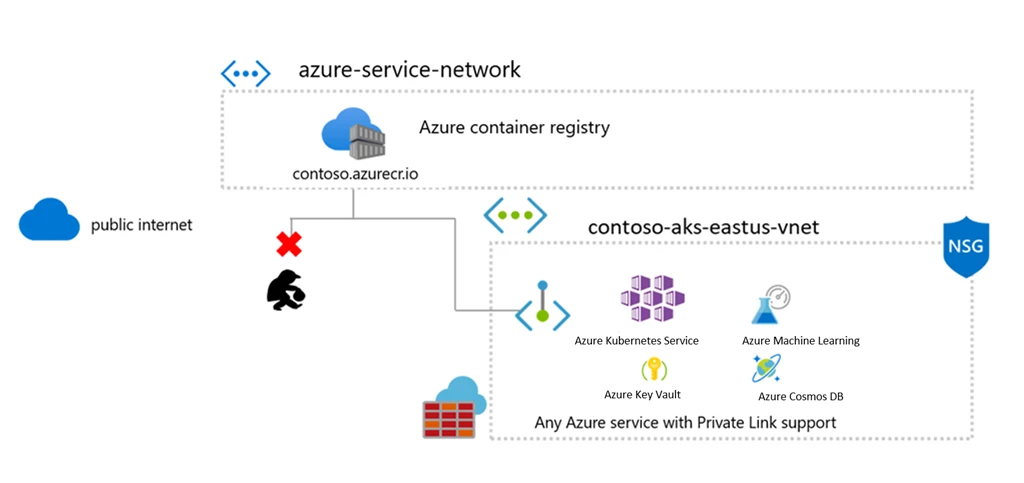
Container Registry previously had the ability to restrict access using firewall rules. With the introduction of Private Link, the registry endpoints are assigned private IP addresses, routing traffic within your virtual network and the service through a Microsoft backbone network.
Private Link support has been one of the top asks, allowing customers to benefit from the Azure management of their registry while benefiting from tightly controlled network ingress and egress.
Private links are available across a wide range of Azure resources with more coming soon, allowing a wide range of container workloads with the security of a private virtual network. See documentation on how to configure Azure Private Link for Container Registry.
Dedicated data-endpoints
Private Link is the most secure way to control network access between clients and the registry as network traffic is limited to the Azure Virtual Network. When Private Link can’t be used, dedicated data-endpoints can minimize data exfiltration concerns. Enabling dedicated data endpoints means they can configure firewall rules with fully qualified domain names ([registry].[region].data.azurecr.io) rather than a rule with wildcard (*.blob.core.windows.net) for all storage accounts.
You can enable dedicated data-endpoints using the Azure portal or the Microsoft Azure CLI. The data endpoints follow a regional pattern, ..data.azurecr.io. In a geo-replicated registry, enabling data endpoints allows endpoints in all replica regions. Review the documentation on how to enable dedicated data endpoints to learn more.
Azure built-in policies
Having security capabilities will secure your workflows if they’re implemented. To assure your Azure resources are following the best security practices, Azure Container Registry has added built-in Azure Policy definitions that you can leverage to enforce security rules. Here are some of the built-in policies that you can enable for your container registry:
- Container Registries should be encrypted with a customer-managed key. Audit Container Registries that do not have encryption enabled with customer-managed keys.
- Container Registries should not allow unrestricted network access. Audit Container Registries that do not have any network (IP or VNET) rules configured and allow all network access by default. Container Registries with at least one IP or firewall rule, or configured virtual network will be deemed compliant.
- Container Registries should use private links. Audit Container Registries that do not have at least one approved private endpoint connection. Clients in a virtual network can securely access resources that have private endpoint connections through private links.
Using Azure Policy, you can ensure that your registries stay compliant with your organization’s compliance needs.
Additional links
- Learn more about Azure Container Registry.
- UserVoice: To vote for existing requests or create a new request.
- Issues: To view existing bugs and issues or log new ones.
- Azure Container Registry documentation: For Azure Container Registry tutorials and documentation.