We are excited to announce the general availability of Azure Cosmos DB reserved capacity – expanding our commitment to making Cosmos DB the most cost-effective database for your modern scale-out workloads.
As a cloud-born database, we have carefully engineered Azure Cosmos DB with multi-tenancy and global distribution (with transparent multi-master replication) from the ground up. Azure Cosmos DB provides, turnkey global distribution, elastic scaling of read and write throughput and storage worldwide, single-digit millisecond read and write latencies at the 99th percentile, five well-defined consistency models, and guaranteed high availability, all backed by industry-leading comprehensive SLAs. Azure Cosmos DB is completely schema-agnostic and automatically indexes all data. This means that you don’t have to deal with cumbersome schema changes, version management and manage indexes across multiple regions. Finally, thanks to the wire protocol compatible APIs for MongoDB/Apache Cassandra/Apache Gremlin on top of a write-optimized, multi-model database engine, migrating data from IaaS hosted/on-premises NoSQL databases to Azure Cosmos DB is more friction-free than before.
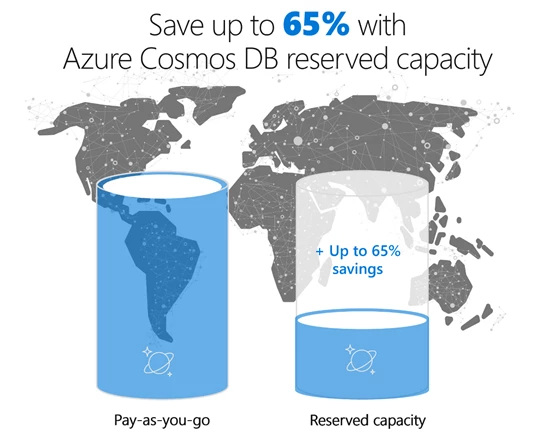
Azure Cosmos DB reserved capacity helps you save money by pre-paying for Azure Cosmos DB resources for a period of one year or three years. Azure Cosmos DB reserved capacity allows you to get a discount on the throughput provisioned for Cosmos DB resources, for example, databases and containers (tables/collections/graphs). Azure Cosmos DB reserved capacity can significantly reduce your Cosmos DB costs— it enables you to save up to 65 percent on regular prices with one-year or three-year upfront commitment. Reserved capacity provides a billing discount and does not affect the runtime state of your Cosmos DB resources. Azure Cosmos DB reserved capacity is available to all supported APIs (including MongoDB, Cassandra, SQL, Gremlin and Azure Tables) and all regions worldwide.
Apply reserved capacity to a single subscription or share across your enrollment
Azure Cosmos DB reserved capacity can be scoped to either a single subscription or shared. It allows you to control how many subscriptions can use the benefit and how the reservation is applied to specific subscriptions, so you can manage reserved capacity usage at an organizational or individual department level. Assignments are easy to change post-purchase also.
A reservation scoped to a single subscription means that the reserved capacity discount will apply to Cosmos DB resources (e.g., databases or containers) within the selected subscription. A reservation with a shared scope means that the billing benefit can be shared across any subscription in the enrollment (i.e., Enterprise Agreement customers) or account (i.e., Pay-as-you-go customers), except for MSDN subscriptions in the enrollment or non-Pay-as-you-go subscriptions in the account.
You can further lower your total cost of ownership by combining Azure Cosmos DB reserved capacity with pay-as-you-go prices to manage costs across predictable and variable workloads. What’s more, you can now improve budgeting and forecasting with a single upfront payment, making it easy to calculate your investments.
How to buy reserved capacity
You can buy Azure Cosmos DB reserved capacity from the Azure portal.
- Sign in to the Azure portal.
- Select All services > Reservations > Add.
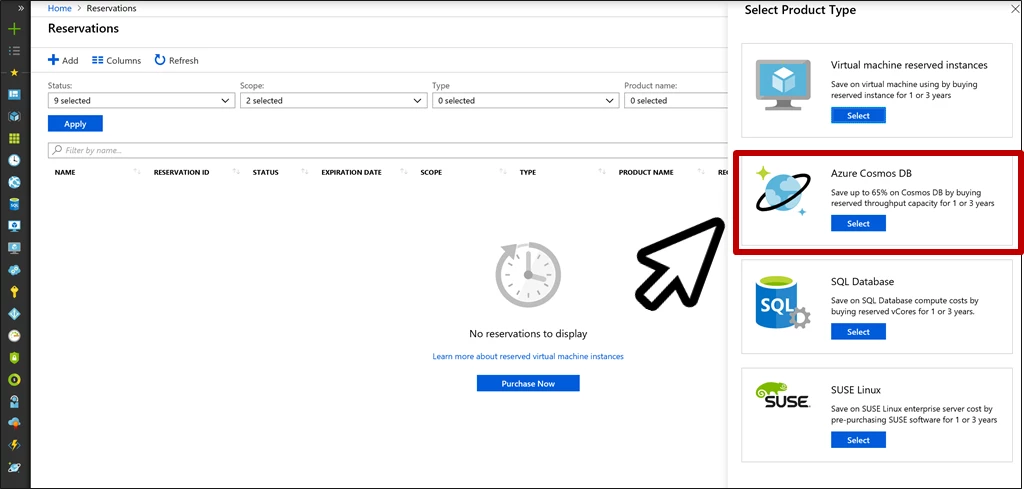
- From the Select Product Type pane, choose Azure Cosmos DB, and then Select to purchase a new reservation.
- Fill in the required fields as shown below:
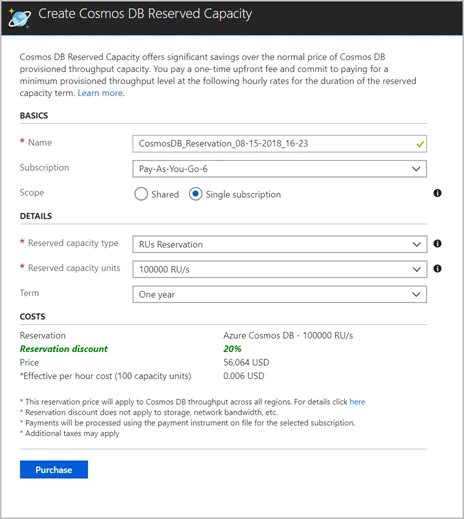
- Review the discount and the price of the reservation in the Costs section.
- Select Purchase. You are done.
Next steps
For more information on reserved capacity pricing, please visit the Azure Cosmos DB pricing page and review reserved capacity documentation. Please reach out to us at AskCosmosDB@microsoft.com, if you have any questions.