This post was co-authored by Anitha Adusumilli, Principal Program Manager, Azure Networking.
Today we are happy to share several key Azure Firewall capabilities as well as update on recent important releases into general availability (GA) and preview.
- Multiple public IPs soon to be generally available
- Availability Zones now generally available
- SQL FQDN filtering now in preview
- Azure HDInsight (HDI) FQDN tag now in preview
- Central management using partner solutions
Azure Firewall is a cloud native firewall-as-a-service offering which enables customers to centrally govern and log all their traffic flows using a DevOps approach. The service supports both application and network level filtering rules and is integrated with the Microsoft Threat Intelligence feed for filtering known malicious IP addresses and domains. Azure Firewall is highly available with built-in auto scaling.
Multiple public IPs soon to be generally available
You can now associate up to 100 public IP addresses with your firewall. This enables the following scenarios:
- DNAT – You can translate multiple standard port instances to your backend servers. For example, if you have two public IP addresses, you can translate TCP port 3389 (RDP) for both IP addresses.
- SNAT – Additional ports are available for outbound SNAT connections, reducing the potential for SNAT port exhaustion.
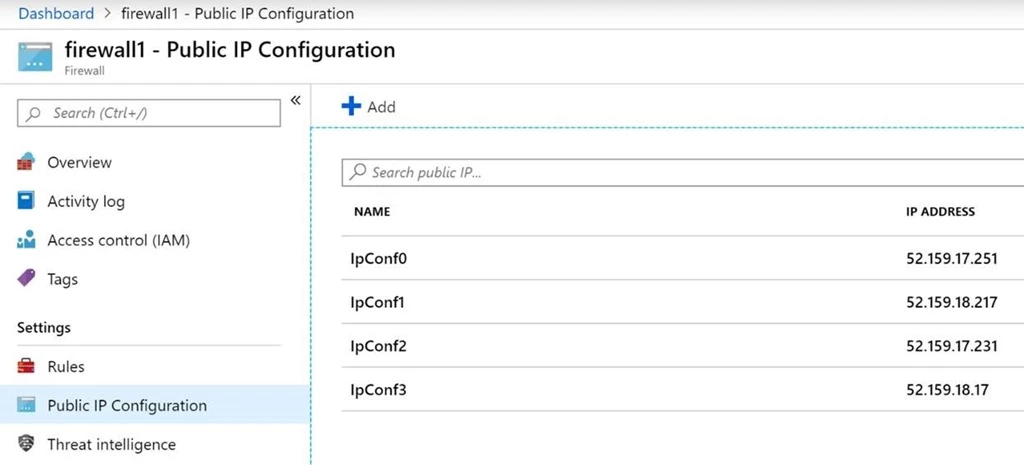
Figure one – Sample Azure Firewall Public IP configuration with multiple public IPs.
Currently, Azure Firewall randomly selects the source public IP address to use for a connection. If you have any downstream filtering on your network, you need to allow all public IP addresses associated with your firewall. Explicit SNAT configuration is on our roadmap. See our documentation “Deploy an Azure Firewall with multiple public IP addresses using Azure PowerShell” for more information.
Multiple public IPs GA will be available in all public regions by July 12, 2019. It is currently supported using REST APIs, templates, PowerShell and Azure CLI. Portal support will be available shortly.
Availability Zones now generally available
Azure Firewall can be configured during deployment to span multiple Availability Zones for increased availability. With Availability Zones, your availability increases to 99.99 percent uptime. For more information, see the Azure Firewall Service Level Agreement (SLA). The 99.99 percent uptime SLA is offered when two or more Availability Zones are selected.
You can also associate Azure Firewall to a specific zone just for proximity reasons, using the service standard 99.99 percent SLA.
There’s no additional cost for a firewall deployed in an Availability Zone. However, there are additional costs for inbound and outbound data transfers associated with Availability Zones. For more information, see Bandwidth pricing details.
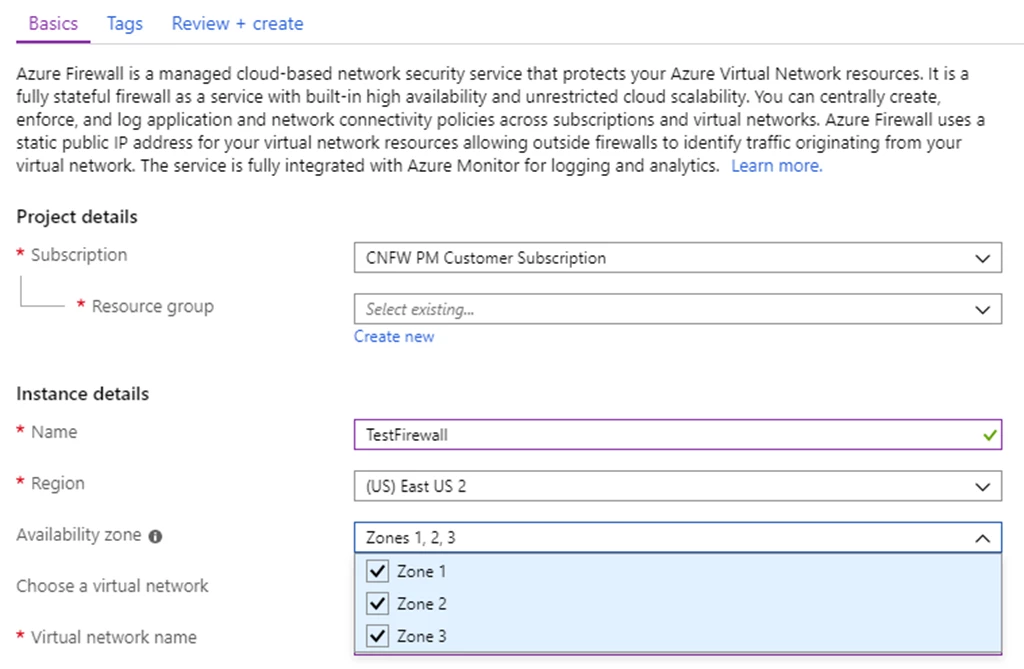
Figure two – Creating Azure Firewall with 99.99 percent SLA
SQL FQDN filtering now in preview
You can now configure SQL FQDNs in Azure Firewall application rules. This allows you to limit access from your VNets to only the specified SQL server instances. The capability is available as a preview in all Azure regions.
Using this capability, you can filter traffic from your virtual networks (VNets) to Azure SQL Database, Azure SQL Data Warehouse, Azure SQL Managed Instance, or SQL IaaS instances deployed in your VNets.
During preview, SQL FQDN filtering is supported in proxy-mode only, port 1433. If you are using non-default ports for SQL IaaS traffic, you can configure those ports in the Firewall application rules. If you are using SQL in redirect mode, which is default for clients connecting within Azure, you can filter access using the SQL service tag as part of Azure Firewall network rules.
SQL FQDN filtering is currently available using REST APIs, templates, and Azure CLI. The portal will be available shortly.
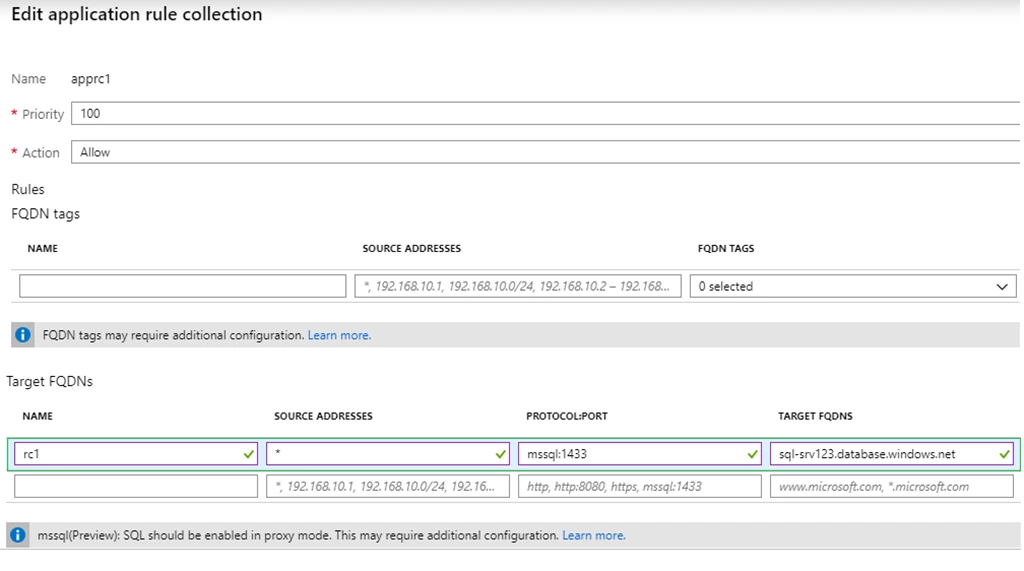
Figure three – Creating Azure Firewall Application rule for SQL FQDN
Azure HDInsight (HDI) FQDN tag now in preview
We recently announced the availability of a FQDN Tag for Azure HDInsight (HDI). This tag is in public preview in all Azure public regions.
VNet-deployed Azure services like HDI have outbound infrastructure dependencies on other Azure services, for example, Azure Storage. To protect your data from exfiltration risk, you might want to use Azure Firewall to restrict outbound access for HDI clusters and allow access to only your data. In addition, you should also allow access to the HDI infrastructure traffic.
FQDN tags for Azure Firewall allow services like HDI to pre-configure their infrastructure dependencies, for example, Azure Storage account FQDNs used by HDI. Instead of using network level service tags in the Azure Firewall to allow HDI outbound dependencies, you can get much more granular control to restrict outbound traffic for HDI by using the FQDN tags.
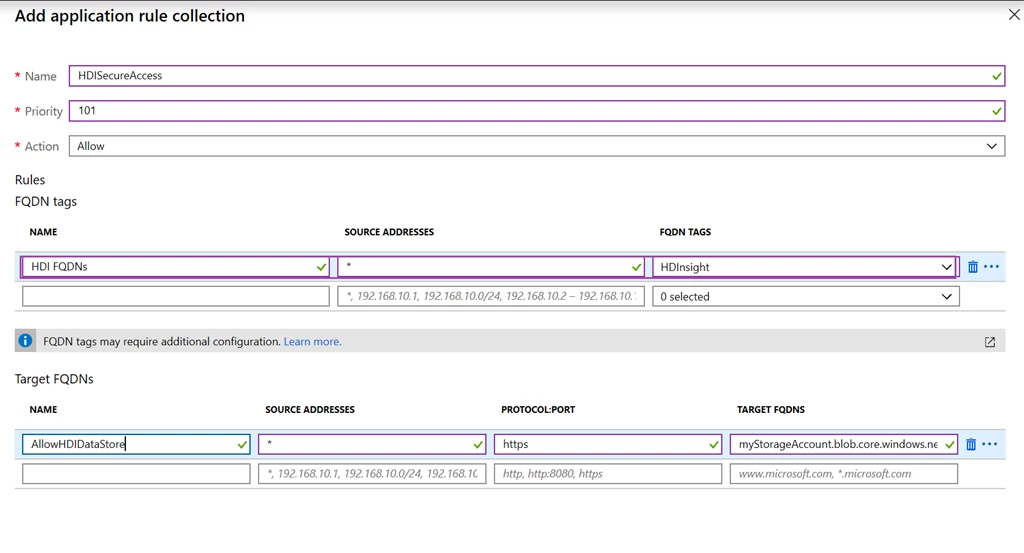
Figure four – Creating Azure Firewall Application rule for HDI FQDN tag
Central management using partner solutions
Azure Firewall public REST APIs can be used by third party security policy management tools to provide a centralized management experience for Azure Firewalls, Network Security Groups (NSGs), and network virtual appliances (NVAs).
- Barracuda Cloud Security Guardian, now generally available in Azure Marketplace, automatically deploys and configures Barracuda’s Cloud Generation WAF/Firewall, or Microsoft’s Azure Firewall.
- AlgoSec CloudFlow central management capability for Azure Firewall and NSGs is now public preview. For more information you can watch this video.
- Tufin Orca, now public preview, automates the discovery, development and enforcement of a unified security policy across Kubernetes and Azure Firewall. For more information you can watch this video.

Next steps
For more information on everything we covered above please see the following blogs, documentation, and videos.
Azure Firewall central management partners: