Skip to main content Explore View all products (200+) Microsoft Foundry Azure Copilot GitHub Copilot Azure Kubernetes Service (AKS) Azure Cosmos DB Azure Database for PostgreSQL Azure Arc Microsoft Fabric Linux virtual machines in Azure Foundry Models Foundry Agent Service Foundry IQ Foundry Tools Foundry Control Plane Observability in Foundry Control Plane Azure OpenAI in Foundry Models Azure Speech in Foundry Tools Azure Machine Learning View all databases Azure Cosmos DB Azure DocumentDB Azure SQL Azure Database for PostgreSQL Azure Managed Redis Microsoft Fabric Azure Databricks Linux virtual machines in Azure Windows Server on Azure Azure Functions Azure Virtual Machine Scale Sets Azure API Management Azure Container Apps Azure Kubernetes Service (AKS) Azure Kubernetes Fleet Manager Azure Container Registry Azure Red Hat OpenShift Azure Container Instances Azure Container Storage Azure Arc Azure Local Microsoft Defender for Cloud Azure Monitor Microsoft Sentinel Azure Migrate View all solutions (40+) Cloud solutions for small and medium businesses Cloud migration and modernization center Data analytics for AI Azure Databases AI apps and agents Microsoft Marketplace Microsoft Sovereign Cloud AI apps and agents Responsible AI with Azure AI Infrastructure Data analytics for AI Machine learning operations (MLOps) Low-code application development on Azure Integration Services Serverless computing DevOps Migration and modernization center .NET apps migration Databases on Azure Linux on Azure Oracle on Azure SAP on the Microsoft Cloud Adaptive cloud High-performance computing (HPC) Infrastructure as a service (IaaS) Resiliency Azure Essentials Frontier Accelerate for Azure FinOps on Azure Microsoft Marketplace Azure pricing overview Create an Azure account Free Azure services Flexible purchase options Pricing calculator FinOps on Azure Maximize ROI from AI Azure savings plans Azure reservations Azure Hybrid Benefit Virtual Machines Azure SQL Microsoft Foundry Microsoft Fabric Azure Kubernetes Service (AKS) Microsoft Defender for Cloud View more Software Development Companies Microsoft Marketplace Find a partner Resources for Azure partners Get started with Azure Customer stories Analyst reports, white papers, and e-books Videos Learn more about cloud computing Documentation Explore Azure portal Developer resources Quickstart templates Resources for startups Developer community Students Azure for partners Blog Events and Webinars Learn Support Contact Sales Get started with Azure Sign in

Ever since I started working on the Virtual Machine (VM) platform in Azure, there has been one feature request that I consistently hear customers asking for us to build. I don’t think words can describe how excited I am to announce that today we are launching the public preview of Serial Console access for both Linux and Windows VMs.

Managing and running virtual machines can be hard. We offer extensive tools to help you manage and secure your VMs, including patching management, configuration management, agent-based scripting, automation, SSH/RDP connectivity, and support for DevOps tooling like Ansible, Chef, and Puppet. However, we have learned from many of you that sometimes this isn’t enough to diagnose and fix issues. Maybe a change you made resulted in an fstab error on Linux and you cannot connect to fix it. Maybe a bcdedit change you made pushed Windows into a weird boot state. Now, you can debug both with direct serial-based access and fix these issues with the tiniest of effort. It’s like having a keyboard plugged into the server in our datacenter but in the comfort of your office or home.

Serial Console for Virtual Machines is available in all global regions starting today! You can access it by going to the Azure portal and visiting the Support + Troubleshooting section. See below for a quick video on how to access Serial Console.
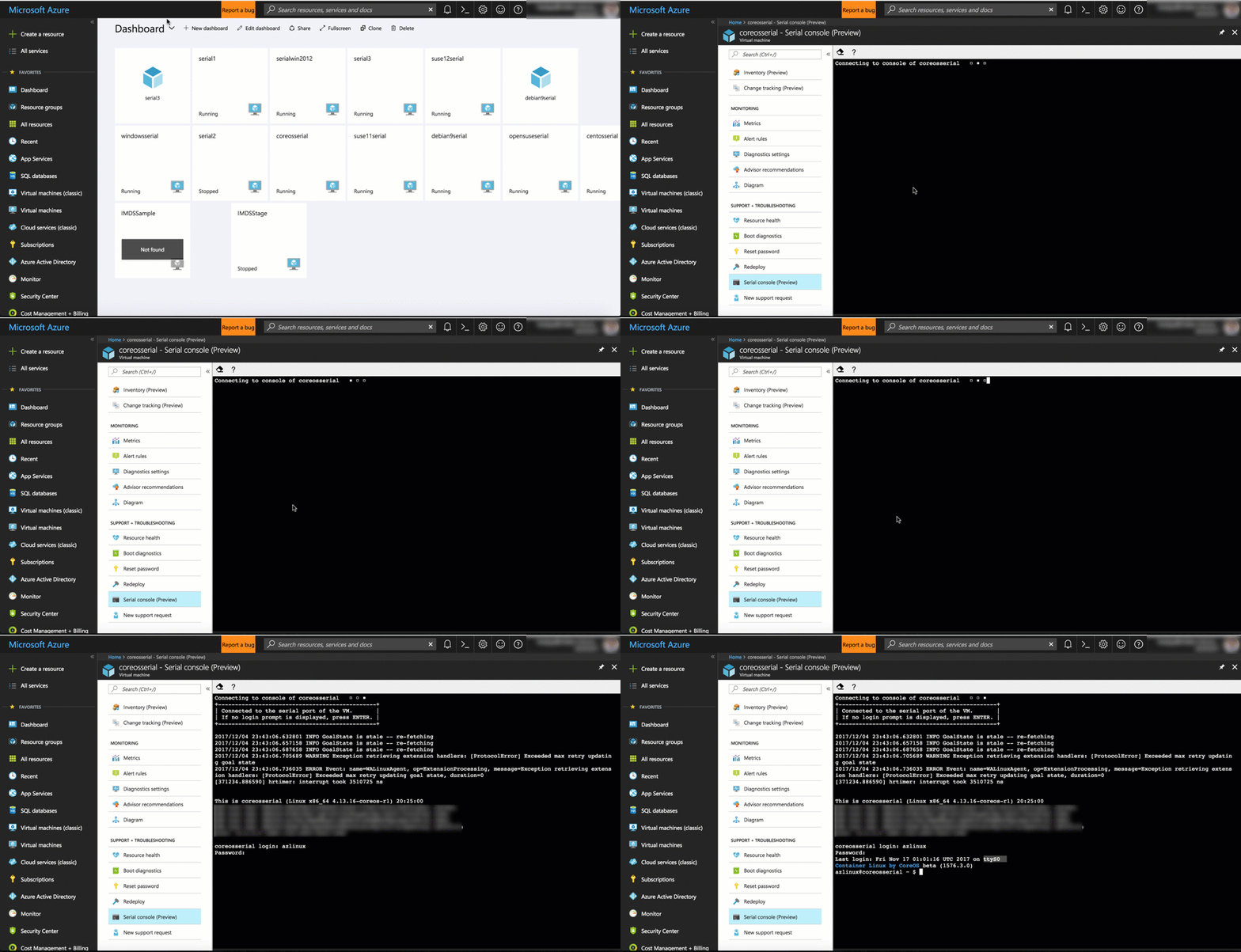
SerialConsole-LinuxAccess

Support for Serial Console comes naturally to Linux VMs. This capability requires no changes to existing images and will just start working. However, Windows VMs require a few additional steps to enable. For all platform images starting in March, we have already taken the required steps to enable the Special Administration Console (SAC) which is exposed via the Serial Console. You can also easily configure this on your own Windows VMs and images, outlined in our Serial Console documentation. From the SAC, you can easily get to a command shell and interact with the system via the serial console as shown here:
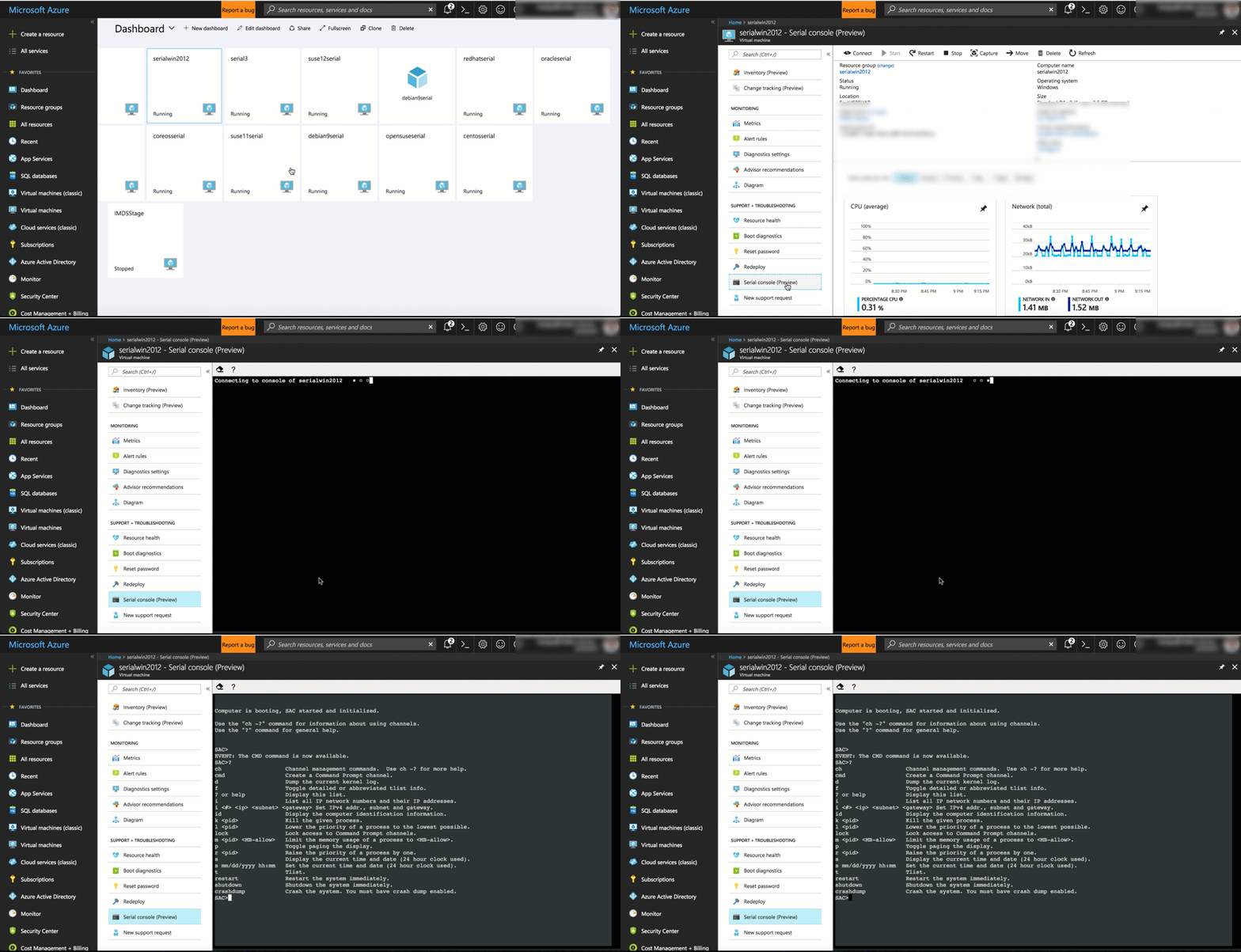
SerialConsole-PrivatePreviewWindows

Serial Console access requires you to have VM Contributor or higher privileges to the virtual machine. This will ensure connection to the console is kept at the highest level of privileges to protect your system. Make sure you are using role-based access control to limit to only those administrators who should have access. All data sent back and forth is encrypted in transit.

I am thrilled to be offering this service on Azure VMs. Please try this out today and let us know what you think! You can learn more in this episode of Azure Friday’s, this Monday’s special episode of Tuesday’s with Corey on Serial Console, or in our Serial Console documentation.

Thanks,

Corey

WE ARE MICROSOFT

Explore Microsoft Foundry

The future of AI starts here. Envision your next great AI app with the latest technologies. Get started with Azure.