
Customers have been using Azure Stack in a number of different ways. We continue to see Azure Stack used in connected and disconnected scenarios, as a platform for building applications to deploy both on-premises as well as in Azure. Many customers want to just migrate existing applications over to Azure Stack as a starting point for their hybrid or edge journey.
Whatever you decide to do once you’ve started on Azure Stack, it’s important to note that in any scenario, some functions are done differently here. One such function is capacity planning. As an operator of the Azure Stack, you have a responsibility to accurately plan for when additional capacity needs to be added to the system. To plan for this, it is important to understand how memory as a function of capacity is consumed in the system. The purpose of this post is to detail how Virtual Machine (VM) placement works in Azure Stack with a focus on the different components that come to play when deciding the available memory for capacity planning.
Azure Stack is built as a hyper-converged cluster of compute and storage. The convergence allows for the sharing of the hardware, referred to as a scale unit. In Azure Stack, a scale unit provides the availability and scalability of resources. A scale unit consists of a set of Azure Stack servers, referred to as hosts or nodes. The infrastructure software is hosted within a set of VMs and shares the same physical servers as the tenant VMs. All Azure Stack VMs are then managed by the scale unit’s Windows Server clustering technologies and individual Hyper-V instances. The scale unit simplifies the acquisition and management Azure Stack. The scale unit also allows for the movement and scalability of all services across Azure Stack, tenant and infrastructure.
You can review a pie chart in the administration portal that shows the free and used memory in Azure Stack like below:
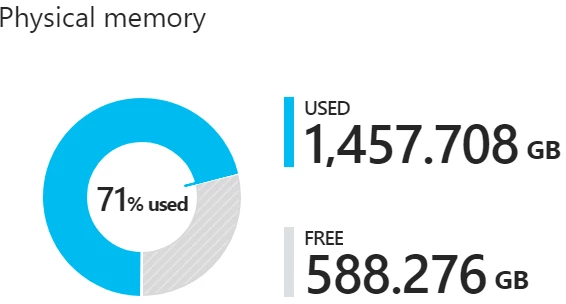
Figure 1: Capacity Chart on the Azure Stack Administrator Portal
The following components consume the memory in the used section of the pie chart:
- Host OS usage or reserve – This is the memory used by the operating system (OS) on the host, virtual memory page tables, processes that are running on the host OS, and the spaces direct memory cache. Since this value is dependent on the memory used by the different Hyper-V processes running on the host, it can fluctuate.
- Infrastructure services – These are the infrastructure VMs that make up Azure Stack. As of the 1904 release version of Azure Stack, this entails approximately 31 VMs that take up 242 GB + (4 GB x number of nodes) of memory. The memory utilization of the infrastructure services component may change as we work on making our infrastructure services more scalable and resilient.
- Resiliency reserve – Azure Stack reserves a portion of the memory to allow for tenant availability during a single host failure as well as during patch and update to allow for successful live migration of VMs.
- Tenant VMs – These are the tenant VMs created by Azure Stack users. In addition to running VMs, memory is consumed by any VMs that have landed on the fabric. This means that VMs in “Creating” or “Failed” state, or VMs shut down from within the guest, will consume memory. However, VMs that have been deallocated using the stop deallocated option from portal, powershell, and cli will not consume memory from Azure Stack.
- Add-on RPs – VMs deployed for the Add-on RPs like SQL, MySQL, App Service etc.
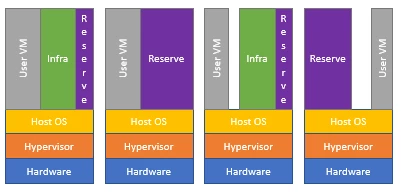
Figure 2: Capacity usage on a 4-node Azure Stack
In Azure Stack, tenant VM placement is done automatically by the placement engine across available hosts. The only two considerations when placing VMs is whether there is enough memory on the host for that VM type, and if the VMs are a part of an availability set or are VM scale sets. Azure Stack doesn’t over-commit memory. However, an over-commit of the number of physical cores is allowed. Since placement algorithms don’t look at the existing virtual to physical core over-provisioning ratio as a factor, each host could have a different ratio.
Memory consideration: Availability sets/VM scale sets
To achieve high availability of a multi-VM production system in Azure Stack, VMs should be placed in an availability set that spreads them across multiple fault domains, that is, Azure Stack hosts. If there is a host failure, VMs from the failed fault domain will be restarted in other hosts, but if possible, kept in separate fault domain from the other VMs in the same availability set. When the host comes back online, VMs will be rebalanced to maintain high availability. VM scale sets use availability sets on the back end and make sure each scale set VM instance is placed in a different fault domain. Since Azure Stack hosts can be filled up at varying levels prior to trying placement, VMs in an availability set or VMSS may fail at creation due to the lack of capacity to place the VM/ VMSS instances on separate Azure Stack hosts.
Memory consideration: Azure Stack resiliency resources
Azure Stack is designed to keep VMs running that have been successfully provisioned. If a host goes offline because of a hardware failure or needs to be rebooted, or if there is a patch and update of Azure Stack hosts, an attempt is made to live migrate the VMs executing on that host to another available host in the solution.
This live migration can only be achieved if there is reserved memory capacity to allow for the restart or migration to occur. Therefore, a portion of the total host memory is reserved and unavailable for tenant VM placement.
Learn more about the calculation for resiliency reserve. Below is a brief for this calculation:
Available Memory for VM placement = Total Host Memory – Resiliency Reserve – Memory used by running tenant VMs – Azure Stack Infrastructure Overhead
Resiliency reserve = H + R * ((N-1) * H) + V * (N-2)
Where:
- H = Size of single host memory
- N = Size of Scale Unit (number of hosts)
- R = Operating system reserve/Memory used by the Host OS, which is .15 in this formula
- V = Largest VM in the scale unit
Azure Stack Infrastructure Overhead = 242 GB + (4 GB x # of nodes). This accounts for the approximately 31 VMs are used to host Azure Stack’s infrastructure .
Memory used by the Host OS = 15 percent (0.15) of host memory. The operating system reserve value is an estimate and will vary based on the physical memory capacity of the host and general operating system overhead.
The value V, largest VM in the scale unit, is dynamically based on the largest tenant VM deployed. For example, the largest VM value could be 7 GB or 112 GB or any other supported VM memory size in the Azure Stack solution. We pick the size of the largest VM here to have enough memory reserved so a live migration of this large VM would not fail. Changing the largest VM on the Azure Stack fabric will result in an increase in the resiliency reserve in addition to the increase in the memory of the VM itself.
Figure 3 is a graph of a 12 host Azure Stack with 384 GB memory per host and how the amount of available memory varies depending on the size of the largest VM on the Azure Stack. The largest VM in these examples is the only VM that has been placed on the Azure Stack.
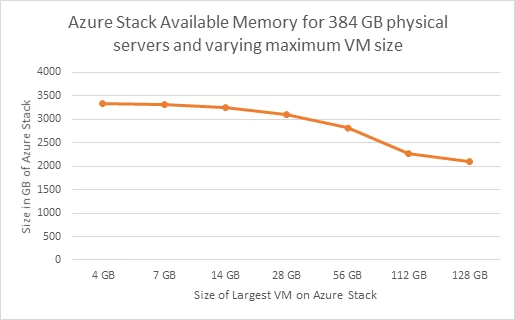
Figure 3: Available memory with changing Maximum VM size
The resiliency reserve is also a function of the size of the host. Figure 4 below shows available memory on different host memory size Azure Stacks given the possible largest VM memory sizes.
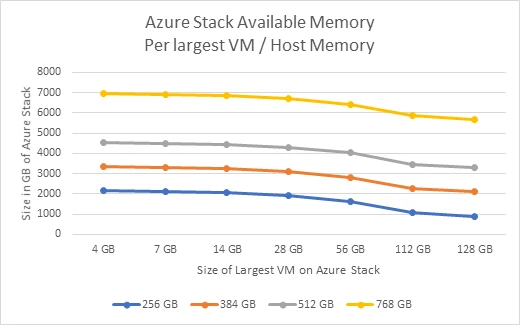
Figure 4: Available memory with different largest VMs over varied host memory
The above calculation is an estimate and subject to change based on the current version of Azure Stack. Ability to deploy tenant VMs and services is based on the specifics of the deployed solution. This example calculation is just a guide and not the absolute answer of the ability to deploy VMs.
Please keep the above considerations in mind while capacity planning for Azure Stack. We have also published an Azure Stack Capacity Planner that can help ease your capacity planning needs. Find more information by looking through some frequently asked questions.






