Today, we see a huge shift to remote work due to the global pandemic. Organizations around the world need to enable more of their employees to work remotely. We are working to address common infrastructure challenges businesses face when helping remote employees stay connected at scale.
A common operational challenge is to seamlessly connect remote users to on-premises resources. Even within Microsoft, we’ve seen our typical remote access of roughly 55,000 employees spike to as high as 128,000 employees while we’re working to protect our staff and communities during the global pandemic. Traditionally, you planned for increased user capacity, deployed additional on-premises connectivity resources, and had time to re-arrange routing infrastructure to meet organization transit connectivity and security requirements. Today’s dynamic environment demands rapid enablement of remote connectivity. Azure Virtual WAN supports multiple scenarios providing large scale connectivity and security in a few clicks.
Azure Virtual WAN provides network and security in a unified framework. Typically deployed with a hub and spoke topology, the Azure Virtual WAN architecture enables scenarios such as:
- Branch connectivity via connectivity automation provided by Virtual WAN VPN/SD-WAN partners.
- IPsec VPN connectivity.
- Remote User VPN (Point-to-Site) connectivity.
- Private (ExpressRoute) connectivity.
- Intra cloud connectivity (transitive connectivity for Virtual Networks).
- Transit connectivity for VPN and ExpressRoute.
- Routing.
- Security with Azure Firewall and Firewall Manager.
Organizations can quickly use Virtual WAN to deploy remote user connectivity in minutes and provide access to on-premises resources. A standard virtual WAN allows fully meshed hubs and routing infrastructure.
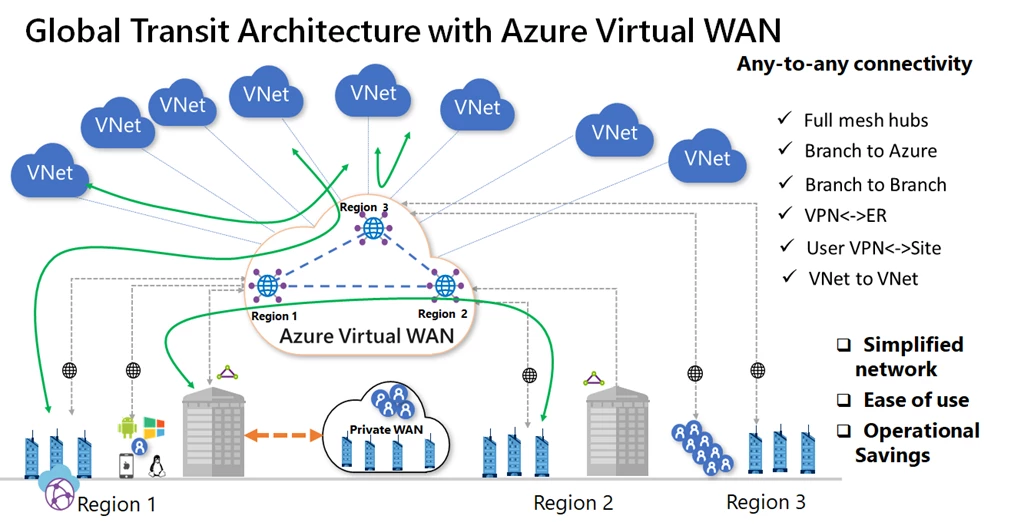
Here is how to support remote users:
- Set up remote user connectivity: Connect to your Azure resources with an IPsec/IKE (IKEv2) or OpenVPN connection. This requires a virtual private network (VPN) client to be configured for the remote user. The Azure VPN Client, OpenVPN Client, or any client that supports IKEv2 can be used. For more information, see Create a point-to-site connection.
- Enable connectivity from the remote user to on-premises: Two options are:
- Set up Site-to-Site connectivity with an existing VPN device. When you connect the IPsec VPN device to Azure Virtual WAN hub, interconnectivity between the Point-to-Site User VPN (remote user) and Site-to-Site VPN is automatic. For more information on how to set up Site-to-Site VPN from your on-premise VPN device to Azure Virtual WAN, see Create a Site-to-Site connection using Virtual WAN.
- Connect your ExpressRoute circuit to the Virtual WAN hub. Connecting an ExpressRoute circuit requires deploying an ExpressRoute gateway in Virtual WAN. As soon as you have deployed one, interconnectivity between the Point-to-Site User VPN and ExpressRoute user is automatic. To create the ExpressRoute connection, see Create an ExpressRoute connection using Virtual WAN. You can use an existing ExpressRoute circuit to connect to Azure Virtual WAN.
- Connect your Azure resources to the Virtual Hub: Select a Virtual Network and attach it to your hub of choice.
- Set up firewall policies in Virtual Hub: A secured virtual hub is an Azure Virtual WAN hub with associated security and routing policies configured by Azure Firewall Manager. Use secured virtual hubs to easily create native security services for traffic governance and protection. You can choose the services to protect and govern your network traffic with Azure Firewall. Azure Firewall Manager also allows you to use your familiar, best-in-breed, third-party security as a service (SECaaS) offerings to protect Internet access for your users. To create a firewall policy and secure your hub, see Secure your cloud network with Azure Firewall Manager using the Azure portal.
Learn more
For additional information, please explore these resources.
• Virtual WAN Global Transit Architecture.
• SD-WAN Connectivity Architecture with Virtual WAN.
• Virtual WAN Monitoring (metrics and logs).
• Install Azure Firewall in Virtual Hub.
• Virtual WAN FAQ.
• Virtual WAN pricing.
• Using Azure Virtual WAN to support remote work documentation.