
Azure Reservations provide flexibility to help meet your evolving needs. You can exchange a reservation for another reservation of the same type, and you can refund a reservation if you no longer need it.
Exchange an existing reserved instance
You start the exchange in the Azure portal with Azure Reservations.
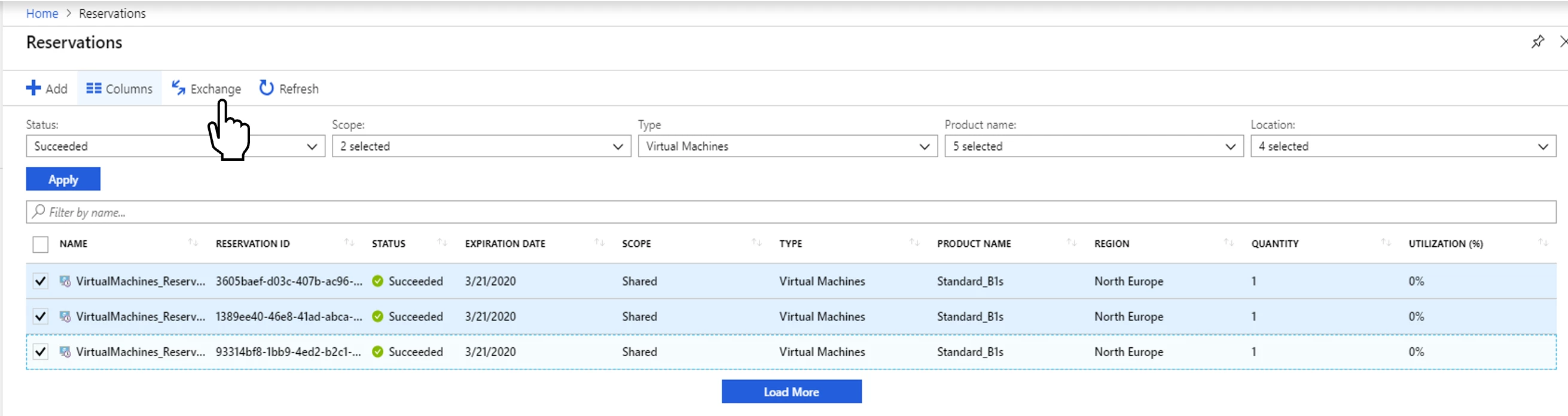
1. Select the reservations that you want to refund and choose Exchange.
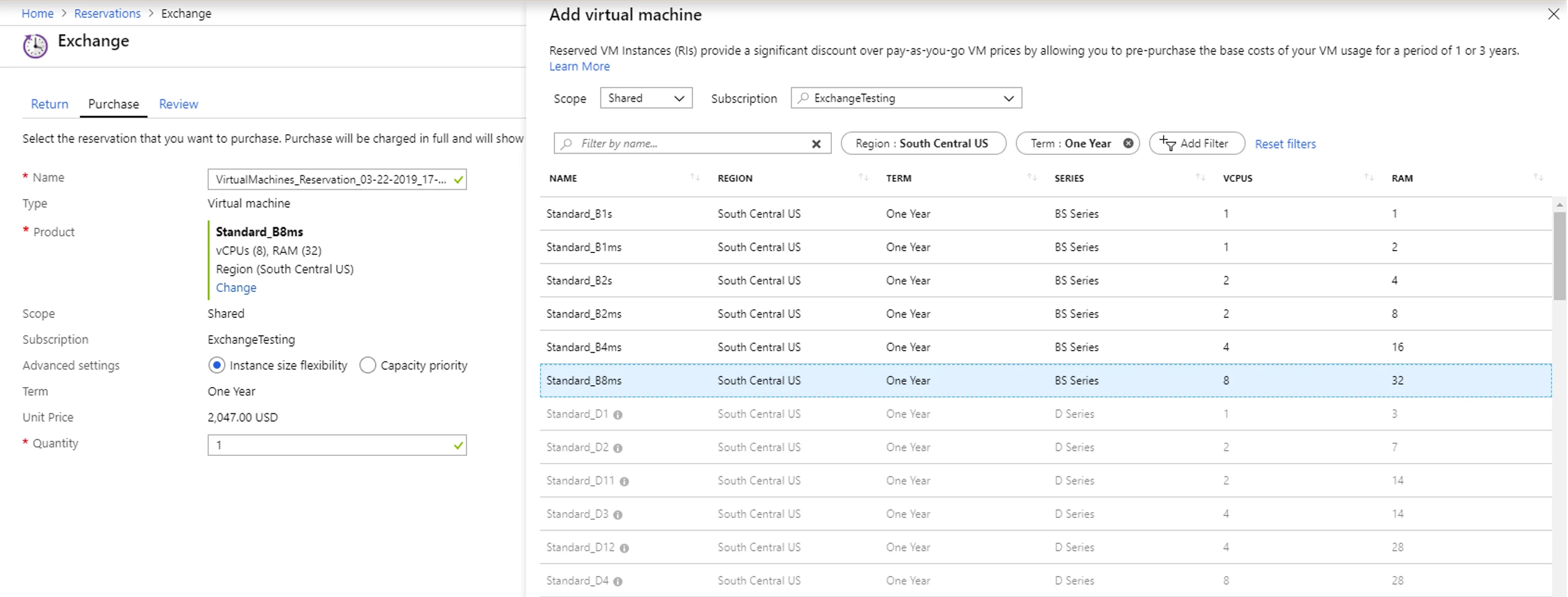
2. Select the SKU you want to purchase and provide quantity. Make sure that the new purchase total is more than the return total. Determine the right size before you purchase.
3. Review and complete the transaction.
For refunding a reservation, go to reservation details and select Refund.
How the return and exchange transactions are processed
First, Microsoft cancels the existing reservation and refunds the pro-rated amount for that reservation. If there is an exchange, the new purchase is processed. Microsoft processes refunds using one of the following methods, depending on your account type and payment method:
Refund processing for enterprise agreement customers
If the original purchase was made using a monetary commitment, then the money is added back to the monetary commitment for both exchange and refunds. Any overage invoices since the original purchase are re-opened and re-rated to make sure that the monetary commitment is used. If the monetary commitment term using the reservation was purchased and is no longer active, then credit will be added to your current enterprise agreement monetary commitment term.
If the original purchase was made as overage, we issue a credit memo.
Refund processing for pay-as-you-go customers with invoice payment method and Cloud solution provider program
The original reservation purchase invoice is cancelled and then a new invoice is created for the refund. For exchange the new invoice has both the refund and the new purchase. The refund amount is adjusted against the purchase. If you only refunded a reservation, then the prorated amount stays with Microsoft and it is adjusted against a future reservation purchase.
Refund processing for pay-as-you-go customers who use credit card payment method
The original invoice is cancelled and a new invoice is created. The money is refunded to the credit card that was used for the original purchase. If you’ve since changed your card, please contact support.
Exchange policies
- You can return multiple existing reservations to purchase a new reservation of the same type. You can’t exchange reservations of one type for another. For example, you can’t return a virtual machine (VM) reservation to purchase a SQL reservation.
- Only reservation order owners can process an exchange. Learn how to add or change users who can manage a reservation.
- An exchange is processed as a refund and repurchased, different transactions are created for the cancellation and the new purchase. The pro-rated reservation amount is refunded for the reservations that you trade-in. You are charged fully for the new purchase. The pro-rated reservation amount is the daily pro-rated residual value of the reservation being returned.
- Reservations can be exchanged or refunded even if the enterprise agreement using which the reservation was purchased has expired and has since renewed into a new enterprise agreement.
- You can change any reservation property such as size, region, quantity, and term with the exchange.
- The new purchase total should equal or be greater than the returned amount.
- The new reservation purchased as part of exchange has a new term starting from the time of exchange.
- There is no penalty or annual limits for exchanges.
Refund policies
- Your total refund is subject to a maximum amount within a 12-month rolling window. To learn more, refer to our refund policies.
- Only reservation order owners can process a refund. Learn how to add or change users who can manage a reservation.
- Microsoft reserves the right to charge a 12 percent penalty for any returns, although the penalty is not currently charged.
Exchanging a reservation purchased for a VM size that doesn’t support premium storage for VM size that supports premium storage
In order to exchange reservations purchased from VM sizes that don’t support premium storage, to corresponding VM sizes that do support premium storage, go to the reservation details and select Exchange. Such an exchange doesn’t reset the term of the reserved instance or lead to a new transaction.






