Skip to main content Explore View all products (200+) Microsoft Foundry Azure Copilot GitHub Copilot Azure Kubernetes Service (AKS) Azure Cosmos DB Azure Database for PostgreSQL Azure Arc Microsoft Fabric Linux virtual machines in Azure Foundry Models Foundry Agent Service Foundry IQ Foundry Tools Foundry Control Plane Observability in Foundry Control Plane Azure OpenAI in Foundry Models Azure Speech in Foundry Tools Azure Machine Learning View all databases Azure Cosmos DB Azure DocumentDB Azure SQL Azure Database for PostgreSQL Azure Managed Redis Microsoft Fabric Azure Databricks Linux virtual machines in Azure Windows Server on Azure Azure Functions Azure Virtual Machine Scale Sets Azure API Management Azure Container Apps Azure Kubernetes Service (AKS) Azure Kubernetes Fleet Manager Azure Container Registry Azure Red Hat OpenShift Azure Container Instances Azure Container Storage Azure Arc Azure Local Microsoft Defender for Cloud Azure Monitor Microsoft Sentinel Azure Migrate View all solutions (40+) Cloud solutions for small and medium businesses Cloud migration and modernization center Data analytics for AI Azure Databases AI apps and agents Microsoft Marketplace Microsoft Sovereign Cloud AI apps and agents Responsible AI with Azure AI Infrastructure Data analytics for AI Machine learning operations (MLOps) Low-code application development on Azure Integration Services Serverless computing DevOps Migration and modernization center .NET apps migration Databases on Azure Linux on Azure Oracle on Azure SAP on the Microsoft Cloud Adaptive cloud High-performance computing (HPC) Infrastructure as a service (IaaS) Resiliency Azure Essentials Frontier Accelerate for Azure FinOps on Azure Microsoft Marketplace Azure pricing overview Create an Azure account Free Azure services Flexible purchase options Pricing calculator FinOps on Azure Maximize ROI from AI Azure savings plans Azure reservations Azure Hybrid Benefit Virtual Machines Azure SQL Microsoft Foundry Microsoft Fabric Azure Kubernetes Service (AKS) Microsoft Defender for Cloud View more Software Development Companies Microsoft Marketplace Find a partner Resources for Azure partners Get started with Azure Customer stories Analyst reports, white papers, and e-books Videos Learn more about cloud computing Documentation Explore Azure portal Developer resources Quickstart templates Resources for startups Developer community Students Azure for partners Blog Events and Webinars Learn Support Contact Sales Get started with Azure Sign in

We are excited to introduce the integration of HDInsight PySpark into Visual Studio Code (VSCode), which allows developers to easily edit Python scripts and submit PySpark statements to HDInsight clusters. For PySpark developers who value productivity of Python language, VSCode HDInsight Tools offer you a quick Python editor with simple getting started experiences, and enable you to submit PySpark statements to HDInsight clusters with interactive responses. This interactivity brings the best properties of Python and Spark to developers and empowers you to gain faster insights.

Key customer benefits

  • Interactive responses brings the best properties of Python and Spark with flexibility to execute one or multiple statements.
  • Built-in Python language service, such as IntelliSense auto-suggest, autocomplete, and error marker, among others.
  • Preview and export your PySpark interactive query results to CSV, JSON, and Excel formats.
  • Integration with Azure for HDInsight cluster management and query submissions.
  • Link with Spark UI and Yarn UI for further troubleshooting.

How to start HDInsight Tools for VSCode

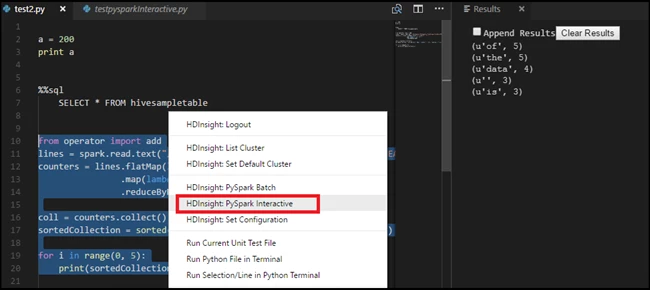
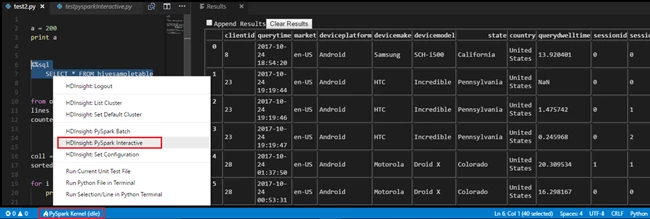
Simply open your Python files in your HDInsight workspace and connect to Azure. You can then start to author Python script or Spark SQL to query your data.

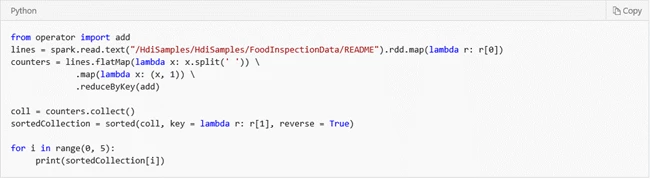
  • Run Spark Python interactive
80d4b7a9-1031-4834-b5a6-3e133aab258d
35fc205e-3743-422b-8ed4-3c8bbc778b2f
  • Run Spark SQL interactive
ba3e6ffe-f0fc-4538-aaaa-d33b813bd792

How to install or update

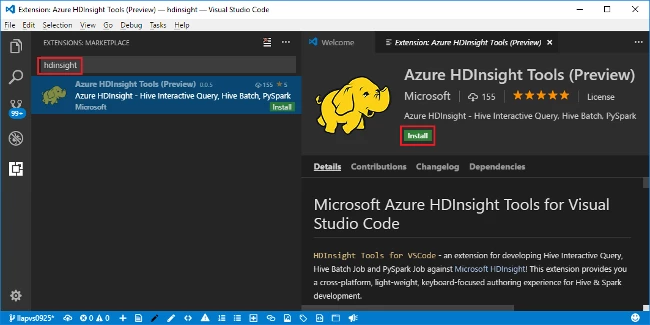
First, install Visual Studio Code and download Mono 4.2.x (for Linux and Mac). Then get the latest HDInsight Tools by going to the VSCode Extension repository or the VSCode Marketplace and searching “HDInsight Tools for VSCode”.
a4991f2e-c132-4794-8a4c-08b3cf68b328

For more information about Azure Data Lake Tool for VSCode, please use the following resources:

Learn more about today’s announcements on the Azure blog and Big Data blog. Discover more on the Azure service updates page.

If you have questions, feedback, comments, or bug reports, please use the comments below or send a note to hdivstool@microsoft.com.


WE ARE MICROSOFT

Explore Microsoft Foundry

The future of AI starts here. Envision your next great AI app with the latest technologies. Get started with Azure.