Modern engineering practices, like Agile and DevOps, are redirecting the ownership of security, operations, and cost management from centralized teams to workload owners—catalyzing innovations at a higher velocity than in traditional data centers. In this new world, workload owners are expected to build, deploy, and manage cloud workloads that are secure, reliable, performant, and cost-effective. If you’re a workload owner, you want well-architected deployments, so you might be wondering, how well are you doing today? Of all the actions you can take, which ones will make the biggest difference for your Azure workloads? And how will you know if you’re making progress?
That’s why we created Azure Advisor Score—to help you understand how well your Azure workloads are following best practices, assess how much you stand to gain by remediating issues, and prioritize the most impactful recommendations you can take to optimize your deployments.
Introducing Advisor Score
Advisor Score enables you to get the most out of your Azure investment using a centralized dashboard to monitor and work towards optimizing the cost, security, reliability, operational excellence, and performance of your Azure resources.
Advisor Score will help you:
- Assess how well you’re following the best practices defined by Azure Advisor and the Microsoft Azure Well-Architected Framework.
- Optimize your deployments by taking the most impactful actions first.
- Report on your well-architected progress over time.
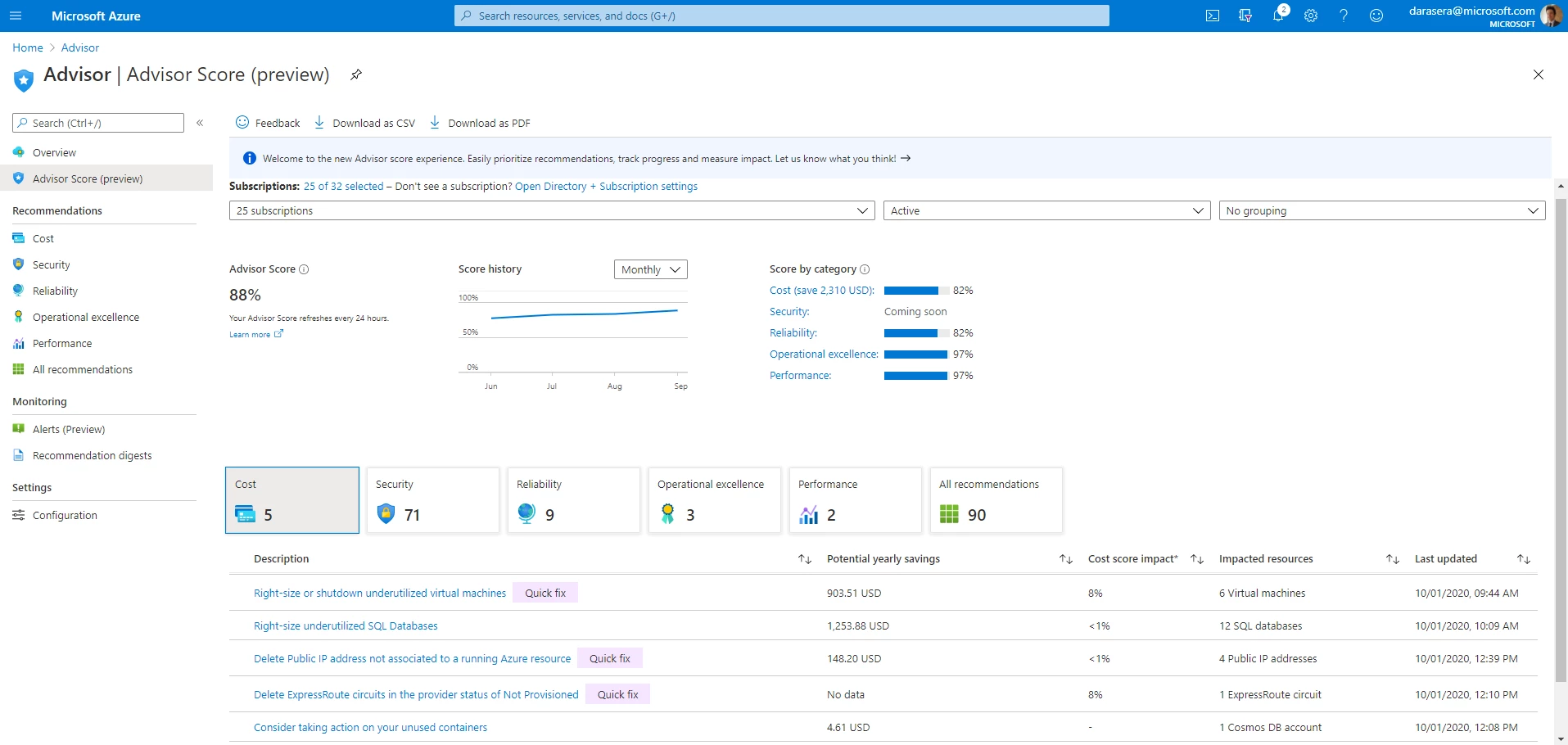
Baselining is one great use case we’ve already seen with customers. You can use Advisor Score to baseline yourself and track your progress over time toward your goals by reviewing your score’s daily, weekly, or monthly trends. Then, to reach your goals, you can take action first on the individual recommendations and resources with the most impact.
How Advisor Score works
Advisor Score measures how well you’re adopting Azure best practices, comparing and quantifying the impact of the Advisor recommendations you’re already following, and the ones you haven’t implemented yet. Think of it as a gap analysis for your deployed Azure workloads.
The overall score is calculated on a scale from 0 percent to 100 percent both in aggregate and separately for cost, security (coming soon), reliability, operational excellence, and performance. A score of 100 percent means all your resources follow all the best practices recommended in Advisor. On the other end of the spectrum, a score of zero percent means that none of your resources follow the recommended best practices. Advisor Score weighs all resources, both those with and without active recommendations, by their individual cost relative to your total spend. This builds on the assumption that the resources which consume a greater share of your total investment in Azure are more critical to your workloads. Advisor Score also adds weight to resources with longstanding recommendations. The idea is that the accumulated impact of these recommendations grows the longer they go unaddressed.
Review your Advisor Score today
Check your Advisor Score today by visiting Azure Advisor in the Azure portal. To learn more about the model behind Advisor Score and see examples of how the score is calculated, review our Advisor Score documentation, and this behind-the-scenes blog from our data science team about the development of Advisor Score.