Azure Network Watcher Connection Troubleshoot, previously in preview as Connectivity Check, is making general availability sporting a new name. Connection Troubleshoot, part of our Network Watcher suite of networking tools and capabilities, enable you to troubleshoot network performance and connectivity issues in Azure.
Continuing the expansion of tools within Azure Network Watcher, this new addition provides visualization of the hop by hop path from source to destination, identifying issues that can potentially impact your network performance and connectivity.
Network Watcher Connection Troubleshoot features
With the addition of Connection Troubleshoot, Network Watcher will see an incremental increase in its capabilities and ways for you to utilize it in your day to day operations. You can now:
- Check connectivity between source (VM) and destination (VM, URI, FQDN, IP Address)
- Identify configuration issues that are impacting reachability
- Provide all possible hop by hop paths from the source to destination
- Hop by hop latency
- Latency – min, max, and average between source and destination
- A topology (graphical) view from your source to destination
- Number of packets dropped during the connection troubleshoot check
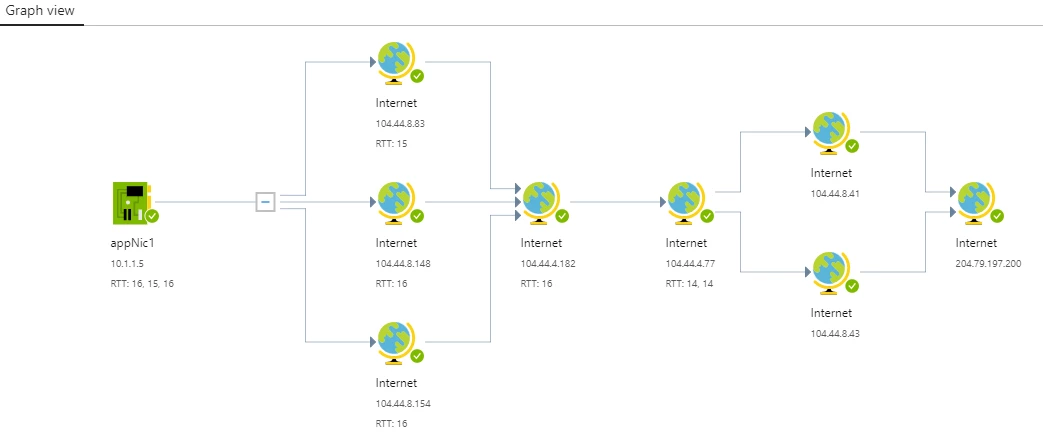
Connectivity troubleshoot check graph view output Source: Azure VM and Destination: www.bing.com.
What kind of issues can Connection Troubleshoot detect?
Connection Troubleshoot can detect the following types of issues that can impact connectivity:
- High VM CPU utilization
- High VM memory utilization
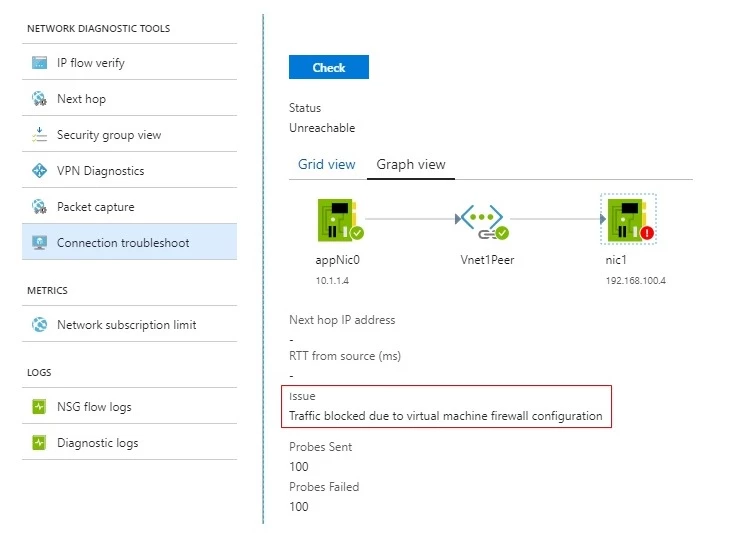
- Virtual machine (guest) firewall rules blocking traffic
- DNS resolution failures
- Misconfigured or missing routes
- NSG rules that are blocking traffic
- Inability to open a socket at the specified source port
- Missing address resolution protocol entries for Azure Express Route circuits
- No servers listening on designated destination ports
Which scenarios are supported by Connection Troubleshoot?
Connection Troubleshoot supports all networking scenarios where the source and destination is an Azure VM, FQDN, URI or an IPv4 Address. Here are some sample scenarios for Connection Troubleshoot to get you started:
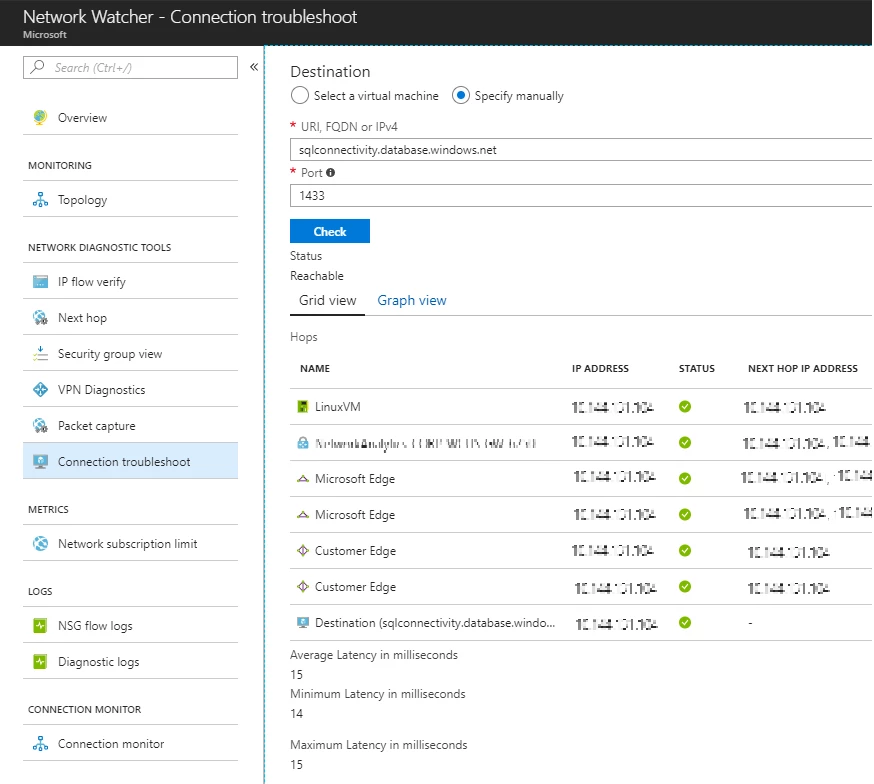
- Connectivity between your Azure VM and an Azure SQL server, where all Azure traffic is tunneled through an on-premises network.
- Connectivity between VMs in different VNets connected using VNet peering. In this example, connection troubleshoot detects that traffic is blocked by the destination VM firewall.
To learn more and get started using Connection Troubleshoot, please visit our documentation page.
Can I use Connection Troubleshoot through other means than the Azure portal?
Yes, Connection Troubleshoot and all Network Watcher features are available using both the Azure portal, as well as using PowerShell, Azure CLI, and REST API.
You can even run Connection Troubleshoot continuously using Azure Functions triggered by a timer to initiate troubleshooting via PowerShell. In the future, stay tuned for a Network Watcher experience enabling continuous connection monitoring of your network infrastructure.
How can I provide feedback for Connection Troubleshoot?
You can provide feedback for Connection Troubleshoot and all Network Watcher feature through the Azure feedback forum.