Today, we are excited to announce the support for backup of large disk VMs and set of improvements aimed at reducing the time taken for backup and restore. These set of improvements and large disk support is based on a new VM backup stack and are available for both managed and unmanaged disks. You can seamlessly upgrade to this new stack without any impact to your on-going backup jobs and there is no change to how you setup backup or restore.
This announcement combines multiple feature improvements:
- Large disk support – Now you can backup VMs with disk sizes up to 4TB(4095GB), both managed and unmanaged.
- Instant recovery point – A recovery point is available as soon as the snapshot is done as part of the backup job. This eliminates the need to wait to trigger restore till data transfer phase of the backup is completed. This is particularly useful in scenarios where you want to apply a patch. Now you can go ahead with the patch once the snapshot phase is done and you can use the local snapshot to revert back if the patch goes bad. This is analogous to checkpoint solution offered by Hyper-V or VMware with the added advantage of having snapshot also securely stored in the backup vault.
- Backup and Restore performance improvements – As part of this new announcement, we are also retaining the snapshots taken as part of the backup job for seven days. This will help us to compute the changes between two backup jobs in an efficient manner to reduce the backup time. These snapshots can also be used to trigger restore. Since these snapshots are available locally, restore process will eliminate the need to transfer the data back from the vault to the storage account, thus reducing the restore time from hours to minutes. Ability to configure the retention snapshots stored locally will be available in upcoming releases.
- Distribute the disks of restored VM – If you are using unmanaged VM, you might have noticed that during restore, we restore all disks to the same storage account. We are adding a capability where you can tell us to distribute those disks to the same set of storage accounts as the original VM to reduce the reconfiguration needed post-restore.
Getting started:
You can use either Azure Portal or PowerShell to update the subscription to the new stack. It is a one-directional change and will retain all your existing policies, recovery points as they were.
Portal:
We are enabling this experience starting today and rolling it out region by region. You will see this across all regions by the end of this week.
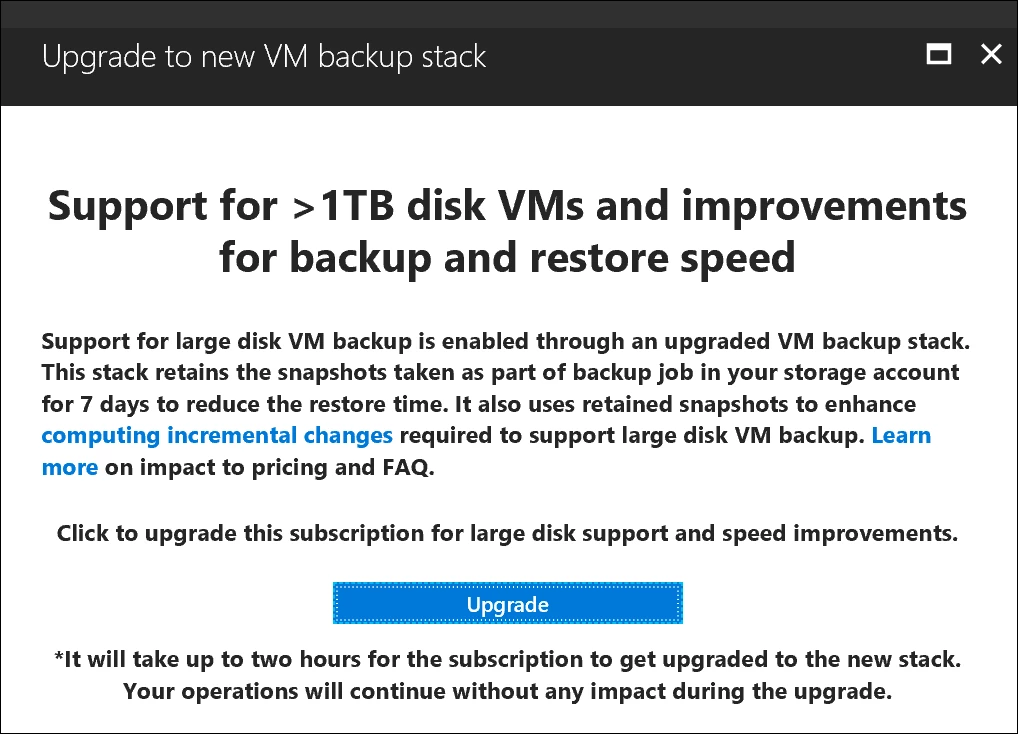
You will see a banner on Recovery Services vault dashboard. Clicking on the banner will open a screen where you can upgrade the stack and get above feature improvements. You can upgrade the complete subscription from any of the vaults. Once upgraded, all VM backups in the subscription will get backed up using the new stack.
PowerShell:
Please execute following cmdlets from an elevated PowerShell terminal:
1. Login to Azure Account.
PS C:> Login-AzureRmAccount
2. Select the subscription which you want to register for the upgrade:
PS C:> Get-AzureRmSubscription –SubscriptionName “Subscription Name” | Select-AzureRmSubscription
3. Register this subscription for the upgrade:
PS C:> Register-AzureRmProviderFeature -FeatureName “InstantBackupandRecovery” –ProviderNamespace Microsoft.RecoveryServices
Related links and additional content:
- Learn more about Azure Backup.
- Want more details? Check out Azure Backup documentation.
- Need help? Reach out to Azure Backup forum for support.
- Tell us how we can improve Azure Backup by contributing new ideas and voting up existing ones.
- Follow us on Twitter @AzureBackup for the latest news and updates.