We are pleased to announce the general availability for Azure HDInsight Tools for Visual Studio Code (VSCode). HDInsight Tools for VSCode give developers a cross-platform lightweight code editor for developing HDInsight PySpark and Hive batch jobs and interactive query.
For PySpark developers who value the productivity Python enables, HDInsight Tools for VSCode offer a quick Python editor with simple getting started experiences, and allow you to submit PySpark statements to HDInsight clusters with interactive responses. This interactivity brings the best properties of Python and Spark to developers and empowers you to gain faster insights.
For Hive developers, HDInsight tools for VSCode offer great data warehouse query experiences for big data and helpful features in querying log files and gaining insights.
Key customer benefits
- Integration with Azure worldwide environments for Azure sign-in and HDInsight cluster management
- HDInsight Hive and Spark job submission with integration with Spark UI and Yarn UI
- Interactive responses with the flexibility to execute one or multiple selected Hive and Python scripts
- Preview and export your interactive query results to CSV, JSON, and Excel format
- Built-in Hive language services such as IntelliSense auto-suggest, autocomplete, and error marker, among others
- Supports HDInsight ESP Cluster and Ambari connection
- Simplified cluster and Spark job configuration management
Latest improvements
Since public preview, we have worked closely with customers to address feedback, implement new functionality, and constantly improve user experiences. Some key improvements include:
- HDInsight Tools for VSCode can be connected to all the Azure environments which host HDInsight services. Read more in the blog post, “HDInsight Tools for VSCode supports Azure environments worldwide.”
- Support for HDInsight Enterprise Security Package. Read more in the blog post, “HDInsight Tools for VSCode integrates with Ambari and HDInsight Enterprise Secure Package.”
- Leverage VSCode built-in user settings and workspace settings for clusters and job configuration management. Read more in the blog post, “HDInsight tools for Visual Studio Code: simplifying cluster and Spark job configuration management.”
- Integrate with VSCode Azure Account and HDInsight explorer to improve Azure sign-in experience, as well as cluster and Hive metadata browse. Read more in the blog post, “HDInsight Tools for VSCode: Integrations with Azure Account and HDInsight Explorer.”
How to get started
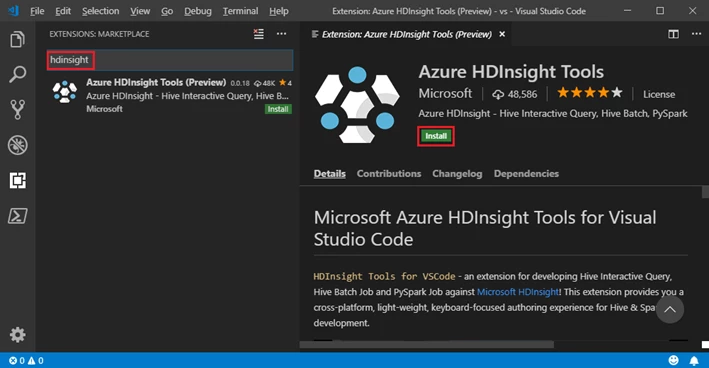
First, install Visual Studio Code and download Mono 4.2.x (for Linux and Mac). Then, get the latest HDInsight Tools by going to the VSCode Extension repository or the VSCode Marketplace and searching HDInsight Tools for VSCode.
For more information about HDInsight Tools for VSCode, please see the following resources:
- User Manual: HDInsight Tools for VSCode
- User Manual: Set Up PySpark Interactive Environment
- Demo Video: “HDInsight Tools for VSCode to support Hive Interactive, Hive Batch and PySpark”
If you have questions, feedback, comments, or bug reports, please send a note to hdivstool@microsoft.com.